alphamap
Specify figure alphamap (transparency)
Syntax
alphamap(alpha_map)

alphamap('parameter')

alphamap('parameter',length)

alphamap('parameter',delta)

alphamap(fig,...)

alphamap(ax,...)

alpha_map = alphamap

alpha_map = alphamap(fig)

alpha_map = alphamap(ax)

alpha_map = alphamap('parameter')
Description
alphamap(alpha_map) sets the
AlphaMap of the current figure to
the specified m-by-1 array of alpha values,
alpha_map. If you set the
alphamap for the figure, then axes and charts in the figure use
the same alphamap.
alphamap('parameter') creates
a new alphamap or modifies the current alphamap. You can specify the
following parameters:
'default'— Set theAlphaMapproperty to the figure's default alphamap.'rampup'— Create a linear alphamap with increasing opacity (defaultlengthequals the current alphamap length).'rampdown'— Create a linear alphamap with decreasing opacity (defaultlengthequals the current alphamap length).'vup'— Create an alphamap that is opaque in the center and becomes more transparent linearly towards the beginning and end (defaultlengthequals the current alphamap length).'vdown'— Create an alphamap that is transparent in the center and becomes more opaque linearly towards the beginning and end (defaultlengthequals the current alphamap length).'increase'— Modify the alphamap making it more opaque (defaultdeltais.1, added to the current values).'decrease'— Modify the alphamap making it more transparent (defaultdeltais.1, subtracted from the current values).'spin'— Rotate the current alphamap (defaultdeltais 1;deltamust be an integer).
alphamap('parameter',length) creates
a new alphamap with the length specified by the integer length (used
with parameters 'rampup', 'rampdown', 'vup', 'vdown').
alphamap('parameter',delta) modifies
the existing alphamap using the value specified by the integer delta (used
with parameters 'increase', 'decrease', 'spin').
alphamap(fig,...) performs the operation on the
alphamap of the figure identified by fig.
alphamap(ax,...) performs the operation on the
alphamap of the Axes object, PolarAxes object, or
GeographicAxes object identified by ax.
alpha_map = alphamap returns
the current alphamap.
alpha_map = alphamap(fig) returns the current alphamap
from the figure identified by fig.
alpha_map = alphamap(ax) returns the current alphamap
from the Axes object, PolarAxes object, or
GeographicAxes object identified by ax.
alpha_map = alphamap('parameter') returns
the alphamap modified by the parameter, but does
not set the AlphaMap property.
Examples
Create a surface plot and change the alphamap.
[x,y] = meshgrid([-2:.2:2]);
z = x.*exp(-x.^2-y.^2);
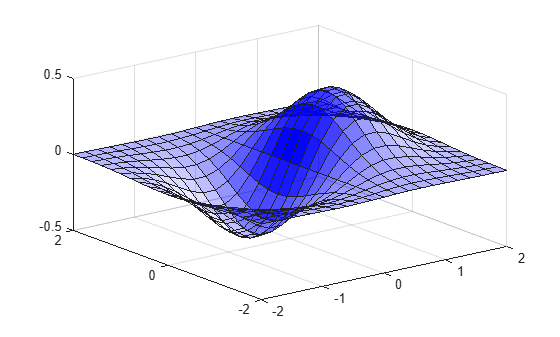
Plot the data, using the gradient of z as the alphamap.
figure
surf(x,y,z+.001,'FaceAlpha','flat',...
    'AlphaDataMapping','scaled',...
    'AlphaData',gradient(z),...
    'FaceColor','blue')
Change the alphamap to be opaque at the middle and transparent towards the ends.
alphamap('vup')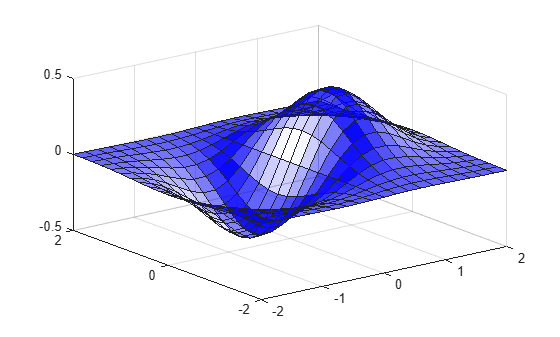
More About
Version History
Introduced before R2006a

