camup
Set or query camera up vector
Syntax
camup

camup([up_vector])

camup('mode')

camup('auto')

camup('manual')

camup(axes_handle,...)
Description
camup returns
the camera up vector setting in the current axes. The camera up vector
specifies the direction that is oriented up in the scene.
camup([up_vector]) sets
the up vector in the current axes to the specified value. Specify
the up vector as x, y, and z components.
camup('mode') returns the
current value of the camera up vector mode, which can be either auto (default)
or manual.
camup('auto') sets the camera
up vector mode to auto. In auto mode, [0
1 0] is the up vector of for 2-D views. This means the y-axis
points up. For 3-D views, the up vector is [0 0 1],
meaning the z-axis points up.
camup('manual') sets the
camera up vector mode to manual. In manual mode,
the value of the camera up vector does not change unless you set it.
camup(axes_handle,...) performs
the set or query on the axes identified by the first argument, axes_handle.
When you do not specify an axes handle, camup operates
on the current axes.
Examples
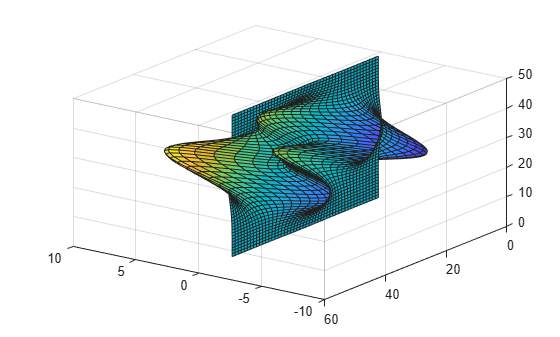
Set the x-axis to be the up axis.
surf(peaks)
camup([1 0 0]);
Version History
Introduced before R2006a

