| MATLAB Function Reference | ![]() |
![]()
ezplot3(funx,funy,funz)
ezplot3(funx,funy,funz,[tmin,tmax])
ezplot3(...,'animate')
ezplot3(axes_handle,...)
h = ezplot3(...)
ezplot3(funx,funy,funz) plots the spatial curve funx(t), funy(t), and funz(t) over the default domain 0 < t < 2π.
funx, funy, and funz can be function handles for M-file functions or an anonymous functions (see Function Handles and Anonymous Functions) or strings (see the Remarks section).
ezplot3(funx,funy,funz,[tmin,tmax]) plots the curve funx(t), funy(t), and funz(t) over the domain tmin < t < tmax.
ezplot3(...,'animate') produces an animated trace of the spatial curve.
ezplot3(axes_handle,...) plots into the axes with handle axes_handle instead of the current axes (gca).
h = ezplot3(...) returns the handle to the plotted objects in h.
Array multiplication, division, and exponentiation are always implied in the expression you pass to ezplot3. For example, the MATLAB® syntax for a plot of the expression
x = s./2, y = 2.*s, z = s.^2;
which represents a parametric function, is written as
ezplot3('s/2','2*s','s^2')That is, s/2 is interpreted as s./2 in the string you pass to ezplot3.
Function handle arguments must point to functions that use MATLAB syntax. For example, the following statements define an anonymous function and pass the function handle fh to ezplot3.
fh1 = @(s) s./2; fh2 = @(s) 2.*s; fh3 = @(s) s.^2; ezplot3(fh1,fh2,fh3)
Note that when using function handles, you must use the array power, array multiplication, and array division operators (.^, .*, ./) since ezplot does not alter the syntax, as in the case with string inputs.
If your function has additional parameters, for example k in myfuntk:
function s = myfuntk(t,k) s = t.^k.*sin(t);
then you can use an anonymous function to specify that parameter:
ezplot3(@cos,@(t)myfuntk(t,1),@sqrt)
This example plots the parametric curve
![]()
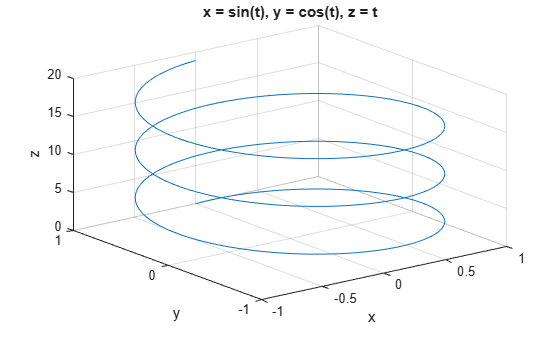
over the domain [0,6π]:
ezplot3('sin(t)','cos(t)','t',[0,6*pi])
ezplot, ezpolar, function_handle, plot3
Function Plots for related functions
![]() | ezplot | ezpolar | ![]() |
| © 1984-2008- The MathWorks, Inc. - Site Help - Patents - Trademarks - Privacy Policy - Preventing Piracy - RSS |