viewmtx
View transformation matrices
Syntax
viewmtx

T = viewmtx(az,el)

T = viewmtx(az,el,phi)

T = viewmtx(az,el,phi,xc)
Description
viewmtx computes a 4-by-4
orthographic or perspective transformation matrix that projects four-dimensional
homogeneous vectors onto a two-dimensional view surface (e.g., your
computer screen).
T = viewmtx(az,el) returns
an orthographic transformation matrix corresponding
to azimuth az and elevation el. az is
the azimuth (i.e., horizontal rotation) of the viewpoint in degrees. el is
the elevation of the viewpoint in degrees.
T = viewmtx(az,el,phi)
returns a perspective transformation matrix. phi is
the perspective viewing angle in degrees. phi is
the subtended view angle of the normalized plot cube (in degrees)
and controls the amount of perspective distortion.
Phi | Description |
|---|---|
0 degrees | Orthographic projection |
10 degrees | Similar to telephoto lens |
25 degrees | Similar to normal lens |
60 degrees | Similar to wide-angle lens |
T = viewmtx(az,el,phi,xc)
returns the perspective transformation matrix using xc as
the target point within the normalized plot cube (i.e., the camera
is looking at the point xc). xc is
the target point that is the center of the view. You specify the point
as a three-element vector, xc = [xc,yc,zc], in
the interval [0,1]. The default value is xc = [0,0,0].
A four-dimensional homogeneous vector is formed by appending a 1 to the corresponding
three-dimensional vector. For example, [x,y,z,1] is the four-dimensional
vector corresponding to the three-dimensional point [x,y,z].
Examples
Determine the projected two-dimensional vector corresponding to the three-dimensional point (0.5,0.0,-3.0) using the default view direction. Note that the point is a column vector.
A = viewmtx(-37.5,30);
x4d = [.5 0 -3 1]';
x2d = A*x4d;
x2d = x2d(1:2)
x2d = 2×1

    0.3967
   -2.4459
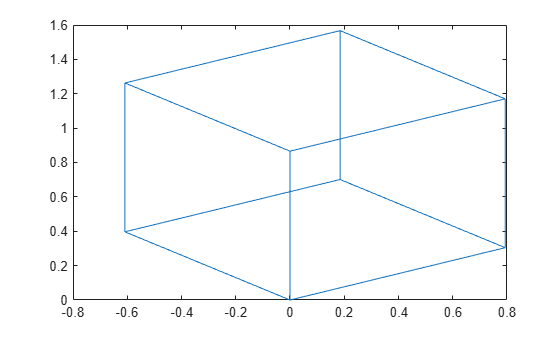
Create vectors that trace the edges of a unit cube.
x = [0  1  1  0  0  0  1  1  0  0  1  1  1  1  0  0];
y = [0  0  1  1  0  0  0  1  1  0  0  0  1  1  1  1];
z = [0  0  0  0  0  1  1  1  1  1  1  0  0  1  1  0];
Transform the points in these vectors to the screen, then plot the object.
A = viewmtx(-37.5,30);
[m,n] = size(x);
x4d = [x(:),y(:),z(:),ones(m*n,1)]';
x2d = A*x4d;
x2 = zeros(m,n); y2 = zeros(m,n);
x2(:) = x2d(1,:);
y2(:) = x2d(2,:);
plot(x2,y2)
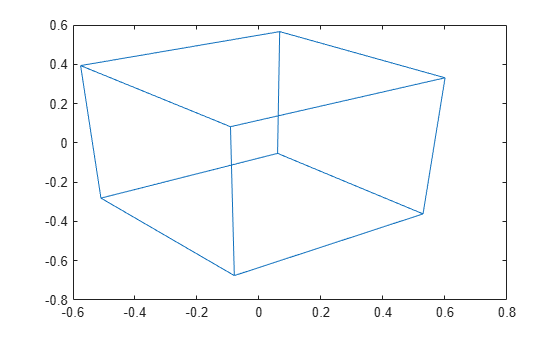
Use a perspective transformation with a 25 degree viewing angle.
A = viewmtx(-37.5,30,25);
x4d = [.5 0 -3 1]';
x2d = A*x4d;
x2d = x2d(1:2)/x2d(4)
x2d = 2×1

    0.1777
   -1.8858
Transform the cube vectors to the screen and plot the object.
A = viewmtx(-37.5,30,25);
[m,n] = size(x);
x4d = [x(:),y(:),z(:),ones(m*n,1)]';
x2d = A*x4d;
x2 = zeros(m,n); y2 = zeros(m,n);
x2(:) = x2d(1,:)./x2d(4,:);
y2(:) = x2d(2,:)./x2d(4,:);
plot(x2,y2)
Version History
Introduced before R2006a

