About Cody
Cody™ is a MATLAB Central game that challenges and expands your knowledge of MATLAB and Simulink®. As a web service provided to the community, Cody helps you sharpen your programming skills by solving problems and interacting with other members of the community. With Cody, you can:
- Solve problems related to MATLAB code
- Find problems, solutions, and players
- Use search directives to find content
- Challenge the community by contributing problems that you create
- Comment on any problem or solution
- Like a problem or a solution
- Earn badges
To play, you need a Community Profile.
Your use of Cody is subject to the MATLAB Central Terms of Use.
Solve Problems
When you see an interesting problem, select it. After the problem opens, click the Solve button and submit your solution. Don't worry about hurting your score or your pride by submitting an incorrect solution. Other players do not see your name with an incorrect solution, nor does an incorrect solution affect your score.
Suppose you choose to solve this problem:
Given an input number x, return the output value x+1.
The author of the problem always provides a starting point, the function template. For our example, the function template is
function y = plus_one(x)
    y = x;
end
The function template does not return the correct solution. In the example, the player edits the function template by adding + 1 to make the code work, as shown below.
function y = plus_one(x)
    y = x + 1;
end
Solution Size
Writing succinct code earns you a better result. Cody uses a node-count calculation to determine the solution size based on the number of nodes in the parse tree. Think of size as code length. Comments do not contribute to code size.
To illustrate how Cody determines size, here are two solutions to the plus-one problem.
- Solution 1 has a size of 12.
function y = plus_one(x)
      y = x+1;
  end
function y = plus_one(x)
      z = x;
      y = z+1;
  end
Both functions return the correct solution, but the first solution provides the better score due to its smaller size.
For the Modeling and Simulation Challenge problems, solution size is a function of the number of elements in your model, including blocks, signals and signal branches.
Solution Evaluation and Measurement
Cody evaluates each solution against a number of tests. Cody determines whether your solution passes these tests and measures the size of your code. Measuring the solution based on code size provides a simple, objective, consistent, and smooth distribution of code sizes for any given problem, as opposed to large, uniform clusters.
The leading solution is the first solution submitted that has the smallest size. When a solution is too long to evaluate, Cody returns the message:
The server has encountered a problem.
To try out the official scoring code yourself, check out calculating size on File Exchange.
Improving Your Score
To improve your score, solve problems correctly and contribute problems. You earn:
- 10 points for the first correct solution you submit for each problem
- 15 points each time you submit a Community problem
Viewing the Community’s Solutions
Once you have solved a problem, you can view all other solutions to that problem.
Find Content
You can find content based on defined categories, such as Problems, Solutions, Players, and Comments. After you select a category, Cody also provides options to quickly find what you need.
Find Problems
From the Problems page, you can find problems by filtering your search using the Problems category, a problem group, and search directives you type in the search box.
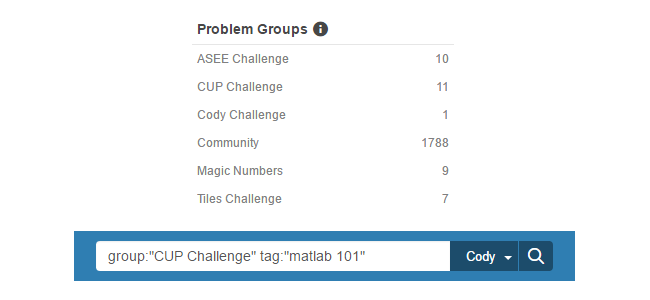
Filter Options for Finding Problems
Cody provides several defined problem groups.
- The Community group contains problems contributed by Cody players. This group is the default.
- The Cody Challenge group contains problems created by Cody administrators. This group starts with three problems and unlocks more problems as you solve them.
- Other groups, such as Tiles Challenge, ASEE Challenge, and Modeling and Simulation Challenge, are also created by Cody administrators. These groups contain problems related to a common theme, such as MATLAB Central contests or professional organizations.
Find Solutions
After you select a problem, Cody provides options to filter solutions using a solution map or a solution list. Cody also provides a Status filter in the left navigational pane to find correct or incorrect solutions from the Solutions page.
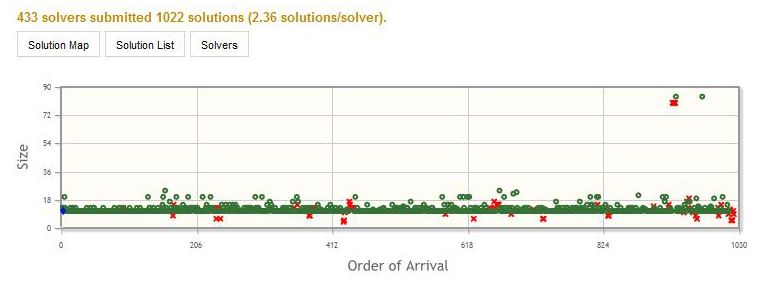
Solution Map for Problem 2.
The Solution Map plots solutions as points against two axes: order of arrival (horizontally) and code size (vertically). Correct solutions are green circles. Incorrect answers are red X. Rails of solid green indicate a single obvious answer. More than one rail indicates more than one straightforward answer.
Using the Solution Map
- To zoom in to activity on the Solution Map, click and drag the cursor, drawing a rectangle over the area.
- To reset the view, double-click in the map area.
- To select a solution, click on a green circle or red X.
Using Search Directives
You can find problems, solutions, or players by specifying search directives in the search box or by editing the URL.
| From the Search Problems page, specify these directives in the search box. | ||
|---|---|---|
Problem Search |
Directive |
Examples |
| Problem identified by this number | id: | id:2 |
| Problems with this group name | group: | group:"Cody Challenge" |
| Problems with these specific tags | tag: | tag:"matlab 101" tag:vectors |
| Author with this name | author: | author:Doug |
| Author identified by this number | author_id: | author_id:869436 |
| Solver with this name | solver: | solver:Doug |
| Solver identified by with this identification number | solver_id: | solver_id:869436 |
| Problem that supports the use of this toolbox | Product: | product:aerospace product:"Control System Toolbox" |
| From the Search Solutions page, specify these directives in the search box. | ||
Solution Result |
Directive |
Examples |
| Player with this name | player: | player:Ned |
| Player with this ID number | player_id: | player_id:140947 |
| Problem with this ID number | problem_id: | problem_id:1 |
| Solution with this size | size: | size:20 |
| Solution size with this range | size_range: | size_range:10-20 |
| From the Search Players page, specify these directives in the search box. | ||
Player Result |
Directive |
Examples |
Player with this ID number |
id: |
|
Player with this name |
name: |
|
Player with this email address |
email: |
|
Players with a public profile in which the Company/Organization field contains this string |
organization: |
|
Using Directives
- To search for a multi-word phrase, enclose the phrase in quotation marks; for example,
player:"Ned Gulley". - To narrow search results, use combinations of directives in the same search. Be sure to include a space between each directive. The syntax
player:"Ned Gulley"size_range:10-20finds all solutions by players with the name Ned Gulley and a solution size between 10 and 20. - To exclude solutions from your search results, insert a minus sign (-) before the directive syntax. The syntax
-player:"Ned"finds solutions from all players except those with the name Ned.
Contribute Problems
Any Cody player, with a score of 200 or more, can challenge others by adding problems to the Community group. If you have a problem without a solution in mind or are looking for a better way to solve it, post the problem in the Community group to learn what other players can offer.
Follow these guidelines for adding problems:
-
From the main page, select the Create a Problem link.

-
Enter both a descriptive title and a meaningful description. Include sample input and output values.

-
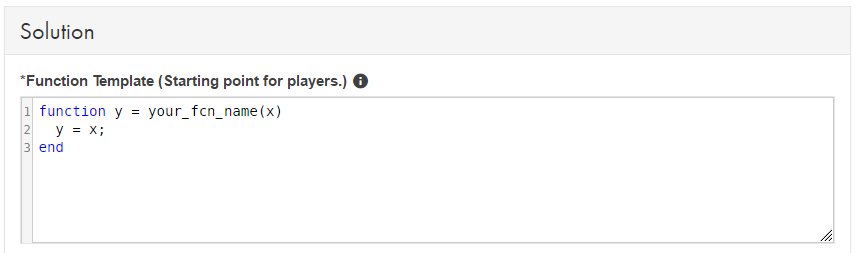
Provide a function template to help players get started. Be sure to change the variable your_fcn_name to a meaningful descriptor of your specific problem. To continue with the example used earlier, your_fcn_name becomes plus_one.
-
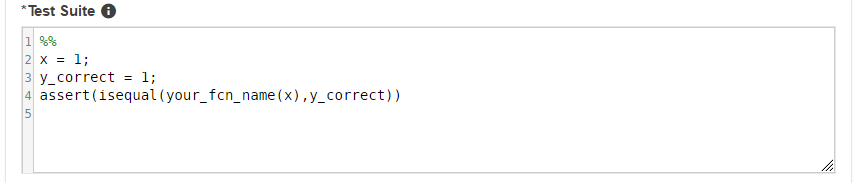
Write tests for a test suite to validate solutions from players. You can provide your own solution to validate your tests. Be sure to change the generic function name your_fcn_name referenced in the test suite to your specific function name.
Earn Badges
As you contribute to Cody, you'll earn badges and points that increase your standing in the Cody community.
| What badges can I earn? | How can I earn this badge? | Points Awarded |
|---|---|---|
| Solver | Solve a problem for the first time. | 10 |
| Promoter | Like a problem or solution. | 10 |
| Commenter | Add a comment to a problem or solution. | 10 |
| Creator | Create a problem. | 15 |
| Leader | Solve a problem with a best solution. | 20 |
| Quiz Master | 50 solvers must solve a problem you created. | 20 |
| Likeable | Must receive 10 likes for a problem you created. | 20 |
| Renowned | Must receive 10 likes for a solution you submitted. | 20 |
| Famous | Must receive 25 total likes for the problems you created. | 20 |
| Celebrity | Must receive 50 total likes for the solutions you submitted. | 20 |
| Puzzler | Create 10 problems. | 50 |
| Speed Demon | Solve a problem first. | 50 |
| Cody Challenge Master | Solve all the problems in the Cody Challenge problem group. | 50 |
| Tiles Challenge Master | Solve all the problems in the Tiles Challenge problem group. | 50 |
| ASEE Challenge Master | Solve all the problems in the ASEE Challenge problem group. | 50 |
| CUP Challenge Master | Solve all the problems in CUP Challenge problem group. | 50 |
| Magic Numbers Master | Solve all the problems in Magic Numbers problem group. | 50 |
| Modeling and Simulation Challenger Master | Solve all the problems in the Modeling and Simulation Challenge problem group. | 50 |
| Scholar | Solve 500 problems. | 50 |
Notes:
- Cody does not handle graphical problems yet.
- Cody supports MATLAB and not the toolboxes.

You can also select a web site from the following list
Americas
- América Latina (Español)
- Canada (English)
- United States (English)
Europe
- Belgium (English)
- Denmark (English)
- Deutschland (Deutsch)
- España (Español)
- Finland (English)
- France (Français)
- Ireland (English)
- Italia (Italiano)
- Luxembourg (English)
- Netherlands (English)
- Norway (English)
- Österreich (Deutsch)
- Portugal (English)
- Sweden (English)
- Switzerland
- United Kingdom (English)
Asia Pacific
- Australia (English)
- India (English)
- New Zealand (English)
- 中国
- 日本Japanese (日本語)
- 한국Korean (한국어)