
Code covered by the BSD License  

Highlights from
ANY2CSV

4.5

4.5 | 4 ratings Rate this file 84 Downloads (last 30 days) File Size: 4.38 KB File ID: #19149
image thumbnail

ANY2CSV

by Felix Zoergiebel


11 Mar 2008 (Updated 27 May 2008)

Exports any type of MATLAB data to a nicely formated csv-file

Editor's Notes:

This file was selected as MATLAB Central Pick of the Week

| Watch this File

File Information
Description

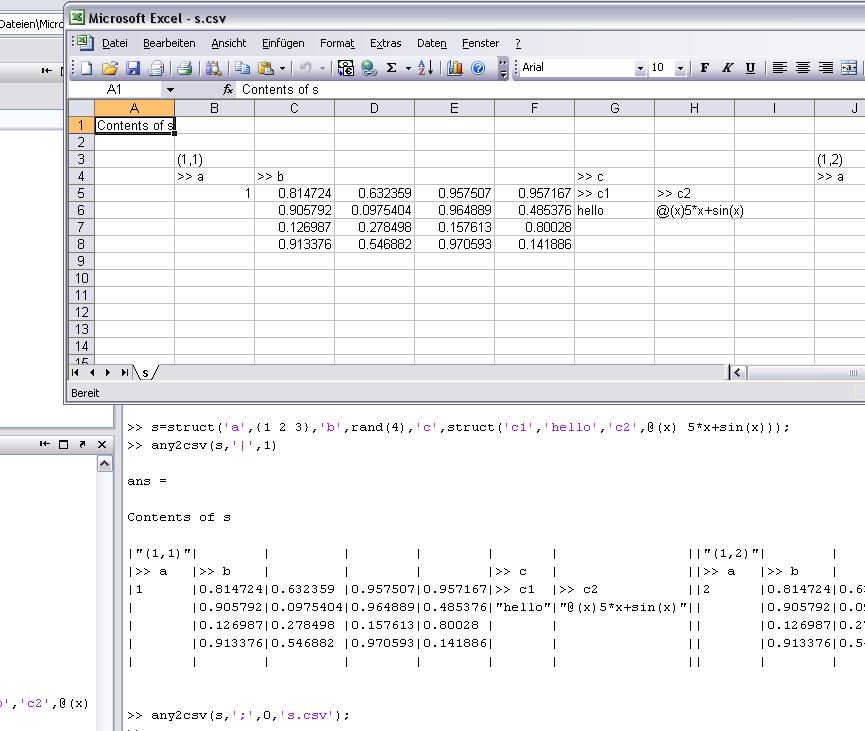
Exports any type of MATLAB data to a nicely formated csv-file, including fieldnames of structs and any multidimensional subscript-indices.
This tool is especially useful if you want to save the content of large structs and cell-arrays to an excel or ods sheet. Any to csv works recursively until all the content of a complicated object is written to a csv-spreadsheet and opens it in the standard csv application. There you can save it to e.g. xls or ods.

MATLAB release MATLAB 7.4 (R2007a)
Other requirements Opening the csv-file after creation only works on os x and windows.
Tags for This File  
Everyone's Tags
Tags I've Applied
Add New Tags Please login to tag files.
Comments and Ratings (10)
11 Mar 2008 Urs (us) Schwarz

does NOT work with empty cell entries, eg,
c={'a',[],{}}
us

11 Mar 2008 Felix Zörgiebel

Shame on me, I should have tested that case... Thanks Urs, I corrected the bug. Felix

10 Nov 2008 Puifai S

Do you know of a way to convert from CSV to XLS quickly?

23 Nov 2008 Felix Zoergiebel

I am using OpenOffice.org instead of Microsoft Office. OpenOffice.org has a very nice import function for csv files. Once the file is imported you can save as XLS. I know that those functions are available via command-line tools, however I do not remember the names and I have never used them.

14 Mar 2009 Steffen

This is a great way to manage the workflow of your data from Matlab to any office-programm like excel or openoffice. It's handy and easy to use.

09 Apr 2009 Joachim

Very usefull work ( see comment from Steffen).

10 Nov 2009 sophie neve

very useful !!
but I find the opening of excel annoying
I also got a (little) problem when creating the file, it says :
The system cannot find the file ''pathname''
normal it does not found... has not been created yet....

so.

19 May 2010 Larissa

Hi Felix,
Could you please have a look at this thread?
http://www.mathworks.com/matlabcentral/newsreader/view_thread/281952#744609
I am out of memory in 2009b. What could be a reason for that?

01 Dec 2010 Oren Schaedel

Thanks, very useful

04 Apr 2011 Kshitij Gupta

very useful

Please login to add a comment or rating.
Updates
12 Mar 2008

The empty cell bug is now finally gone.

27 May 2008

- display struct fields horizontally or vertically -> line 128
- display content of cell/struct fields under or right to the subscripts/fieldname -> line 127

Thanks Jiro Doke for those two ideas!

- removed empty struct bug

27 May 2008

New feature: struct fields can be arranged vertically or horizontally. Setting in line 128
New feature: horz. and vert. distance between subscript/fieldname and content of cell/structfield can be set in line 127
Thanks Jiro Doke for your comments!

Tag Activity for this File
Tag Applied By Date/Time
data import Felix Zoergiebel 22 Oct 2008 09:52:52
data export Felix Zoergiebel 22 Oct 2008 09:52:52
export struct export cell export mixed data export csv xls ods Felix Zoergiebel 22 Oct 2008 09:52:52
potw Cristina McIntire 07 Nov 2008 13:01:21
data export Rajender 04 Oct 2010 05:47:49
pick of the week Jiro Doke 11 Feb 2011 20:13:58

Contact us at files@mathworks.com