Code covered by the BSD License  

Highlights from
Image Processing GUI

4.0

4.0 | 1 rating Rate this file 110 Downloads (last 30 days) File Size: 2.98 MB File ID: #30285
image thumbnail

Image Processing GUI

by Theodoros Giannakopoulos


03 Feb 2011 (Updated 15 Feb 2011)

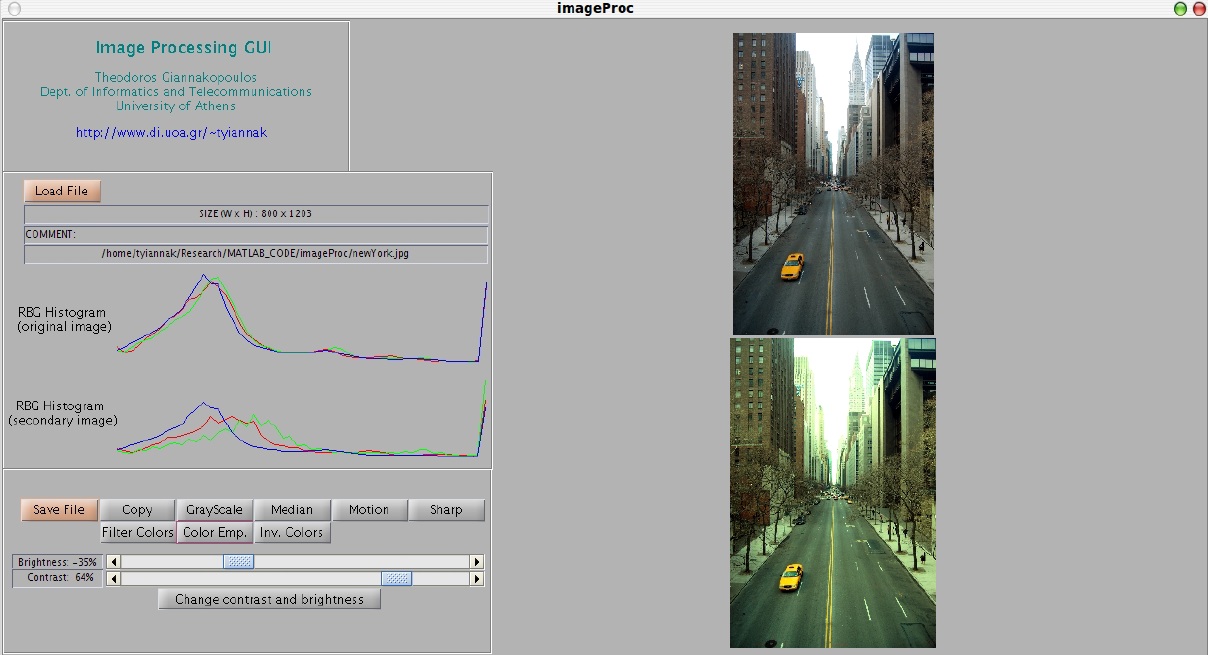
A simple GUI with basic image processing functionalities.

| Watch this File

File Information
Description

This is a GUI that demonstrates some basic image processing functionalities, e.g., color filtering, motion filtering, etc. The user can load any of the basic image file types and then generate a secondary image based on the provided functionalities. All of the adopted functionalities make direct use of Matlab buildin functions, apart from the "Color Filter" procedure, which is not straightforward and has been implemented for this demo.

Required Products Image Processing Toolbox
MATLAB release MATLAB 7.5 (R2007b)
Other requirements Tested both on Linux & Windows platforms.
Tags for This File  
Everyone's Tags
Tags I've Applied
Add New Tags Please login to tag files.
Comments and Ratings (5)
13 Feb 2011 Sam

Hi there! Your image processing GUI was very outstanding! I'm currently working on image processing for my final year project and still a newbie. I was wondering if you could add a rotation button(90,180,270 degree) function into the GUI? Your feedback would be highly appreciated...TQ

15 Feb 2011 Theodoros Giannakopoulos

Hi Sam. Thank you for your question. This is quite simple actually. You only need to add a button and then use the imrotate function (http://www.mathworks.com/help/toolbox/images/ref/imrotate.html). I am uploading an updated version which provides you the ability to rotate an image (rotate angle is selected in the range 0.360 using a slider).

27 Feb 2011 Sam

Hello! Thank you for your previous feedback :) May if i ask your opinion about the de-blurring function in image processing? Is it complicated to add the function into GUI?

28 Feb 2011 Sam

Also, can the zoom in and out button be included into the user interface? I'm still a new learner in image processing so I'm sorry for the trouble. ^ ^

09 Mar 2011 Mangesh

can i find the upper pixel and lower pixel value to detect the length of that object in motion.

Please login to add a comment or rating.
Updates
15 Feb 2011

Update 1 (2011-02-15): Image rotation functionality added

15 Feb 2011

Update 1 (2011-02-15): Image rotation functionality added

Tag Activity for this File
Tag Applied By Date/Time
image processing Theodoros Giannakopoulos 04 Feb 2011 11:23:07
gui Theodoros Giannakopoulos 04 Feb 2011 11:23:07
color filtering Theodoros Giannakopoulos 04 Feb 2011 11:23:07
gui Sergey 15 Feb 2011 17:14:46
color filtering nirlep 07 Mar 2011 09:35:51
gui nirlep 07 Mar 2011 09:35:54
image processing nirlep 07 Mar 2011 09:35:56
moion filtering Mangesh 09 Mar 2011 12:11:30
gui Enal 16 May 2012 20:08:10
gui abderrahim red 02 Jun 2012 10:33:39

Contact us at files@mathworks.com