5.0

5.0 | 3 ratings Rate this file 161 downloads (last 30 days) File Size: 2.74 KB File ID: #3550

ShadePlotForEmphasis

by Michael Robbins


04 Jun 2003 (Updated 06 Jun 2003)

No BSD License  

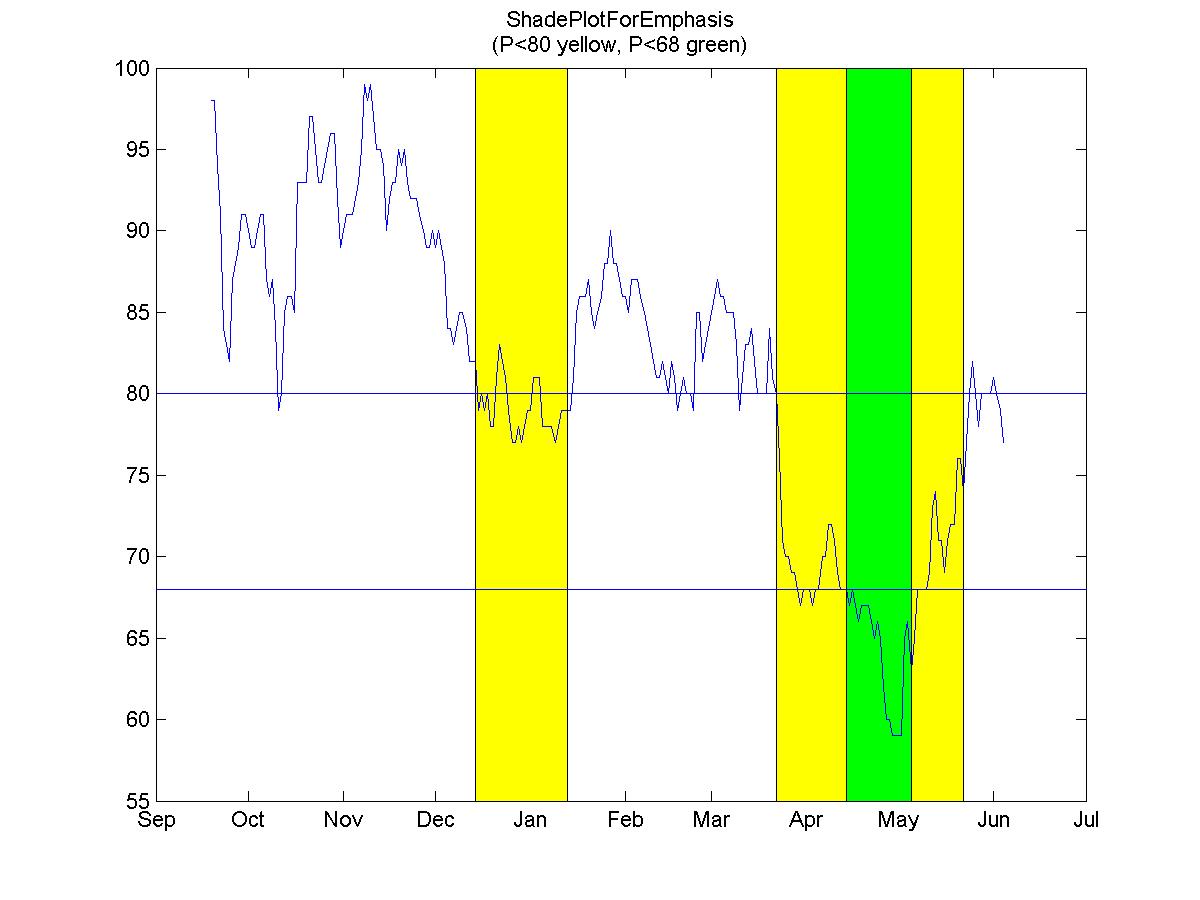
Plots a shaded bar for emphasis as commonly seen on economic charts.

Editor's Notes:

This was a File Exchange Pick of the Week

Download Now | Watch this File

File Information
Description

ShadePlotForEmpahsis
  Plots a shaded bar for emphasis as commonly seen on economic charts.
 
  INPUTS:
   x where the bar is placed. If you want a bar from x=4:8 then
         use [4 8]. If you want x=[4:8,10:20] then use {4:8,10:20}
  colors Use 'y' to make all bars yellow. Use {'y','g','r'} for
         yellow, green and red bars.
  alphas Use 0.5 if you want all bars to be translucent. Use {0,.5,1}
         for transparent, translucet and opaque bars.
 
  USAGE:
  % DEFINE DATA
  P=[ ...
  98 98 94 91 84 83 82 87 88 89 91 91 90 89 89 90 91 91 87 86 87 84 79 80 ...
  85 86 86 85 93 93 93 93 97 97 95 93 93 94 95 96 96 92 89 90 91 91 91 92 ...
  93 95 99 98 99 97 95 95 94 90 92 93 93 95 94 95 93 92 92 92 91 90 89 89 ...
  90 89 90 89 88 84 84 83 84 85 85 84 82 82 82 79 80 79 80 78 78 81 83 82 ...
  81 79 77 77 78 77 78 79 79 81 81 81 78 78 78 78 77 78 79 79 79 79 81 85 ...
  86 86 86 87 85 84 85 86 88 88 90 88 88 87 86 86 85 87 87 87 86 85 84 83 ...
  82 81 81 82 81 80 82 81 79 80 81 80 80 79 85 85 82 83 84 85 86 87 86 86 ...
  85 85 85 83 79 81 83 83 84 82 80 80 80 80 84 81 80 76 71 70 70 69 69 68 ...
  67 68 68 68 67 68 68 70 70 72 72 71 69 68 68 68 67 68 67 66 67 67 67 66 ...
  65 66 65 62 60 60 59 59 59 59 65 66 63 65 68 68 68 68 69 73 74 71 71 69 ...
  71 72 72 76 76 74 77 80 82 80 78 80 80 80 80 81 80 79 77];
  T=today-length(P)+1:today;
  Y={today-[13 74],today-[142 172]};
  G={today-[30 51]};
 
  % PLOT THE DATA
  plot(T,P);
  datetick;
  line(get(gca,'Xlim'),[80 80])
  line(get(gca,'Xlim'),[68 68])%
  title({'ShadePlotForEmphasis','(P<80 yellow, P<68 green)'});
 
  % DRAW SOME YELLOW BARS
  ShadePlotForEmpahsis(Y,'y',0.5);
 
  % DRAW A GREEN BAR
  ShadePlotForEmpahsis(G,'g',0.5);
 
 
  | ## _#__/
  | ## / #
  | ## / #
  | /#\_/ #
  |/ ## #
  |__##_____#_____
 
  IT'S NOT FANCY BUT IT WORKS

Acknowledgements
This submission has inspired the following:
Shaded time series
MATLAB release MATLAB 6.5 (R13)
Tags for This File  
Everyone's Tags
Tags I've Applied
Add New Tags Please login to tag files.
Comments and Ratings (3)
02 Aug 2007 Vaishali Dadhe  
29 Aug 2007 Francisco Bido

Mathworks needs to rapidly implement a more refined version of this popular type of plot. In the mean time, this code is VERY useful. Thanks!!

09 Oct 2009 David Groppe

Great function! Thanks for writing it. It would be a bit easier to use though if you corrected the spelling of "emphasis." Currently you spell it "empahsis."
      much appreciated,
            -D

Please login to add a comment or rating.
Tag Activity for this File
Tag Applied By Date/Time
annotation Michael Robbins 22 Oct 2008 07:02:42
customization Michael Robbins 22 Oct 2008 07:02:42
plot Michael Robbins 22 Oct 2008 07:02:42
shade Michael Robbins 22 Oct 2008 07:02:42
graphics Michael Robbins 22 Oct 2008 07:02:42
transparent Michael Robbins 22 Oct 2008 07:02:42
bar Michael Robbins 22 Oct 2008 07:02:42
shading Gautam Vallabha 17 Jun 2009 11:15:54
 

MATLAB Central Terms of Use

NOTICE: Any content you submit to MATLAB Central, including personal information, is not subject to the protections which may be afforded information collected under other sections of The MathWorks, Inc. Web site. You are entirely responsible for all content that you upload, post, e-mail, transmit or otherwise make available via MATLAB Central. The MathWorks does not control the content posted by visitors to MATLAB Central and, does not guarantee the accuracy, integrity, or quality of such content. Under no circumstances will The MathWorks be liable in any way for any content not authored by The MathWorks, or any loss or damage of any kind incurred as a result of the use of any content posted, e-mailed, transmitted or otherwise made available via MATLAB Central. Read the complete Terms prior to use.

Contact us at files@mathworks.com