4.6

4.6 | 10 ratings Rate this file 18 Downloads (last 30 days) File Size: 3.77 KB File ID: #5752
image thumbnail

GUI_sheet ; Java GUI table from MATLAB

by Andrej Mosat


23 Aug 2004 (Updated 27 Aug 2004)

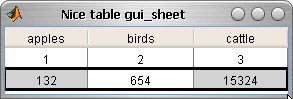
Creates a GUI table from a structure with custom data and behaviour.

| Watch this File

File Information
Description

Create a Java-Mathworks GUI table from your structure in a separate window. Table can be: edited by the user, resized, hidden, confirmed. You can easily display the predefined size of the table to the user, he then edits the data (aka Array or Matrix Editor in MATLAB) and you can import/export the data afterwards. This feature is missing in GUI, can be accessed only from calling java functions in an external window with programmed properties. You can add and program buttons for actions related to the table afterwards, or access data from command line.
Tested in MATLAB R12 R13 R14.
Should be understood as an example on how to do the Java tables, not as a fixed product on tables in MATLAB.

MATLAB release MATLAB 6.5.1 (R13SP1)
Other requirements Java enabled in Matlab, comes as factory default :-)
Tags for This File  
Everyone's Tags
Tags I've Applied
Add New Tags Please login to tag files.
Comments and Ratings (15)
29 Sep 2004 Albert von Strudeldorf

Nice implementation for a missing feature! It is platform independant, which is not the case of most "COM"-based hacks.
Matlab should definetly include this (or better a GUIDE element like this) in the next release.

12 Mar 2005 poe puri

Guide really needs some sort of table to display data. This is great!

03 May 2005 Venkatesh Rajmendram

It would be nice if this was feature in GUIDE it self

18 Jan 2006 Peter Krug

Does what it claims. Simple, nice. Saving this figure to an image file would be nice.

18 Jan 2006 Andrej Mosat

Planning a new version. As the printing in Java is rather complicated (for me :-) I don`t know if I can handle it alone within 2 months. Experiments show, that printing involves setting up a page object, rendering the framebuffer and putting this to printable object. Actually what u see is what u get. This delivers many problems: e.g. fonts, line thickness, ... Also java 1.4.2 - 1.5.x seems to have some bug with linux printing. Thank you for ratings.

14 Jan 2007 David Susanto

Simple but though, but still need more improvement

08 Feb 2007 andy sio

cool stuff dude

10 Feb 2007 Paul Nita

nice piece of work.

12 Apr 2007 christoph huber  
28 Sep 2007 Wojciech Chojnowski

Is it possible to change values in table? Using Matlab R2006b I can resize table and columns but can't change cell value.

08 Oct 2007 Adolfo Cardona

Thanks

05 Dec 2007 Andrej Mosat

To: Wojciech Chojnowski
Yes, you have to set the table object as editable.
From the code:
% setting the behaviour of the table (can be found in java awt documentation, or methods of java table)
b.setExcelMode(1);
should do the trick.
I don`t know if something changed in java AWT in Matlab 2006b, but presumably not.

Try to debug the application and see the methods/properties of the object "b", which is the java AWT Table object instance. There should be something like "editable" property.
Hint:
debug,
stop at the point b.setExcelMode(1);
and in the matlab command line press:
b.<Tab>

I hope this helps if not, blame mathworks for it :-)

07 Jun 2008 Breno Carneiro Pinheiro

Hi All, I have a issue to solve.

I already have an application from where I'd love to call your table code to show some values. The problem is that I need to generate an executable file to run on other machines without Matlab installed. To do this I use the mbuild -setup command, choose my compiler (Microsoft Visual C/C++ version 6.0) and the mcc -m command. It seems that the gui_sheet.m uses java, so I wonder know how I could generate this executable that gather all my files along with the one you made available on net.

Thanks in advance,

Breno

10 Jun 2009 Isaac

If this is still active, should the "License" be updated to be the GNU GPL (1,2,3) or restated as a Google Public License? The text "GPL (www.google.com)" can be misinterpreted....
Also, my compliments for facing down the demons of awt and friends! ;-)

05 Oct 2010 Vlad Atanasiu

Simple and elegant. Thank you!

Please login to add a comment or rating.
Updates
26 Aug 2004

Description and text corrections

27 Aug 2004

Description and text corrections

Tag Activity for this File
Tag Applied By Date/Time
gui tools Andrej Mosat 22 Oct 2008 07:30:36
example Andrej Mosat 22 Oct 2008 07:30:36
table Andrej Mosat 22 Oct 2008 07:30:36
java Andrej Mosat 22 Oct 2008 07:30:36
excel Andrej Mosat 22 Oct 2008 07:30:36
gui Andrej Mosat 22 Oct 2008 07:30:36
guide Andrej Mosat 22 Oct 2008 07:30:36
data structure Andrej Mosat 22 Oct 2008 07:30:36
frame Andrej Mosat 22 Oct 2008 07:30:36
listbox Andrej Mosat 22 Oct 2008 07:30:36
java diego fonseca 09 Jul 2009 13:39:31
data structure Olga 30 Oct 2009 07:22:27
guide Arnav Mukherjee 06 Mar 2010 08:10:16
table tou 04 Jun 2011 20:07:41

Contact us at files@mathworks.com