
Code covered by the BSD License  

Highlights from
plotyy2

Be the first to rate this file! 5 Downloads (last 30 days) File Size: 1.48 KB File ID: #7540
image thumbnail

plotyy2

by Laurent Cavin


27 Apr 2005 (Updated 28 Apr 2005)

Simplify zooming of plotyy dual plots.

| Watch this File

File Information
Description

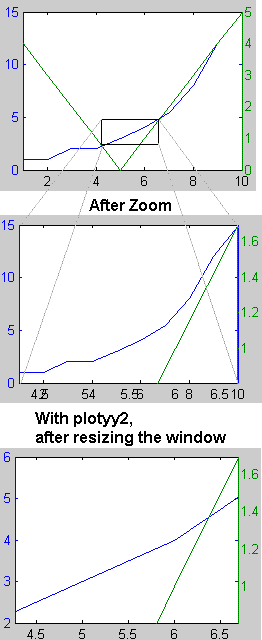
The command plotyy is handy, but the implementation (superposing two plots on top of each other) present some problems. One of them is zooming, which does apply to only the uppermost plot (see screenshot, second plot).

This issue is know, and has no solution according to Mathworks (see refs below).

To address this, plotyy2 is a simple hack that adds a resize custom function to the figure generated by plotyy. On resize, the two x axis will be synchronized (see third plot on screenshot).

This is a non-automatic workaround, as manually resizing the figure is required after a zoom...

Reference to problem:
Solution Number: 1-15WA9
http://www.mathworks.com/support/solutions/data/1-15WA9.html

Acknowledgements
This submission has inspired the following:
Manchester
MATLAB release MATLAB 7 (R14)
Tags for This File  
Everyone's Tags
Tags I've Applied
Add New Tags Please login to tag files.
Comments and Ratings (6)
10 May 2005 Sander Stepanov

it is very good idea, but in my test it does not work,
for code
x=[ 1 2 3 4 5];
 y = [10 20 30 40 50];
 z= [100 200 300 400 500];
 plotyy2(x,log10(y),x,z);
still only one axes is zoomed

11 May 2005 Laurent Cavin

When I test your code, it works. Do not forget that you have to RESIZE the figure for the second zoom to take effect. On the second plot, it will only be a horizontal zoom. Vertically, the scale is set on auto and will be fitted to the data.

13 Jul 2005 Mikhail Kozlov

Dear Laurent Cavin,
would you, please, offer any example

18 Nov 2005 Albert Von Würsteldorf

LINKAXES Synchronize limits of specified 2-D axes
   Use LINKAXES to synchronize the individual axis limits
   on different subplots within a figure. Calling linkaxes
   will make all input axis have identical limits. This is useful
   when you want to zoom or pan in one subplot and display
   the same range of data in another subplot.
 
   LINKAXES(AX) Links x and y-axis limits of the 2-D axes
   specified in AX.
 
   LINKAXES(AX,OPTION) Links the axes AX according to the
   specified option. The option argument can be one of the
   following strings:
         'x' ...link x-axis only
         'y' ...link y-axis only
         'xy' ...link x-axis and y-axis
         'off' ...remove linking
 
   See the LINKPROP function for more advanced capabilities
   that allows linking object properties on any graphics object.
 
   Example (Linked Zoom & Pan):
 
   ax(1) = subplot(2,2,1);
   plot(rand(1,10)*10,'Parent',ax(1));
   ax(2) = subplot(2,2,2);
   plot(rand(1,10)*100,'Parent',ax(2));
   linkaxes(ax,'x');
   % Interactively zoom and pan to see link effect
 
   See also linkprop, zoom, pan.

    Reference page in Help browser
       doc linkaxes

16 Apr 2007 Greg Fleizach

I haven't tried the code, but as Albert pointed out, MATLAB has this capability with the "linkaxes" function. Here is an example:

[haxes,hline1,hline2] = plotyy(a,b,a,c);
linkaxes(haxes,'x');

You can then zoom in both axes.

03 Jul 2008 Thierry Dalon

At least with R2008 it seems implemented in plotyy.

Please login to add a comment or rating.
Tag Activity for this File
Tag Applied By Date/Time
specialized Laurent Cavin 22 Oct 2008 07:47:22
plotting Laurent Cavin 22 Oct 2008 07:47:22
plotyy zoom resizefcn Laurent Cavin 22 Oct 2008 07:47:22

Contact us at files@mathworks.com