Code covered by the BSD License  

Highlights from
WORLDDATAMAP

image thumbnail
from WORLDDATAMAP by Kelly Luetkemeyer
Map a region using data from a shapefile or data grid.

WORLDDATAMAP Examples

WORLDDATAMAP Examples

This demo illustrates using WORLDDATAMAP to draw maps of the world using data from a variety of shapefiles and regular data grids.

Contents

Examples using landareas.shp

The following examples draw maps of the World using data from landareas.shp.

Draw a map of the World with coastlines.

figure
worlddatamap world
title('World')

Draw a map of Antarctica as a patch.

figure
worlddatamap('antarctica','patch')
title('Antartica')

Draw a map of Africa and India and major lakes and rivers.

figure
worlddatamap({'Africa','India'},{'lakes', 'rivers'})
title('Africa and India with Major Lakes and Rivers')

Draw a map of New Zealand's major cities.

figure
worlddatamap('New Zealand','citiesonly')
title('Cities of New Zealand')

Draw a map of the geoid surface.

figure
load geoid
worlddatamap(geoid, geoidrefvec)
title('Geoid Surface')

Draw a map of terrain elevations in Korea.

load korea
figure
worlddatamap(map, refvec, 'dem');
title('Terrain Elevation Map of Korea')

Draw a line map of the region of Korea.

load korea
figure
worlddatamap(map, refvec, 'line');
title('Line Map of Korea')

Mask the World's land surface.

figure
worlddatamap worldonly patch
h=handlem('world');
set(h,'facecolor','black')
title('Land Areas of the World')

Display the geoid and mask the land surface.

figure
worlddatamap worldonly patch
h=handlem('world');
set(h,'facecolor','black')
load geoid
geoshow(geoid, geoidrefvec, 'display', 'texture')
zdatam(h,max(geoid(:)))
title('Geoid Surface with Masked Land Areas')

Examples displaying the United States of America

The following examples draw a map of the United States using data from landareas.shp or usastatehi.shp.

Draw the United States and add rivers and lakes.

figure
worlddatamap('usa',{'rivers','lakes'});
title('USA Rivers Lakes')

Draw a map of the United States using the usastatehi shapefile.

figure
worlddatamap usastatehi.shp usa
title('USA States')

Draw a map of the United States as a patch.

figure
worlddatamap usastatehi.shp usa patch
title('USA Patch States');

Draw a map of the states near Mexico with labels.

figure
worlddatamap usastatehi.shp mexico patch labels
title('States near Mexico with Labels')

Draw a map of the states near Mexico as patches only (notice that labels are not displayed).

figure
worlddatamap usastatehi.shp mexico patchonly labels
title('States near Mexico as Patch Only')

Draw a map of the state of Missouri with a state label.

figure
worlddatamap({'usastatehi.shp','name'},'missouri','patch','labels')
title('Missouri')

Draw a map of only the state of Missouri with all features.

figure
worlddatamap({'usastatehi.shp','name'},'missourionly','patch','all')
title('Missouri Only with Major Rivers, Lakes, and Cities')

Downloading data from the Internet

A variety of world vector data in shapefile format can be downloaded from the Internet.

These examples download and use data from three different world vector shapefiles, cntry98, cntry02, and world_borders.

For details on locating other geospatial data for download over the Internet, see the following documentation at The MathWorks web site: http://www.mathworks.com/support/tech-notes/2100/2101.html

Download the cntry98 shapefiles The cntry98 shapefiles can be downloaded from:

http://www.zmuc.dk/public/GIS-intro/GIS-data/Lektion1/Temaer/

- or -

http://giscenter.isu.edu/spatial_library/Other/World/data/world/

url = 'http://www.zmuc.dk/public/GIS-intro/GIS-data/Lektion1/Temaer/';
try
   urlwrite([url '/cntry98.shp'],'cntry98.shp');
   urlwrite([url '/cntry98.dbf'],'cntry98.dbf');
   urlwrite([url '/cntry98.shx'],'cntry98.shx');
catch
   error('Unable to download cntry98 shapefiles.');
end

Download the cntry02 shapefiles. The cntry02 shapefiles can be downloaded from:

http://openmap.bbn.com/data/shape/cntry02.tar.gz

- or -

http://www.zmuc.dk/public/GIS-intro/GIS-data/Lektion1/Temaer/

url = 'http://openmap.bbn.com/data/shape/cntry02.tar.gz';
try
   files = untar(url)
catch
   error('Unable to download %s.', url);
end
files = 

  Columns 1 through 4

    'cntry02/'    'cntry02/.DS_Store'    'cntry02/cntry02.avl'    'cntry02/cntry02.dbf'

  Columns 5 through 7

    'cntry02/cntry02.prj'    'cntry02/cntry02.sbn'    'cntry02/cntry02.sbx'

  Columns 8 through 11

    'cntry02/cntry02.shp'    [1x23 char]    'cntry02/cntry02.shx'    'cntry02/cntry02.ssx'

Download the world_borders shapefiles. The world_borders shapefiles can be downloaded from:

http://mappinghacks.com/data/world_borders.zip

url = 'http://mappinghacks.com/data/world_borders.zip';
try
   files = unzip(url)
catch
   error('Unable to download %s.', url);
end
files = 

    'world_borders.dbf'    'world_borders.shp'    'world_borders.shx'

Examples using cntry98.shp

The following examples illustrate making maps from political boundaries defined by data in cntry98.shp.

Draw a map of the World using the countries defined by cntry98.shp.

figure
worlddatamap cntry98.shp world
title({'World Countries','Using cntry98.shp'})

Draw a map of the countries of Europe as a line.

figure
worlddatamap('cntry98.shp','europe','line')
title({'European Countries','Using cntry98.shp'})

Draw a map of North and South America as a patch and include the major rivers and lakes.

figure
worlddatamap('cntry98.shp',{'North America','South America'}, ...
             'patch',{'lakes', 'rivers'});
title({'North and South America','Using cntry98.shp'})

Examples using cntry02.shp

These examples use data from cntry02.shp.

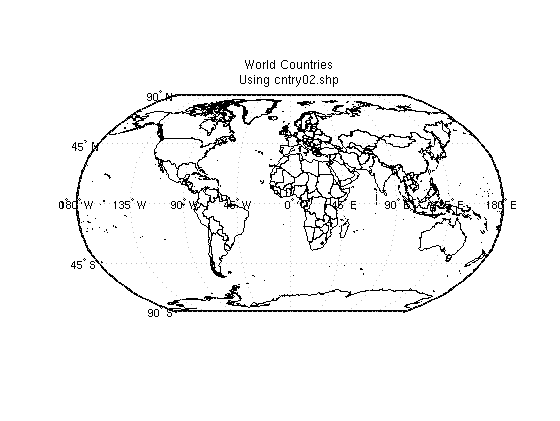
Draw a map of the World using the countries defined by cntry02.shp.

figure
worlddatamap cntry02.shp world
title({'World Countries','Using cntry02.shp'})

Draw a map of the countries of Europe.

figure
worlddatamap('cntry02.shp','europe','patch')
title({'European Countries','Using cntry02.shp'})

Draw a map of the cities of South America.

figure
worlddatamap('cntry02.shp','south america','cities')
title({'Cities of South America','Using cntry02.shp'})

Draw a map of Africa with all cities, rivers, and lakes. Set the width of the Nile river to be larger than the others.

figure
worlddatamap('cntry02.shp','africa',{'rivers','lakes'})
nile = handlem('Nile');
whiteNile = handlem('Nile - White Nile');
set([nile; whiteNile],'linewidth',4.0)
title({'African Countries with Major Rivers and Lakes','Using cntry02.shp'})

Draw a map of all landlocked countries. List the attribute names of the file cntry02.shp. Notice that the dataset contains a LANDLOCKED field name. Use the LANDLOCKED attribute (Y) to display only the countries that are landlocked.

info = shapeinfo('cntry02.shp')
{info.Attributes.Name}

figure
worlddatamap({'cntry02.shp','landlocked'},'yonly','patch')
load coast
plotm(lat,long)
title({'Landlocked Countries','Using cntry02.shp'})
info = 

       Filename: [3x52 char]
      ShapeType: 'Polygon'
    BoundingBox: [2x2 double]
    NumFeatures: 251
     Attributes: [14x1 struct]


ans = 

  Columns 1 through 5

    'FIPS_CNTRY'    'GMI_CNTRY'    'ISO_2DIGIT'    'ISO_3DIGIT'    'CNTRY_NAME'

  Columns 6 through 11

    'LONG_NAME'    'SOVEREIGN'    'POP_CNTRY'    'CURR_TYPE'    'CURR_CODE'    'LANDLOCKED'

  Columns 12 through 14

    'SQKM'    'SQMI'    'COLOR_MAP'

Examples using world_borders.shp

The following example illustrates making a map from political boundaries defined by data in world_borders.shp

Draw a map of Australia including major cities.

figure
worlddatamap world_borders.shp Australia patch cities
title({'Australia','Using world\_borders.shp'})

Examples using GSHHS

The following examples illustrate making maps of the World with data from the Global Self-consistant Hierarchical High-resolution Shorelines dataset.

Download GSHHS low resolution data.

url = 'http://www.ngdc.noaa.gov/mgg/shorelines/data/gshhs/gshhs_l.b.gz';
files = gunzip(url)
files = 

    'gshhs_l.b'

Create a shapefile of the GSHHS data.

Since the GSHHS data does not have a default REGIONATTRIBUTE field name of 'name', 'cntry_name', 'country_name', or 'long_name', add a Name field name with 'World' as the attribute value.

s = gshhs('gshhs_l.b');
[s.Name] = deal('World');
shapewrite(s, 'gshhs_l');

Create a map of global shorelines using GSHHS low resolution data.

figure
worlddatamap gshhs_l.shp world
title({'Global Shorelines','Using gshhs\_l.shp'})

Create a map of the Pacific region's shorelines.

figure
worlddatamap gshhs_l.shp pacific
title({'Pacific Region Shorelines','Using gshhs\_l.shp'})

Contact us at files@mathworks.com