
4.0

4.0 | 17 ratings Rate this file 28 Downloads (last 30 days) File Size: 197.54 KB File ID: #7828
image thumbnail

explorestruct

by Hassan Lahdili


10 Jun 2005 (Updated 14 Aug 2007)

MATLAB Utility for exploring structures and plotting its fields.

Editor's Notes:

This file was a File Exchange Pick of the Week

| Watch this File

File Information
Description

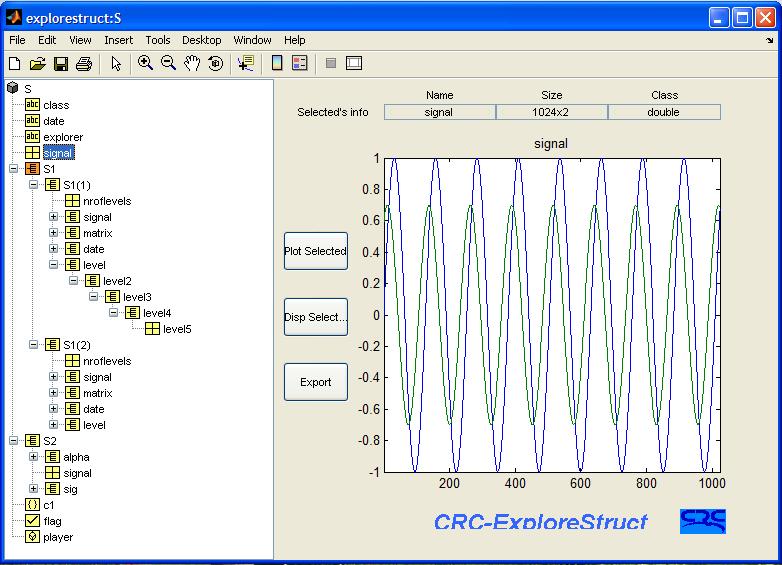
CRC-ExploreStruct v.1.1
MATLAB Utility for exploring structures and plotting their fields.

This GUI is an updated and enhanced version of the StructBrowser utility submitted to MATLAB Central in May 2003. It comes with new interface and an enhanced display. It uses Microsoft TreeView control to display and explore any kind of MATLAB structures. The CRC ExploreStruct was designed to expose the contents of the array struct to any depth and plot any of the components. This tool is very useful for programmers using structures in their code.

MATLAB release MATLAB 7.0.1 (R14SP1)
Other requirements Does not work with MATLAB 6.1 and 6.5
Tags for This File  
Everyone's Tags
Tags I've Applied
Add New Tags Please login to tag files.
Comments and Ratings (21)
15 Jul 2005 Gerd Kunert

The tool seems to be quite useful.
Two comments:
a) replace line 247 by
   fields{length(fields)+1, 1} = cNode.getValue;
such that exlorestruct also works with Matlab 7.0.1.

b) For variables that can be displayed in a single line (such as a string), it would be useful to display the variable content as well (not only in the Matlab window)

15 Jul 2005 Taoufik Mbarek  
15 Jul 2005 Brett Shoelson

This is a nice tool that provides a convenient way to visualize structures. I was keen on using it with ExcelFileSummary; it works, but it seems to have a limited viewing depth for nested structures. Still, very nice.

21 Sep 2005 viktor trogrlic

doesn't work in Matlab Rel. 13!
What can I do to make it work on rel. 13?

08 Nov 2005 Francis Pieraut

Doesn't work

18 Nov 2005 Daniel Eottevenyi

Very good tool, but there is a bug in line 264 (sometimes false data will be shown unless it is replaced):
 if(field(d+2)==')')
     idx = str2num(field(d+1));
 else
     if(field(d+3)==')')
        idx = str2num(field(d+1:d+2));
     else
        idx = str2num(field(d+1:d+3));
     end
 end

20 Aug 2006 Hans van Lint

I liked StructBrowser, but this one doesn't work for me. I get a message:

??? Error using ==> explorestruct>myExpfcn4
The uitree node type is not recognized. You may need to define an ExpandFcn for the nodes.

Any one with suggestions???

30 Jan 2007 Ami Drory

I like it, but it would be good to extend this tool to be able to explore classes, cells etc.

02 Aug 2007 Michael Miller

Not compatible with latest version of Matlab (R2007a). The following error occurs even when you run the demo.
>> es_demo
??? There is no 'UIContextMenu' property in the 'com.mathworks.hg.peer.UITreeNode' class.

Error in ==> explorestruct at 83
set(root,'UIContextMenu', cmenu);

83 set(root,'UIContextMenu', cmenu);
K>>

06 Jan 2008 Eric Lee

A good tool!
Note: I made a small change to line 182, to avoid the need to copy the exp_struct_icons directory. This may make the tool more portable.

% pth = [matlabroot, '\work\exp_struct_icons\'];
pth = [fileparts(mfilename('fullpath')) '\exp_struct_icons\']

26 Feb 2008 Jagadeesh K

Suppose, the tree is huge and if i provide the user to enter the text in editbox and a search button to search for the text.And on click of the search button, if the entered text is present in the tree, then that Node has to be highlighted.How can this functionlity be achieved?

26 Feb 2008 Jagadeesh K

How to highlight a particular node of the tree?
or
How to setfocus on a particular node of the tree?

04 Jun 2008 Martin Römpert

Excellent tool ...

@ Michael Miller(mmiikkee@comcast.net)
Date: 2007-08-02

Change line 83 ff to:
% set(root,'UIContextMenu', cmenu);
t = tree.Tree;
set(t,'UIContextMenu', cmenu)

14 Jan 2009 Michael Ashby

I am unable to get this to work, even on the demo.

The GUI is displayed but is missing the left side completely. No error messages. I am running 2008a.

Any advice please?

14 Jan 2009 Michael Ashby

add to comment above...

Matlab version 7.7.0

Thanks

07 May 2009 Tobias Nüesch

I've got the same problems as Michael Ashby in R2008b (7.7.0.471): the left side is missing.

Does anyone have a fixed version?

07 May 2009 Tobias Nüesch

Got it for R2008b!

First, add 'v0' to the uitreenode and uitree commands. Second, pause the execution of the m-file after the uitree command by approx. 0.1 seconds (could depend on your computer). To this, replace the code from line 28 to 31 by

set(h, 'Name', fig_name);
root = uitreenode('v0', name, name, [], false);
tree = uitree('v0', 'Root', root, 'ExpandFcn', @myExpfcn4);
pause(0.1)
set(tree, 'Units', 'normalized', 'position', [0 0 0.35 1]);

07 May 2009 Michael Ashby  
07 May 2009 Michael Ashby

So, with Tobias' fix (above), this is working nicely. Thanks to the author and to Tobias.

23 Sep 2009 Aurelien Queffurust

It also works in R2009a when you modify the lines 28 to 31
You have to add a first argument 'v0' to line 83 as mentionned Martin Römpert ... but also for EACH line with uitreenode . It will prevent warnings in a standalone mode (MATLAB Compiler). These warnings tell you to add v0 to continue to use this undocumnted feature (uitreenode). I made this modification and now there is no warning at all when I expand my nodes.

12 Oct 2010 Patrice Tscherrig

Hassan,

Extremely nice tool!
There is a tiny bug in the subfunction getcNodevalue.
Replace
d = findstr(field,'(');
and
idx = str2num(field(d+1));

with
        d = findstr(field,'(');
        d_e = findstr(field,')');
            idx = str2num(field(d+1:d_e-1));

as else the structure will not correctly refresh for structures >(9*1).

Best regards,
Patrice

Please login to add a comment or rating.
Updates
14 Aug 2007

Editing

Tag Activity for this File
Tag Applied By Date/Time
structures Hassan Lahdili 22 Oct 2008 07:50:18
cell arrays Hassan Lahdili 22 Oct 2008 07:50:18
utilities Hassan Lahdili 22 Oct 2008 07:50:18
explore structures Hassan Lahdili 30 Mar 2011 09:21:26

Contact us at files@mathworks.com