function A=AnalyseExcelFormulas(filename,outfilename)
% ANALYSEEXCELFORMULAS Extracts formulas from an Excel workbook and lists
% them in several different ways to aid analysis.
%
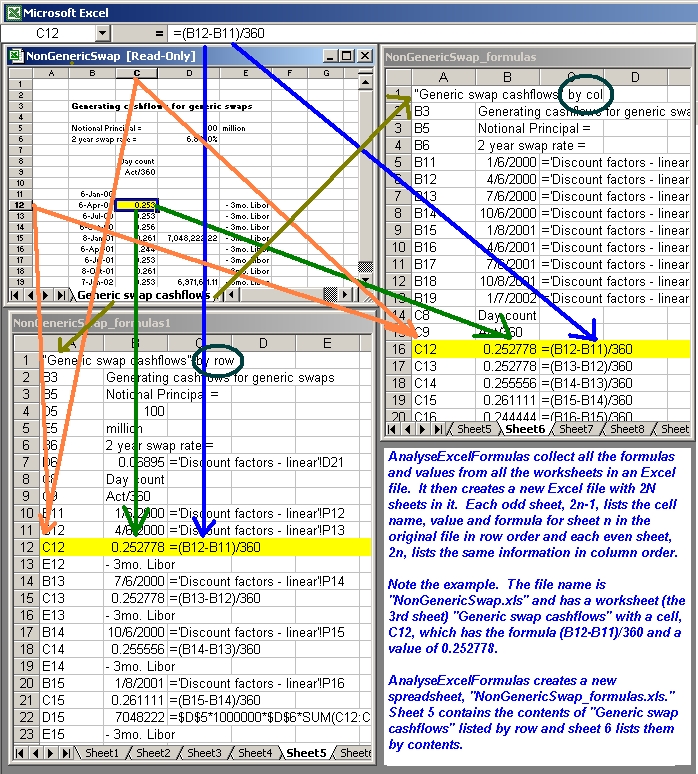
% AnalyseExcelFormulas collects all the formulas and values from all the
% worksheets in an Excel file. It then creates a new Excel file with 2N+1
% sheets in it (where N is the number of worksheets in the orginal
% workbook). Each odd sheet, 2n-1, lists the cell name, value and
% formula for sheet n (from the original file) in row order and each sheet,
% 2n, lists the same information in column order. The last sheet (2N+1)
% contains all the information on all the other sheets in one large list
% for easy printing. In addition, a structure is returned by the function.
% The structure's fields have the same name as the sheet tabs in your
% workbook and contain one cell array of all the values in the worksheet
% and another with all the formulas (e.g. A.LIBOR_Sheet.Formula and
% A.LIBOR_Sheet.Value.
%
% Note the example. The file name is "NonGenericSwap.xls" which has a
% worksheet (the 3rd sheet in the workbook) called "Generic swap cashflows"
% which has a cell (C12) which has the formula "=(B12-B11)/360" and a
% numerical value (result) of 0.252778.
%
% AnalyseExcelFormulas creates a new spreadsheet that it titles
% "NonGenericSwap_formulas.xls." In the 5th worksheet (2*3-1), it puts the
% title "'Generic swap cashflows' by row" in A1 and then creates three
% columns below it. The first contains the cell addresses in the row order
% (e.g. A1, A2, A3, ... B1, B2, C2). The second contains the values of the
% cells as they appear when you open the workbook. The third column
% contains the formulas).
%
% The 6th (2*3) worksheet's A1 would contain the title "'Generic swap
% cashflows" by col" and it's first column would list the addresses in
% column order (e.g. A1, B1, C1, ... A2, B2, C2).
%
% The last sheet in the new workbbok, number 2N+1, would contain all the
% data from all the other sheets.
%
% Empty cells are not listed.
%
% The function would return a structure that would have a
% Genericswapcashflow.Formula field with a cell array of formulas and a
% Genericswapcashflow.Value field with a cell array of values.
%
% >> A = AnalyseExcelFormulas('c:\NonGenericSwap.xls', ...
% 'c:\NonGenericSwap_formulas.xls')
%
% A =
% Key: [1x1 struct]
% Discountfactorslinear: [1x1 struct]
% Genericswapcashflows: [1x1 struct]
% Forward1v5HS: [1x1 struct]
% Forward1v5NPA: [1x1 struct]
% Forward1v5IF: [1x1 struct]
% Refrateapproach: [1x1 struct]
% Amortising5yrHS: [1x1 struct]
% Amortising5yrNPA: [1x1 struct]
% Amortising5yrIF: [1x1 struct]
% ComplexswapHS: [1x1 struct]
% ComplexswapNPA: [1x1 struct]
% ComplexswapIF: [1x1 struct]
% Nondiscountingaswap: [1x1 struct]
% NewMarketData: [1x1 struct]
% ValuingComplexswapNPA: [1x1 struct]
% ValuingComplexswapIF: [1x1 struct]
%
% >> A.Genericswapcashflows
%
% ans =
% Formula: {17x4 cell}
% Value: {17x4 cell}
%
% It's not fancy, but it works.
% Michael Robbins, CFA
% michaelNOrobbinsSPAMusenet@yahoo.com
% d=dir('c:\*xls');
% for i=1:length(d)
% fprintf('AnalyseExcelFormulas(''c:\\%s'');\n',d(i).name);
% end;
A=[];
iBig=0;
if nargin<1 filename = 'c:\NonGenericSwap.xls'; end;
if nargin<2 outfilename = [strtok(filename,'.') '_formulas.xls']; end;
h.activex1 = actxserver('Excel.Application');
invoke(h.activex1.Workbooks,'Open',filename);
NumWorksheets = h.activex1.Worksheets.Count;
if NumWorksheets<1
errordlg(mfilename,'No worksheets');
else
for iWorksheets = 1 : NumWorksheets
try
% GET VALUES AND FORMULAS FROM THE EXCEL SHEET
TargetSheet = get(h.activex1.sheets,'item',iWorksheets);
t=regexp(TargetSheet.Name,'\w','match');
F{iWorksheets} = TargetSheet.UsedRange.Formula;
V{iWorksheets} = TargetSheet.UsedRange.Value;
% POPULATE A STRUCTURE
s(1).type='.';
s(1).subs=[t{:}];
s(2).type='.';
s(2).subs='Formula';
A=subsasgn(A,s,F{iWorksheets});
s(2).subs='Value';
A=subsasgn(A,s,V{iWorksheets});
% MAKE A TABLE OF VALUES AND FORMULAS (I know I should have done
% this more elegantly, but I'm lazy).
[L,W]=size(V{iWorksheets});
i=1;
C{iWorksheets}{1,1}=['''"' TargetSheet.Name '" by row'];
iBig=iBig+1+single(iBig==1);
E{iBig,1}=C{iWorksheets}{1,1};
for r=1:L
for c=1:W
B = AnalyseExcelFormulas_(r,c,F{iWorksheets},V{iWorksheets});
if ~isempty(B)
i=i+1;
C{iWorksheets}(i,1:length(B))=B;
iBig=iBig+1;
E(iBig,1:length(B))=B;
end;
end;
end;
i=1;
D{iWorksheets}{1,1}=['''"' TargetSheet.Name '" by col'];
iBig=iBig+1;
E{iBig,1}=D{iWorksheets}{1,1};
for c=1:W
for r=1:L
B = AnalyseExcelFormulas_(r,c,F{iWorksheets},V{iWorksheets});
if ~isempty(B)
i=i+1;
D{iWorksheets}(i,1:length(B))=B;
iBig=iBig+1;
E(iBig,1:length(B))=B;
end;
end;
end;
end;
end;
%close(h.activex1);
% WRITE OUTPUT
iSheet=0;
for iWorksheets = 1 : NumWorksheets
iSheet=iSheet+1;
if ~isempty(C{iWorksheets}) & ~isempty(C{iWorksheets})
xlswrite(outfilename,C{iWorksheets},iSheet);
iSheet=iSheet+1;
xlswrite(outfilename,D{iWorksheets},iSheet);
end;
end;
if ~isempty(E)
xlswrite(outfilename,E,iSheet+1);
end;
end;
function B = AnalyseExcelFormulas_(r,c,F,V);
B=[];
v = V{r,c};
f = F{r,c};
good_v = ~isempty(v) && any(~isnan(v));
good_f = ~isempty(f) && any(~isnan(f)) && f(1)=='=';
if good_v | good_f
B{1}=nn2an(r+2,c+1);
B{2}=v;
if good_f
B{3}=['''' f];
end;
end;
function cr = nn2an(r,c)
% Thanks Brett Shoelson
t = [floor((c - 1)/26) + 64 rem(c - 1, 26) + 65];
if (t(1)<65), t(1) = []; end
cr = [char(t) num2str(r)];