Image Display and Exploration: Enhancements to Image Viewer app
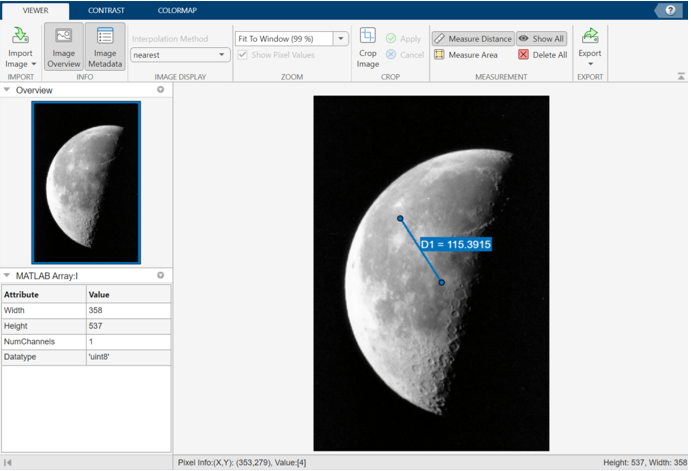
The enhanced Image Viewer app provides more functionality and better ease of use. For example,
you can now use the app to interactively draw polygon ROIs and measure their areas. Open the
app using the new imageViewer function.
The enhanced Image Viewer app and the imageViewer
function are recommended over the imtool function, which will be removed in a future release. For more
information, see Functionality being removed or changed.
Volume Visualization: Cinematic rendering, volumetric light scattering, advanced lighting controls, and interactive cropping
The Volume object has new properties and rendering styles for displaying 3-D image
volumes. To set property values at object creation, specify them to the volshow function as name-value arguments.
Control the amount of light reflected by a volume using the new
SpecularReflectance property. Increase the specular reflectance
to make a volume appear shinier.
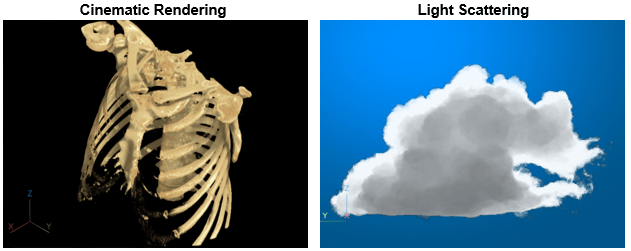
Specify the RenderingStyle property as
"CinematicRendering" to display a photorealistic volume using
iterative postprocessing. Specify the number of postprocessing iterations using the
new CinematicNumIterations property. For an example, see Display Volume Using Cinematic Rendering.
Specify the RenderingStyle property as
"LightScattering" to display the object with volumetric light
scattering, including light absorption, inscattering, and outscattering. Specify the
balance between rendering quality and speed using the new
LightScatteringQuality property. For an example, see Display Translucent Volume with Advanced Light Scattering.
The Viewer3D object has new properties and tools to control the lighting and remove
objects in a scene. To set properties at object creation, specify them to the viewer3d function as name-value arguments.
Control the strength of ambient and diffuse light within a viewer using the new
AmbientLight and DiffuseLight properties,
respectively.
Apply denoising to the objects in a viewer using the new
Denoising property. Specify the amount of smoothing and
standard deviation of the Gaussian smoothing kernel using the new
DenoisingDegreeOfSmoothing and
DenoisingSigma properties, respectively.
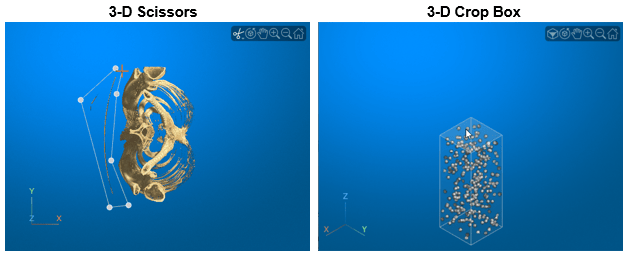
Use a crop box to crop the objects in a viewer to a rectangular subregion. For an example, see the Crop Blocked Volume section of Display Large 3-D Images Using Blocked Volume Visualization.
Use the 3-D scissors tool to remove regions from of a viewer. For an example, see Remove Objects from Volume Display Using 3-D Scissors.
Border selection and deletion: Remove or retain specified borders and border structures
The imclearborder function has a new Borders name-value
argument that enables you to specify which image borders to remove or from which to remove
connected structures.
The imkeepborder function retains only the light structures in an image that are
connected to the image borders. You can specify a subset of image borders which to retain or
for which to retain structures.
imclearborder: Improved performance
The imclearborder function shows improved performance. For example, in this code,
the call to imclearborder is about 1.7x faster than in the previous
release.
function t = imclearborderTimingTest A = imbinarize(imread("rice.png")); f = @() imclearborder(A); t = timeit(f); end
The approximate execution times are:
R2023a: 0.85 ms
R2023b: 0.51 ms
The code was timed on a macOS 12.5.1, Intel® Core i9 CPU @ 3.6 GHz test system.
C Code Generation: Generate code from additional functions using MATLAB Coder
This list indicates the Image Processing Toolbox™ functions that have been enabled for code generation in this release. For all target platforms, these functions generate C code. For a complete list of Image Processing Toolbox functions that support code generation, see Functions Supporting Code Generation.
The edge function now supports code generation for the
"approxcanny" edge detection method.
Hyperspectral Image Processing: Image Processing Toolbox Hyperspectral Imaging Library (Version 23.2)
Read hyperspectral data from .bsq, .bil,
.bip, and multipage TIFF files using the new capabilities of the
hypercube object.
View statistical data of spectral signatures, and export the spectral signatures using the new capabilities in the Hyperspectral Viewer app.
Use the hyperSlic function to perform 2-D superpixel oversegmentation of
hyperspectral cubes using the simple linear iterative clustering (SLIC)
algorithm.
The Change Detection in Hyperspectral Images example shows how to detect changes in land cover from hyperspectral images taken at different times.
The Ship Detection from Sentinel-1 C Band SAR Data Using YOLO v2 Object Detection example shows how to detect ships from Sentinel-1 C Band SAR Data using YOLO v2 object detection.
The Automate Pixel Labeling of Hyperspectral Images Using ECOSTRESS Spectral Signatures in Image Labeler example shows how to load hyperspectral images into the Image Labeler (Computer Vision Toolbox) and automatically label pixels.
To use these functions and tools, you must download the Image Processing Toolbox Hyperspectral Imaging Library from the Add-On Explorer. See Get and Manage Add-Ons.
Functionality being removed or changed
imtool will be removed
Still runs
The imtool function will be removed in a future release. In most situations, use
the Image Viewer app instead. The app has more functionality and is easier to use
than the Image Tool. To update your code, replace instances of imtool
with imageViewer.
Unlike Image Tool, the Image Viewer app does not return a figure. If you
want to display an image in Image Tool and return the figure that contains the tool, use
the images.compatibility.imtool.r2023b.imtool function instead. To update your
code that displays an image and returns the Image Tool figure, replace instances of
imtool with
images.compatibility.imtool.r2023b.imtool.
| Discouraged Usage | Recommended Replacement |
|---|---|
This example uses the
I = imread("cameraman.tif");
imtool(I) | Here is equivalent code that uses the
I = imread("cameraman.tif");
imageViewer(I) |
This example uses the
I = imread("cameraman.tif"); imtool(I,[5 250],Interpolation="bilinear") | Here is equivalent code that uses the
I = imread("cameraman.tif"); imageViewer(I,DisplayRange=[5 250],Interpolation="bilinear") |
This example uses the
[I,map] = imread("trees.tif");
imtool(I,map) | Here is equivalent code that uses the
[I,map] = imread("trees.tif");
imageViewer(I,Colormap=map) |
This example uses the
I = imread("cameraman.tif");
hTool = imtool(I); | Here is equivalent code that uses the
I = imread("cameraman.tif");
hTool = images.compatibility.imtool.r2023b.imtool(I); |
bigimage and bigimageDatastore will be
removed
Still runs
The bigimage object and the bigimageDatastore object
will be removed in a future release. To read and process large or multiresolution images,
use the blockedImage object and the blockedImageDatastore object instead.
| Discouraged Usage | Recommended Replacement |
|---|---|
This example creates a bigIm = bigimage("tumor_091R.tif"); | Here is equivalent code, replacing the blockedIm = blockedImage("tumor_091R.tif"); |
This example creates a bigImds = bigimageDatastore(bigIm); | Here is equivalent code that creates a
blockImds = blockedImageDatastore(blockedIm); |
Continue to display large or multiresolution image data using the bigimageshow function.