Detailed plot function for fmincon
The fmincon
optimplot plot function displays detailed information during an
optimization. For example,
x0 = [-2;2];
fun = @(x)100*(x(2) - x(1)^2)^2 + (1 - x(1))^2;
lb = [-2;-2];
ub = [3;3];
options = optimoptions("fmincon",PlotFcn="optimplot");
[x,fval] = fmincon(fun,x0,[],[],[],[],lb,ub,[],options)
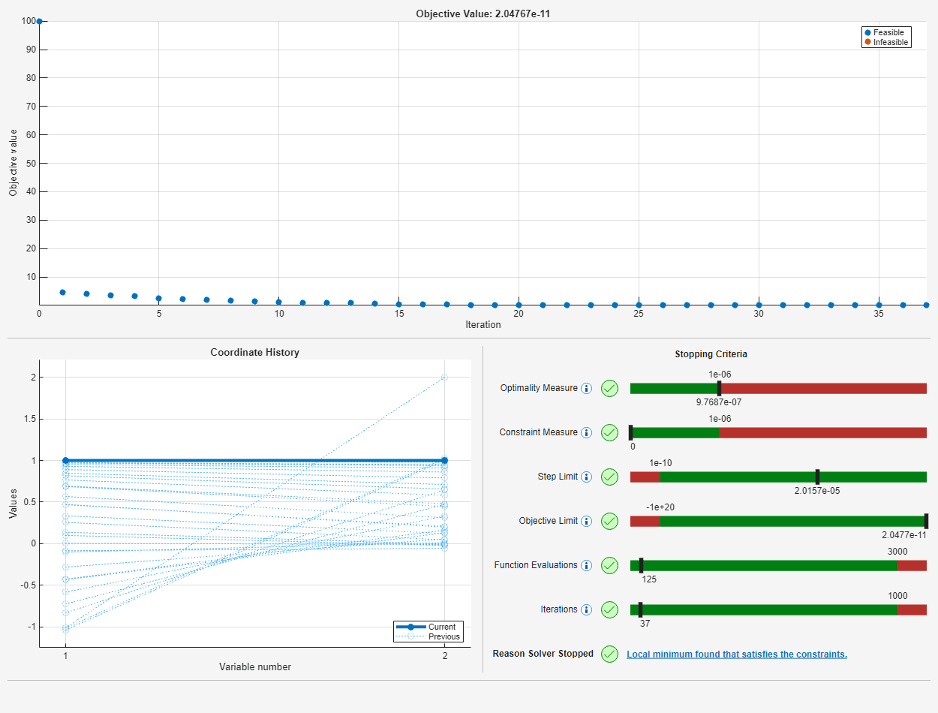
The optimplot plot function opens in a separate window from any
other plot functions. For an example, see Monitor Solution Process with optimplot.
Plot Functions and Output Functions for intlinprog
"highs" Algorithm: Obtain iterative information as the solver
progresses
The intlinprog
"highs" algorithm now supports output functions and plot
functions. For example, to have intlinprog produce a plot while
solving, specify the built-in "optimplotmilp" plot
function.
options = optimoptions("intlinprog",PlotFcn="optimplotmilp");
[x,fval] = intlinprog(f,intcon,A,b,Aeq,beq,lb,ub,options)
For details, see intlinprog Output Function and Plot Function Syntax.
The intlinprog
"legacy" algorithm will be removed in a future
release.
The optimValues output function and plot function structure
field named lowerbound is now named
dualbound.
The "highs" algorithm now supports the
MaxFeasiblePoints option. The output
structure for the "highs" algorithm now supports the
numfeaspoints field.
Code Generation for coneprog: Generate C or C++ code for
problems with linear objective function and cone constraints
The coneprog function now supports code generation. For details, see
Code Generation for coneprog Background and Generate Code for coneprog.
Single-precision code generation for quadprog,
lsqlin, and optimwarmstart
The quadprog and lsqlin solvers and the optimwarmstart function can generate code for single-precision
floating point hardware. If you want to generate single-precision code, all relevant
data, such as constraint matrices and bounds, must have the type
"single". For details, see Single-Precision Code Generation.
Note
This single-precision capability is available for code generation only; it is not available for general MATLAB® computations.
EquationProblem and OptimizationConstraint
Evaluation: Compute equation and constraint satisfaction using
issatisfied and evaluate
Compute the degree of satisfaction of nonlinear equation systems and of
optimization constraints using the evaluate and issatisfied functions. For an EquationProblem object, issatisfied returns a
boolean value indicating whether all equations are satisfied at a point, and returns
a boolean satisfaction value for each equation in a system in the second output.
evaluate returns the equation value at a point. For an
OptimizationConstraint object, evaluate returns
the values of the constraints, and issatisfied returns boolean
values for the constraints.
The value of a constraint depends on the constraint type. An equation is
equivalent to an == constraint. For expressions
L and R:
| Constraint Type | Value |
|---|---|
L <= R | L – R |
L >= R | R – L |
L == R | abs(L – R) |
For details, see the evaluate and issatisfied reference pages.
mpsread uses HiGHS software
mpsread now uses HiGHS open-source
software to read MPS files into a form that intlinprog and linprog accept.
The mpsread display now includes a reference to
HiGHS.
Green hydrogen production example
The example Optimize Green Hydrogen Production System shows how to use forecast cost and demand data to plan a hydrogen production system optimally. The example uses the problem-based optimization approach to model and solve a large linear programming problem.
Functionality being removed or changed
intlinprog
"legacy" algorithm and Algorithm option
will be removed in a future release
Still runs
The intlinprog
"legacy" algorithm will be removed in a future release.
Usually, the "highs" algorithm (default) performs better than
the "legacy" algorithm. Now that "highs"
supports output functions and plot functions, there is no loss of functionality
when switching to "highs".
Because intlinprog will have just one algorithm when the
"legacy" algorithm is removed, at that time:
The
Algorithmoption will be removed.All options that are valid only for the
"legacy"algorithm will be removed.intlinprogwill use the"highs"algorithm, the current default.The
algorithmfield will be removed from theoutputstructure.
intlinprog plot function and output function
optimValues field lowerbound renamed
dualbound
Behavior change
The optimValues output function and plot function structure
field named lowerbound is now named
dualbound. The new name is clearer for maximization
problems, where the dualbound is an upper bound on the
objective function value. The optimplotmilp plot function now
uses the labels Primal Bound and Dual
Bound instead of Branch/bound UB and
Branch/bound LB.
To avoid errors, change any custom output functions and plot functions to use the new field name.
linprog
"dual-simplex-legacy" algorithm will be removed in a future
release
Still runs
The linprog
"dual-simplex-legacy" algorithm will be removed in a future
release. Usually, the "dual-simplex-highs" algorithm
(default) performs better than the "dual-simplex-legacy"
algorithm.
More objects support evaluate and
issatisfied
The following objects now support the evaluate and issatisfied functions:
You can evaluate the values of these objects (optimization expressions or
constraints or equations) on a set of points that are expressed as an OptimizationValues object or on a single point expressed as a
structure. For an example, see Evaluate Expressions in Equation.