Filter Designer App: New and improved algorithm- and specification-based filter design
This release introduces a new version of the Filter Designer app. The app enables you to design IIR, FIR, and multirate filters using any one of these options:
Start with a list of specifications and then select an algorithm that best satisfies those parameters.
Start with an algorithm and then adjust the algorithm parameters.
Add, remove, or modify transfer-function poles and zeros.
Import and modify a
digitalFilterobject, a filter System object™, or a design made with a previous version of the app.
You can manage, analyze, and compare your filters in the same display or in side-by-side displays using several analysis plots. After you finish designing a filter, you can:
Export your design to the MATLAB® workspace or to Simulink®.
Generate a C header or COE file using coefficients.
Generate MATLAB code to recreate your design or filter a signal.
Export filters to DSP HDL IP Designer (DSP HDL Toolbox), if you have a DSP HDL Toolbox™ license.
For more information, see Filter Designer has changed.
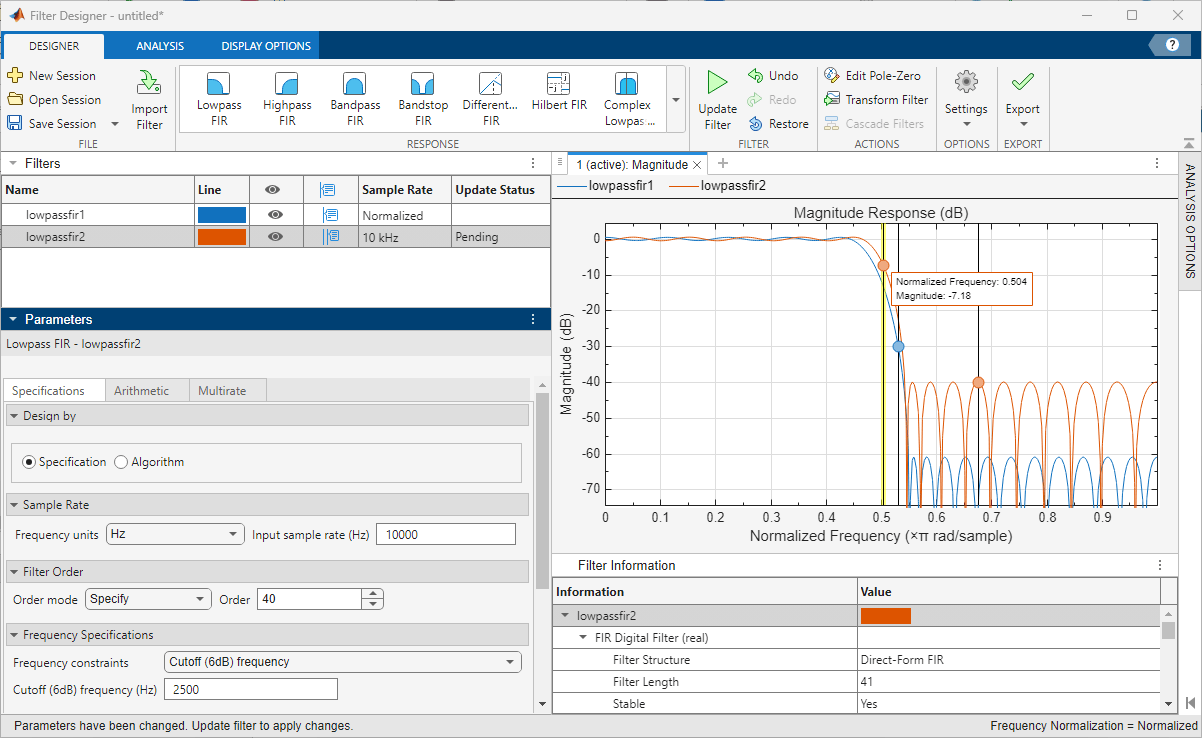
Filter Designer App: New and improved algorithm- and specification-based filter design
digitalFilter Object: Use digital filter cascades and
CTF format
Starting this release, digitalFilter objects can also
represent Digital Filter Cascades. A digital filter cascade is a representation of several digital filters
connected in series.
These new object functions enable you to create, analyze and modify a digital filter cascade:
cascade— Cascade two or more digital filter objects.ctf— Return filter coefficients in cascaded-transfer-function (CTF) format. If the filter is a cascade of digital filters, it returns the coefficients of all the stages in CTF format.getNumStages— Get the number of stages of a digital filter or digital filter cascade.setSampleRate— Set the sample rate of a digital filter or digital filter cascade.
You can now create a digitalFilter object by specifying a set
of filter coefficients in CTF format.
filt2block Function: Create Simulink blocks from CTF coefficients and digital filter cascades
The filt2block function now supports
creating Simulink blocks from CTF coefficients, from digitalFilter objects that
contain CTF coefficients, or from digitalFilter objects that
represent digital filter cascades.
Filter Design: Design complex FIR filters and use custom window functions
Starting this release, the designfilt function supports
these additional equiripple-based filter design responses.
'complexlowpassfir'— Complex lowpass FIR filter'complexhighpassfir'— Complex highpass FIR filter
In the Design Filter Live Editor task, you can now specify a custom window function for window-based filter designs.
Filter Analyzer App: Add data tips and copy displays
This release enables you to add data tips on filter analysis plots in the Filter Analyzer app and copy displays to the clipboard.
Spectral and Time-Frequency Analysis: Plot in axes, panels, and apps
Signal Processing Toolbox™ introduces a Parent name-value argument that
enables you to specify a target container in which to plot output for these functions:
Spectral Analysis —
cpsd,mscohere,periodogram,poctave,pwelch, andtfestimateTime-Frequency Analysis —
pspectrum,stft, andxspectrogram
Specify the target container as one of these objects: Axes, UIAxes, or Panel.
The Plot Spectral Representations of Signal in App Designer example shows how to create and run an app that plots Welch's PSD estimate, the octave spectrum, and the scalogram of a signal.
Feature Extraction: Extract time-frequency features from specified signal representation
The signalTimeFrequencyFeatureExtractor object now supports feature
extraction from a signal representation that you specify in the
Transform property.
This release introduces the
timeFrequencyFeatureTransformOptionsobject, which lets you set the signal representation associated with each time-frequency feature that you aim to extract.The
Transformproperty now supports astructarray or atimeFrequencyFeatureTransformOptionsobject.
For more information, see signalTimeFrequencyFeatureExtractor has changed.
Signal Feature Extractor App: Import audio signals and extract audio features
Starting this release, you can import audio signals and extract audio features in the Signal Feature Extractor app. You must have an Audio Toolbox™ license to use this functionality.
Signal Labeling: Use time-frequency masks and get STFT map
This release introduces the timeFrequencyMask object, which enables you to plot
time-frequency regions of interest and convert time-frequency masks for machine
learning workflows
This release also introduces two functions for the labelSpectrogramOptions object.
The
getTFMapfunction enables you to obtain the short-time Fourier transform (STFT) map of a signal based on the spectrogram options set on thelabelSpectrogramOptionsobject.The
getTFMapSizefunction enables you to determine the size of the STFT map that would result if computed using the spectrogram options set on thelabelSpectrogramOptionsobject.
Spectral Measurements: Estimate band power from multiple bands
The bandpower function now returns
the average power at multiple frequency ranges.
signalDatastore Object: Read file data in
parallel
The new UseParallel name-value argument in the readall function enables you to read file data in parallel from
a signalDatastore object. You must have a Parallel Computing Toolbox™ license to use this functionality.
filtfilt Function: New options to perform zero-phase
digital filtering
Starting this release, the filtfilt function supports new name-value arguments that enable
you to zero-phase filter signals with additional options.
InitialStatesMethod— Choose an algorithm to estimate the initial conditions of the filter states.TransientLength— Specify a number of samples or choose an estimation method to suppress the transient response from the filtered signal.PaddingPattern— Choose a pattern to pad the input signal on both ends before filtering.
Enhanced accuracy for digital filter design, spectral windows, and waveform generation
This release updates the method to compute the sine and cosine terms used in
several Signal Processing Toolbox functions. The sinpi and cospi functions provide more accurate results than
sin and cos for inputs that
represent multiple-of-π angles.
These functions now yield enhanced accuracy:
Digital Filter Design —
fir1,fircls,fircls1,firls, andrcosdesignSpectral Windows —
barthannwin,blackman,bohmanwin,flattopwin,hamming,hann,taylorwin, andtukeywinWaveform Generation —
sinc
EDF File Analyzer App: New character encoding formats to read annotations
The EDF File
Analyzer app, the edfread function, and the edfinfo object now support reading annotations in any of these
character encoding formats: UTF-8, ASCII, and Latin-1.
AI Application Examples: Coexecute PyTorch models in MATLAB
This release introduces examples that apply signal processing techniques and deep learning models using Python® coexecution to the analysis of signals.
Use Signal Feature Extraction to Train PyTorch Fault Detection Model demonstrates how to coexecute a PyTorch® long short-term memory neural network in MATLAB to identify faulty bearing signals.
Signal Imputation in Signal Analyzer Using Time-Series Foundation Model demonstrates how to coexecute a PyTorch time-series foundation model in Signal Analyzer to restore missing samples in signals.
Anomaly Detection in Signal Labeler Using Time-Series Foundation Model demonstrates how to coexecute a PyTorch time-series foundation model in Signal Labeler to detect anomalies in signals.
Code Generation Example: Generate deployable code that identifies faults in gearbox
This release introduces an example that demonstrates how to generate deployable code for vibration analysis. Generate C++ Code That Analyzes Vibration Signals from Rotating Machinery shows how to generate C++ code that analyzes the vibration signal from an accelerometer attached to a gearbox and identifies the local faults on the gear or pinion teeth.
Deep Learning: Code generation support for inverse short-time Fourier transform
The dlistft function now supports C/C++ and GPU code
generation.
You must have MATLAB Coder™ to generate standalone C and C++ code. You must have a MATLAB Coder and GPU Coder™ license to generate CUDA® code for graphical processor units (GPU).
GPU support to compute average order-magnitude spectrum for vibration analysis
The orderspectrum function now
supports gpuArray objects.
You must have a Parallel Computing Toolbox license to use gpuArray objects with the
supported functions. For more details, see Run MATLAB Functions on a GPU (Parallel Computing Toolbox). To find which GPUs are supported, see
GPU Computing Requirements (Parallel Computing Toolbox).
Single-precision support for spectral windows and digital filter analysis
These Signal Processing Toolbox functions now support single precision:
Spectral Windows —
gausswin,hamming,kaiser,nuttallwin,rectwin,taylorwin, andtukeywinDigital Filter Analysis —
filternorm
Functionality being removed or changed
Filter Designer has changed
Behavior change
The new version of the Filter Designer app contains most of the functionality found in previous versions plus new and updated features. On the other hand, there are some differences to keep in mind:
In Filter Designer, you can open any design sessions that you saved as
.fdafiles using previous versions of the app. This feature has some limitations:In some cases, the new Filter Designer cannot infer the metadata that stores the specifications used to design a given filter. In those cases, the app imports only the filter coefficients. You cannot modify designs specified as coefficients, but you can use them as reference to compare to new designs. You can also export these designs back to the workspace or use them to create Simulink models.
There are some design options that the new Filter Designer does not support. If you used these unsupported options when designing your filter and set them to nondefault values, the filter specification metadata inferred by the new Filter Designer may not be a perfect match to the filter specification metadata of the original design.
The algorithm used by the new Filter Designer to determine the order of a minimum-order design is an enhanced version of the one used by previous versions. For that reason, the order of your filter might change when you redesign the filter with the same specification parameters.
For more information, see Compatibility Considerations.
Filter Designer no longer imports or exports filters as
dfiltobjects. Instead, the app supports filters as coefficients in CTF format,digitalFilterobjects, or filter System objects.You can still specify the coefficient quantization in the new Filter Designer. To set other internal fixed-point properties, export the filter and adjust the settings in the System object, Simulink block, or DSP HDL IP Designer (DSP HDL Toolbox) session.
signalTimeFrequencyFeatureExtractor has changed
Behavior change
The Transform property of signalTimeFrequencyFeatureExtractor objects will no longer
support string scalars or character vectors in a future release. Instead,
specify Transform as a struct array or
a timeFrequencyFeatureTransformOptions object.
If you create or edit a
signalTimeFrequencyFeatureExtractor object whose
Transform property is specified as a string
scalar or character vector,
signalTimeFrequencyFeatureExtractor automatically
sets Transform to a
timeFrequencyFeatureTransformOptions object.
filterBuilder will be removed
Still runs
filterBuilder will be removed in a future
release. Use the Filter Designer app or the designfilt function with no input arguments instead.
dspfwiz will be removed
Still runs
dspfwiz will be removed in a future release. To
create Simulink blocks from your filter designs, use Filter Designer.
FVTool will be removed
Warns
FVTool will be removed in a future release. Use Filter Analyzer instead. There are differences that require updates to your code.