Configure AUTOSAR Classic component models for Simulink Real-Time workflows
Starting in R2024b, you can test and refine your AUTOSAR Classic component models by creating a Simulink® Real-Time™ AUTOSAR-compliant copy by following these steps.
1. Create, import, and update AUTOSAR Classic component models in Simulink.
2. Create a Simulink
Real-Time copy of the model by using Generate Simulink Real-Time Model and
Test Harness from the Share tab of the model toolstrip
or by using the autosar.slrealtime.migrateModel (AUTOSAR Blockset) function.
3. Deploy the Simulink Real-Time copy of the model onto a Speedgoat® machine for rapid prototyping.
Record any model modifications and parameter changes made to the Simulink Real-Time model and apply them to your AUTOSAR model. For more information, see Generate Simulink Real-Time Test Harness and Model from AUTOSAR Component Models for Rapid-Prototyping and Simulation (AUTOSAR Blockset).
Instrument an XY plot
In R2024b, you can bind signals to an XY plot by using the connectXYPlot function. For more information, see connectXYPlot.
Manage parameter sets from App Designer app
In R2024b, you can add a parameter set button to an App Designer app by using the
ParameterSetButton function. This control lets you load, save, copy, or
set the default parameter set for the loaded real-time application on the target
computer.
Manage target computer events in UI figure
In R2024b, you can add and manage target computer events for apps by using the
EventManager function. This control lets you select target computer
events (such as the ParamChanged event) and configure a callback
function that responds to the event.
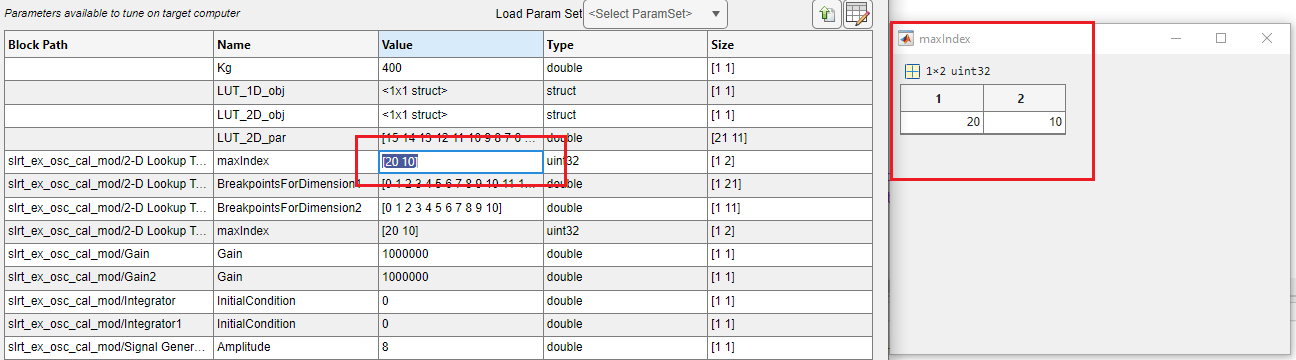
View and edit multidimensional parameters in Simulink Real-Time Explorer
Starting in R2024b, you can view and edit multidimensional parameter values in Simulink Real-Time Explorer. Click on the parameter value to open the variable editor window and change the values.
Compile and generate code for FMU blocks with FMI 3.0 standards
Starting in R2024b, Simulink Real-Time supports FMU 3.0 standards. For a model that
contains an FMU
block with FMI Version set to 3.0, you can:
Compile the model.
Generate, build, and execute code for Simulink Real-Time applications.
Functionality Being Removed or Changed
| Functionality | What Happens When You Use This Functionality? | Use This Functionality Instead | Compatibility Considerations |
|---|---|---|---|
Previous to R2024b, the | Can optionally overwrite existing parameter set without generating an error. | N/A | N/A |
In R2024b, the | Can reload data from bus data inputs for root Inport blocks. | N/A | N/A |