R2024a

New Features, Compatibility Considerations

 VTOL UAV Controller Template: Deployment to PX4 hardware

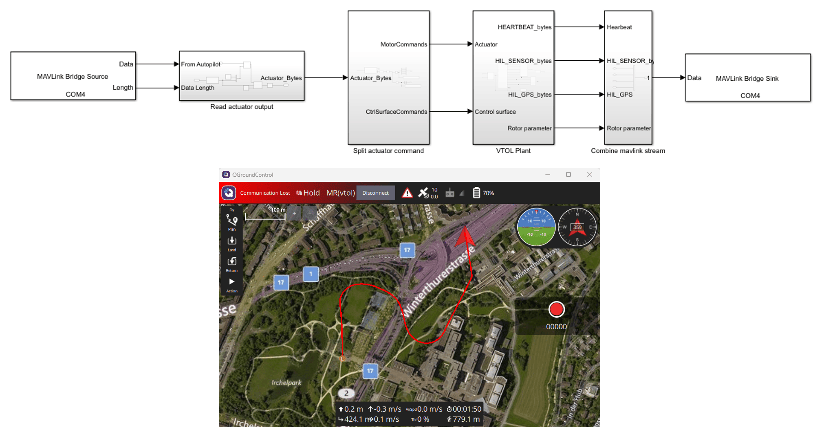
You can now deploy the VTOL UAV controller template to PX4 hardware for Hardware-in-the-Loop (HITL) simulation. For more information, see PX4 Hardware-in-the-Loop (HITL) Simulation and Visualization with VTOLHITL simulation and model
 UAV Scenario: Simulate wind effect on UAV platforms

You can now model wind effects in a UAV scenario by creating uavWindSteady, uavWindGust, or uavWindTurbulence objects, then adding the wind object to the UAV platform using addWind function. Obtain the wind velocity in the UAV platform body frame by using the windVelocity function while scenario simulation is running. Generating wind samples for UAV platform in MATLAB® requires an Aerospace Toolbox license. Generating wind samples for a UAV platform in Simulink® requires an Aerospace Blockset™ license.
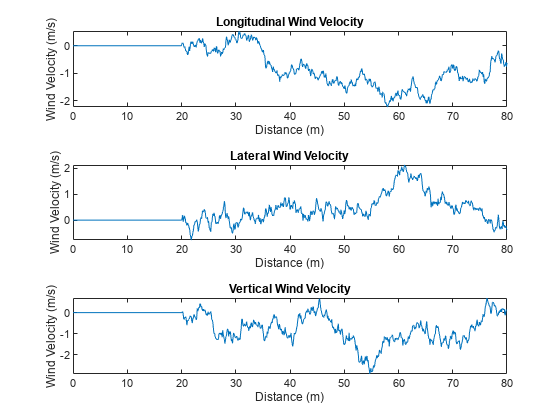
Sample wind in UAV scenario

ArduPilot Log Support: Read ArduPilot logs into Flight Log Analyzer app and MATLAB

The Flight Log Analyzer app now enables you to import ArduPilot® dataflash log files (.bin). On the app toolstrip, select Import > From BIN to load an ArduPilot log file. You can also read ArduPilot log files into MATLAB by using the ardupilotreader object.

Flight Log Analyzer App: Visualize trajectory and UAV attitude on 3D map

You can now use the Flight Log Analyzer app to visualize the flight trajectory and attitude of a UAV in 3D by enabling 3D Map from the app toolstrip. The 3D map requires a Mapping Toolbox™ license.
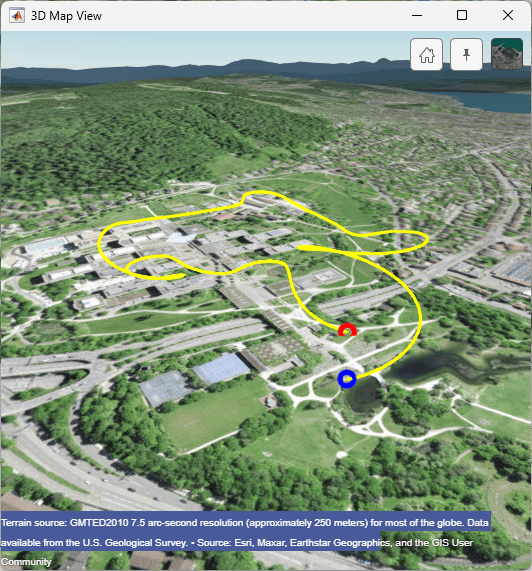
Flight log analyzer app showing the 3D map

 PX4 Autopilots: Support for PX4 Autopilot Firmware v1.14

UAV Toolbox Support Package for PX4® Autopilots now supports PX4 Autopilot Firmware v1.14 for both Ubuntu 18.04 and Windows platforms. The support package supported v1.12.3 until R2023b.

 PX4 Autopilots: Support for PX4 Cube Orange Plus and Pixhawk 6c autopilot

You can now use UAV Toolbox Support Package for PX4 Autopilots to generate code for the Cube Orange Plus and Pixhawk® 6c autopilots.

To generate the code, in the Configuration Parameters dialog box, select Hardware Implementation, and under Hardware board select PX4 Cube Orange+ or PX4 6c.

PX4 Autopilots: CAN Transmit and CAN Receive blocks to support STM32H7-based autopilots

The CAN Transmit and CAN Receive blocks from UAV Toolbox Support Package for PX4 Autopilots now support transmitting and receiving messages through the CAN port on STM32H7 microcontroller-based autopilots such as Cube Orange, Cube Orange Plus, Pixhawk 6x, and Pixhawk 6c.

PX4 Autopilots: Support package documentation moved into UAV Toolbox documentation

Starting in R2024a, the UAV Toolbox Support Package for PX4 Autopilots documentation is included in the UAV Toolbox product documentation and all support package updates are announced in the UAV Toolbox release notes. In previous releases, the support package documentation installed with the support package software. To access the archived release notes from previous support package releases, see PX4 Autopilots R2023b Release Notes.

Simulation 3D Scene Configuration Block: Use additional weather configurations to simulate adverse weather conditions

Starting in R2024a, you can configure the Simulation 3D Scene Configuration block to design enhanced weather scenarios within a 3D visualization environment. Additional weather configurations include:

  • Sun position based on geolocation

  • Snowfall conditions

  • Volumetric cloud parameters

  • Raindrop interaction on camera sensors

 3D Visualization: Simulating models in 3D environment requires Simulink 3D Animation

Starting in R2024a, simulating models with these Simulation 3D blocks requires Simulink 3D Animation™. The blocks allow Simulink software to integrate with Unreal Engine® so that you can interrogate the world around the vehicle for virtually testing perception, control, and planning algorithms.

 Compatibility Considerations

Simulating models and interfacing with Unreal Engine in the 3D environment requires Simulink 3D Animation.

  Unreal Engine Simulation Upgrade: Run 3D simulations using Unreal Engine 5.1

The 3D visualization engine that comes installed with UAV Toolbox has been updated to Unreal Engine 5.1. Previously, the toolbox used Unreal Engine 4.27.

For information about using Unreal Engine to create custom scenes, see Customize Unreal Engine Scenes for UAVs and Unreal Engine Simulation Environment Requirements and Limitations.

 Compatibility Considerations

If your Simulink model uses an Unreal Engine executable or project developed using a prior release of the UAV Toolbox Interface for Unreal Engine Projects support package, the simulation may return an error. To migrate the project so that it is compatible with the R2024a version of the support package, see Migrate Projects Developed Using Prior Support Packages.

Unreal Engine Simulation Upgrade: Run 3D simulations on Linux platforms

The 3D visualization engine that comes installed with UAV Toolbox has been updated to run on Linux® platforms. Previously, the 3D visualization ran on only Windows® platforms.

For more information, see Unreal Engine Simulation Environment Requirements and Limitations.

Suburban Scene Stencil ID

The Suburban scene asset now has a stencil ID that enables you to perform semantic segmentation using the Simulation 3D Camera block. For an example of semantic segmentation in a UAV simulation, see Depth and Semantic Segmentation Visualization Using Unreal Engine Simulation.
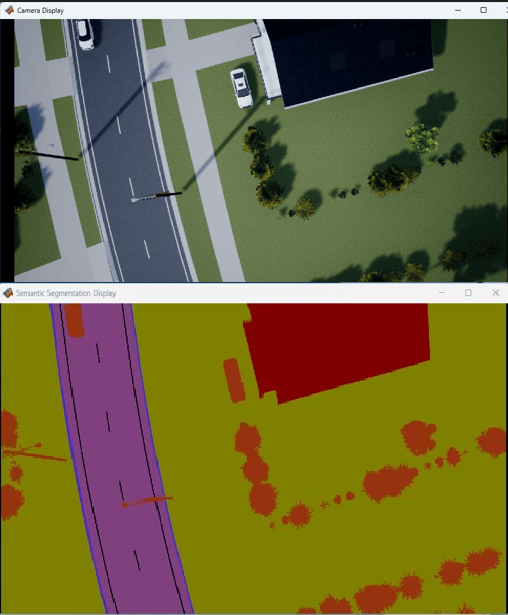
Semantic segmentation in suburban scene

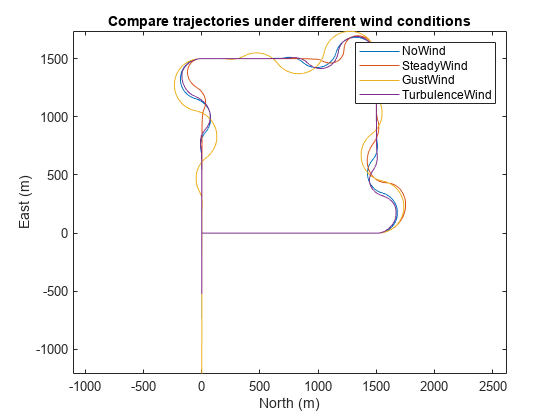
New Example: Simulate UAV Waypoint Following with Different Wind Conditions

This release contains a new example on how to simulate a UAV Scenario with different wind conditions. For more information, visit Simulate UAV Waypoint Following with Different Wind Conditions Trajectories under different wind conditions
Example Update: Simulate Safe Landing of UAV in Unexplored Environment Using Unreal Engine

The Simulate Safe Landing of UAV in Unexplored Environment Using Unreal Engine example has been updated to provide more information on the Stateflow chart, 3D lidar sensor, and the plant and controller model used in the example.