I'm curious how the community uses the hold command when creating charts and graphics in MATLAB. In short, hold on sets up the axes to add new objects to the axes while hold off sets up the axes to reset when new objects are added.
When you use hold on do you always follow up with hold off? What's your reasoning on this decision?
Can't wait to discuss this here! I'd love to hear from newbies and experts alike!
22 Comments
Time Descending
Late to the conversation, but... In my 20 years of using Matlab almost daily for work, I don't think I have ever issued a hold off! My figures are an artist's canvas, not a whiteboard. :-) I build my plots, often with lots of different axes (almost always with hold state one, so I can incrementally add graphic elements), then close the figure when I'm done. I also work a lot with map axes, whose hold state is on by default. It has never ocurred to me to change the hold state back once I've turned it on.

"My figures are an artist's canvas, not a whiteboard" - Kelly Kearney.
I'll remember this one! Love it.

I created the holdon class attached. It does the same thing as hold on but instead of hold off, you can use its restore() method to revert the axis back to whatever the hold state was initially.
plot(1:5);
h=holdon();
plot(10:15);
h.restore();
I've used something similar to these lines below to achieve similar results.
ax is the axes handle. When the variable holdCleanup is cleared, the original hold state will be reverted.
originalHoldState = string(matlab.lang.OnOffSwitchState(ishold(ax)));
holdCleanup = onCleanup(@()hold(ax,originalHoldState));
or in earlier releases prior to strings and enums,
holdOpts = {'off','on'};
originalHoldState = holdOpts{ishold(ax)+1};
holdCleanup = onCleanup(@()hold(ax,originalHoldState));

I looked up the documentation page for hold and thought the following might be of interest:
- hold all is the same as hold on, but will eventually be removed. Does anyone use that?
- hold can be used by itself to toggle its status on and off. This seems like it could lead to ambiguity, for example, when multiple functions operate on the same axes.
- Which is why there is an ishold() function to check the hold status. But, why not explicitly state its status each time?
- hold can be toggled for multiple axes at once. I always operate on one at a time.
By the way, the documentation page for ishold() might be the shortest one I have ever seen. I wonder if someone could write a script to capture the length of all documentation articles, output a histogram of lengths, and summarize the shortest and longest pages.
Where's the heart emoji reaction?

I "hold off" the great majority of the time... but maybe not always.
Hold-blocks..., live script quirks..., non-destructive graphics..., I can barely hold my excitement with these responses so far!
I just searched MATLAB Answers for the number of threads that I've contributed to that contain "hold on" and that contain "hold off". It's a lousy metric because someone else in the thread could have used those terms and it misses things like hold(ax,'on'). But if I always use "hold off" whenever I use "hold on" the two counts would be close.
Unsurprisingly, they weren't close. 81% of the query results contained "hold on" and 19% contained "hold off".
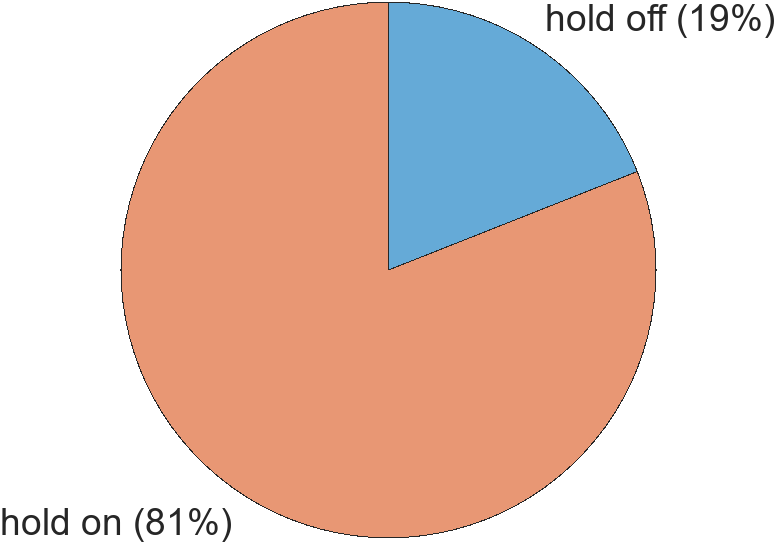
When creating a new chart like piechart (R2023b), it's important for chart authors to turn hold off to leave the chart in a state consistent with MATLAB graphics behavior.
But when working with charts, I think users develop workflows around their hold preferences. The hold-on team becomes used to calling figure or clf|cla when they want to reset the figure space so there's less of a need to turn hold off. The hold-off team expects the replacement and reset behaviors that follow the addition of new objects to the axes when hold is off.
This is my mental model but I'd love for the community to update it with more stories and preferences.
Maybe another reason I often leave hold on is because deep down inside I never feel like I'm done developing a visualization and "hold off" seems too final. When I look at my charting functions and scripts from grad school, nearly all of them have green comments at the end that start with "ToDo", even the ones that ended up in publications.

All those un-hold-offed hold-ons make me feel dirty (should there be a 10 yard holding penalty?). MATLAB karma will catch up some day. Before you can get to heaven, you'll have to say "hold on" 788 times! :-)
Do you also fopen without fclosing?

Should Adam not rather have to say "hold off" 788 times?
After all, we don't want to risk a sign mistake on his way to heaven!
Thanks for the correction Harald. I got so worked up I flipped the polarity!
Ha! ALWAYS fclose! In fact, the line that immediately follows any of my fopen commands is cleanFID=onCleanup(@()fclose(fid)); so that the files are closed even in cases of errors or early exits!
I don't view hold on-off as blocks but I love hearing this perspective. Instead, my workflow when working with charts is to create a new figure or call clf when I want to start something new instead of relying on the hold state.

I almost always just leave hold on. I often want to add things to the plot at other places in the function and don't want to worry about the state (like scroll up and see if I turned it off or not). So I just leave it on. When I know that I want to start with a totally new, blank graph/axes, then I activate that axes with the axes() function and then call hold off and cla. Not sure if that's redundant or not. Does, or should, cla automatically do a hold off? I have no idea so I just do both.

Since hold sets the AddNext property, hold off after cla will only be necesary if the default state was changed. I doubt that happens a lot.
ax = axes();
ax.NextPlot
hold(ax, 'on')
ax.NextPlot
cla(ax)
ax.NextPlot
You will see that after the cla() that NextPlot is still 'add' -- NextPlot is not one of the properties affected by cla() (at least not if the reset option is not given)
I have often seen hold off not used. But, like Mike, I always try to include the hold off. Otherwise, it seems imbalanced.
I am curious to know if there are cases where not using hold off causes problems, degrades performance, etc. Is it purely a matter of style?

I've gotten into a mess with hold on in live scripts!
I have found that Live Scripts sometimes exhibit quirky behavior compared to regular scripts.
I am curious if thoses messes would have also occurred in regular .m files.
I treat them like brackets in that I'll often do this
plot(x,y)
hold on
hold off
and then put my additional commands inside the um...what could you call it...hold block?
That's my practice too. But if I'm, er... holding onto the code for a long time, I eventually find this ugly and so I replace the hold block with non-destructive graphics commands. Just a matter of taste.
plot(x,y)
line( ... )
line( ... )
I like that practice. But, it begs the question. Can all graphics be plotted in this manner? Can we hold on to such hope?
Or should we hold off for the day that it becomes possible to do this ?
Sign in to participate

