inOutStatus
(Not recommended) Status of triangles in 2-D constrained Delaunay triangulation
inOutStatus(DelaunayTri) is not recommended. Use isInterior(delaunayTriangulation) instead.
DelaunayTri is not recommended. Use delaunayTriangulation instead.
Syntax
Description
IN = inOutStatus( returns the in/out status
of the triangles in a 2-D constrained Delaunay triangulation of a geometric domain. The
DT)i'th triangle in the triangulation is classified as inside the domain
if IN(i) = 1 and outside otherwise.
Note
inOutStatus is only relevant for 2-D constrained
Delaunay triangulations where the imposed edge constraints bound a closed geometric
domain.
Examples
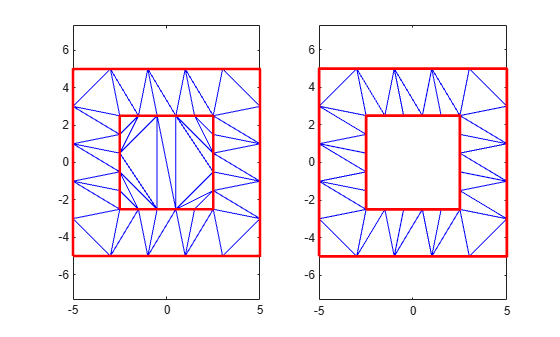
Create a geometric domain that consists of a square with a square hole.
outerprofile = [-5 -5; -3 -5; -1 -5; 1 -5; 3 -5; ...
 5 -5; 5 -3; 5 -1; 5 1; 5 3;...
 5 5; 3 5; 1 5; -1 5; -3 5; ...
 -5 5; -5 3; -5 1; -5 -1; -5 -3; ];
innerprofile = outerprofile.*0.5;
profile = [outerprofile; innerprofile];
outercons = [(1:19)' (2:20)'; 20 1;];
innercons = [(21:39)' (22:40)'; 40 21];
edgeconstraints = [outercons; innercons];
Create a constrained Delaunay triangulation of the domain.
dt = DelaunayTri(profile,edgeconstraints);
Create two plots: one showing the interior and exterior triangles with respect to the domain, and one that uses inOutStatus to plot the interior triangles only.
subplot(1,2,1)
triplot(dt)
hold on
plot(dt.X(outercons',1),dt.X(outercons',2),...
     '-r','LineWidth',2)
plot(dt.X(innercons',1),dt.X(innercons',2),...
     '-r','LineWidth',2)
axis equal
hold off
subplot(1,2,2)
inside = inOutStatus(dt);
triplot(dt(inside,:),dt.X(:,1),dt.X(:,2))
hold on
plot(dt.X(outercons',1),dt.X(outercons',2),...
     '-r','LineWidth',2)
plot(dt.X(innercons',1),dt.X(innercons',2),...
     '-r','LineWidth',2);
axis equal
hold off
Input Arguments
Tips
inOutStatuscan produce incorrect or inconsistent results when boundary constraints intersect or overlap. To avoid this behavior, use constraints that form one or multiple closed boundaries that do not intersect or overlap. When boundary constraints are nested without intersections or overlaps, the inside or outside status alternates across the boundaries.
Version History
Introduced in R2009a

