fgets
R2026bRead line from file, keeping newline characters
Description
Examples
Read a single line from a file, first excluding newline characters, and then including them. Use the following file.
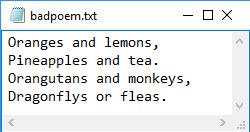
To read the first line from the file badpoem.txt, use fopen to open the file. Then read the first line using fgetl, which excludes the newline character.
fid = fopen('badpoem.txt');
line_ex = fgetl(fid)  % read line excluding newline character
line_ex =
'Oranges and lemons,'
To reread the same line from the file, first reset the read position indicator back to the beginning of the file.
frewind(fid);
Use the fgets function to read the first line from the file badpoem.txt, which reads the line including the newline character.
line_in = fgets(fid) % read line including newline characterline_in =
'Oranges and lemons,
'
Compare the output by examining the lengths of the lines returned by the fgetl and fgets functions.
length(line_ex)
ans = 19
length(line_in)
ans = 20
fgetl returns an output that displays in one line, while fgets returns an output that includes the newline character and, therefore, displays it in two lines.
line_ex
line_ex = 'Oranges and lemons,'
line_in
line_in =
    'Oranges and lemons,
     '
Close the file.
fclose(fid);
Input Arguments
Output Arguments
Tips
tlinedoes not include any characters after the newline characters or the end-of-file marker.fgetsreads characters using the encoding scheme associated with the file. To specify the encoding scheme, usefopen.To read lines from a file while removing newline characters, use
fgetl.

