fminbnd
R2026bSolve single-variable local minimization problem on a fixed interval
Syntax
Description
fminbnd is a one-dimensional minimizer that finds the
location of a local minimum for a problem specified by
x, x1, and x2 are finite scalars, and f(x) is a function that returns a scalar.
If multiple local minima exist on the interval (x1,x2),
fminbnd returns only one, which is not guaranteed to be the
global minimum. For details, see Local vs. Global Minimum.
Examples
Find the point where the function takes its minimum in the range .
fun = @sin;
x1 = 0;
x2 = 2*pi;
x = fminbnd(fun,x1,x2)
x =
4.7124
To display precision, this is the same as the correct value .
3*pi/2
ans =
4.7124
Minimize a function that is specified by a separate function file. A function accepts a point x and returns a real scalar representing the value of the objective function at x.
Write the following function as a file, and save the file as scalarobjective.m on your MATLAB® path.
function f = scalarobjective(x)
f = 0;
for k = -10:10
    f = f + (k+1)^2*cos(k*x)*exp(-k^2/2);
end
Find the x that minimizes scalarobjective on the interval 1 <= x <= 3.
x = fminbnd(@scalarobjective,1,3)
x =

    2.0061
Minimize a function when there is an extra parameter. The function has a minimum that depends on the value of the parameter . Create an anonymous function of that includes the value of the parameter . Minimize this function over the interval .
a = 9/7;
fun = @(x)sin(x-a);
x = fminbnd(fun,1,2*pi)
x =
5.9981
This answer is correct; the theoretical value is
3*pi/2 + 9/7
ans =
5.9981
For more information about including extra parameters, see Parameterizing Functions.
Monitor the steps fminbnd takes to minimize the function for .
fun = @sin;
x1 = 0;
x2 = 2*pi;
options = optimset(Display="iter");
x = fminbnd(fun,x1,x2,options)
 Func-count     x          f(x)         Procedure
    1        2.39996      0.67549        initial
    2        3.88322     -0.67549        golden
    3        4.79993    -0.996171        golden
    4        5.08984    -0.929607        parabolic
    5        4.70582    -0.999978        parabolic
    6         4.7118           -1        parabolic
    7        4.71239           -1        parabolic
    8        4.71236           -1        parabolic
    9        4.71242           -1        parabolic

Optimization terminated:
 the current x satisfies the termination criteria using OPTIONS.TolX of 1.000000e-04
x =
4.7124
Find the location of the minimum of and the value of the minimum for .
fun = @sin;
[x,fval] = fminbnd(fun,1,2*pi)
x =
4.7124
fval =
-1.0000
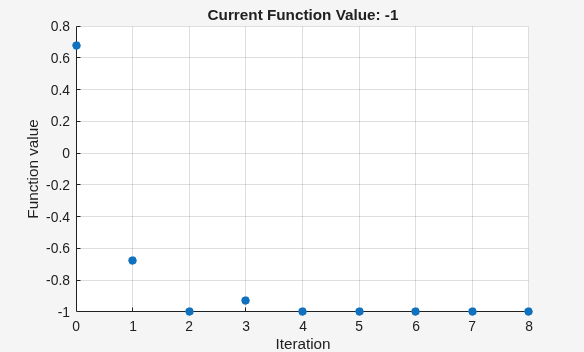
Return all information about the fminbnd solution process by requesting all outputs. Also, monitor the solution process using a plot function.
fun = @sin;
x1 = 0;
x2 = 2*pi;
options = optimset(PlotFcns=@optimplotfval);
[x,fval,exitflag,output] = fminbnd(fun,x1,x2,options)
x =
4.7124
fval =
-1.0000
exitflag =
1
output = struct with fields:
    iterations: 8
     funcCount: 9
     algorithm: 'golden section search, parabolic interpolation'
       message: 'Optimization terminated:↵ the current x satisfies the termination criteria using OPTIONS.TolX of 1.000000e-04 ↵'
Input Arguments
Output Arguments
Limitations
The function to be minimized must be continuous.
fminbndmight only give local solutions.fminbndcan exhibit slow convergence when the solution is on a boundary of the interval.
More About
In general, optimization solvers return a local minimum (or optimum). The result might be a global minimum (or optimum), but might not.
A local minimum of a function is a point where the function value is smaller than at nearby points, but possibly greater than at a distant point.
A global minimum is a point where the function value is smaller than at all other feasible points.

MATLAB and Optimization Toolbox™ optimization solvers typically return a local minimum. Global Optimization Toolbox solvers can search for a global minimum, but do not guarantee that their solutions are global. For an example of global search, see Find Global or Multiple Local Minima (Global Optimization Toolbox).
Algorithms
fminbnd is a function file. The algorithm
is based on golden section search and parabolic interpolation. Unless
the left endpoint x1 is
very close to the right endpoint x2, fminbnd never
evaluates fun at the endpoints, so fun need
only be defined for x in the interval x1 < x < x2.
If the minimum actually occurs at x1 or x2, fminbnd returns
a point x in the interior of the interval (x1,x2)
that is close to the minimizer. In this case, the distance of x from
the minimizer is no more than 2*(TolX + 3*abs(x)*sqrt(eps)). See [1] or [2] for details
about the algorithm.
Alternative Functionality
App
The Optimize Live Editor task provides a visual interface for
fminbnd.
References
[1] Forsythe, G. E., M. A. Malcolm, and C. B. Moler. Computer Methods for Mathematical Computations. Englewood Cliffs, NJ: Prentice Hall, 1976.
[2] Brent, Richard. P. Algorithms for Minimization without Derivatives. Englewood Cliffs, NJ: Prentice-Hall, 1973.
Extended Capabilities
Version History
Introduced before R2006a

