hgtransform
Transform graphics objects
Description
h = hgtransform creates a Transform object
in the current axes. If no axes exist, then hgtransform creates
new axes. Use h to query and set properties of the
Transform object after creating it. For a list of properties,
see Transform Properties.
You can use a Transform object as a container for transforming a
group of graphics objects without having to modify the coordinate data of each
object. Group objects by parenting them to a single Transform
object, and then and perform transformations, such as
translations, scaling, and rotations, on the Transform object to
modify the child objects as a group.
h = hgtransform( sets
properties of the Name,Value)Transform object using one or more name-value
arguments. For example, hgtransform(Matrix=M) creates a
Transform object with transform matrix M in
the current axes. For a list of properties, see Transform Properties.
Examples
Rotate a group of objects around the z-axis. Create a 3-D star composed of Surface objects. Then, group the objects by parenting them to a Transform object, and apply the transformation to all the objects together.
Start by creating the axes and adjusting the view. Display grid lines and label the axes.
ax = axes("XLim",[-1.5 1.5],"YLim",[-1.5 1.5],"ZLim",[-1.5 1.5]);
view(3)
grid on
xlabel(ax,"x-axis");
ylabel(ax,"y-axis");
zlabel(ax,"z-axis");
Plot a 3-D star composed of multiple Surface objects. Because the surfaces represent a single shape, store them in an array, s.
[x,y,z] = cylinder([0.2 0]);
s(1) = surface(x,y,z,FaceColor="red");
s(2) = surface(x,y,-z,FaceColor="green");
s(3) = surface(z,x,y,FaceColor="blue");
s(4) = surface(-z,x,y,FaceColor="cyan");
s(5) = surface(y,z,x,FaceColor="magenta");
s(6) = surface(y,-z,x,FaceColor="yellow");
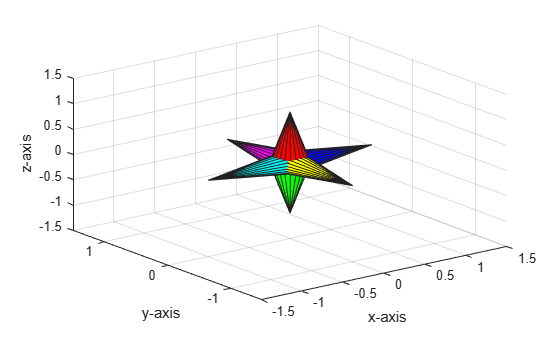
To group the graphics objects for transformation, create a Transform object and parent the Surface objects to it.
h = hgtransform;
set(s,"Parent",h)
Create a rotation matrix to rotate the group of surfaces pi radians around the z-axis. Then, apply the rotation matrix by setting the Matrix property of the Transform object h. The surfaces parented to h rotate pi radians around the z-axis.
R = makehgtform("zrotate",pi);
h.Matrix = R;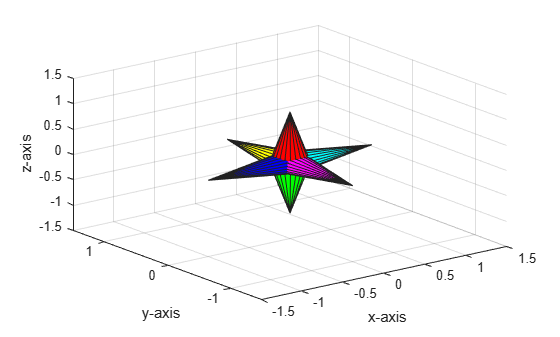
You can transform different objects within the same axes independently.
Start by creating the axes and adjusting the view. Display grid lines and label the axes.
ax = axes("XLim",[-3 1],"YLim",[-3 1],"ZLim",[-3 1]);
view(3)
grid on
xlabel(ax,"x-axis");
ylabel(ax,"y-axis");
zlabel(ax,"z-axis");
Create two spheres.
[x,y,z] = sphere;
s1 = surface(x,y,z);
s2 = surface(x,y,z);
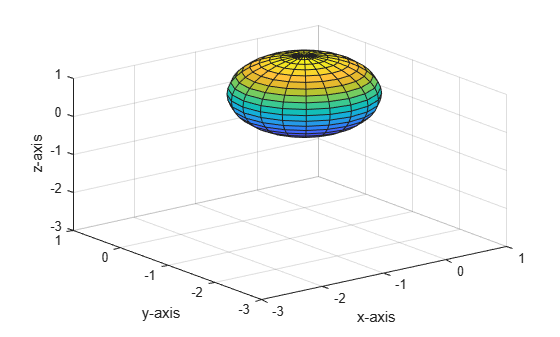
Create two Transform objects in the specified axes.
h1 = hgtransform(ax);
h2 = hgtransform(ax);
Parent one sphere to h1, and parent the other sphere to h2.
s1.Parent = h1;
s2.Parent = h2;
Create a translation matrix to translate the second sphere away from the first sphere. Then, apply the translation matrix by setting the Matrix property of the Transform object h2.
Txy = makehgtform("translate",[-1.5 -1.5 0]);
h2.Matrix = Txy;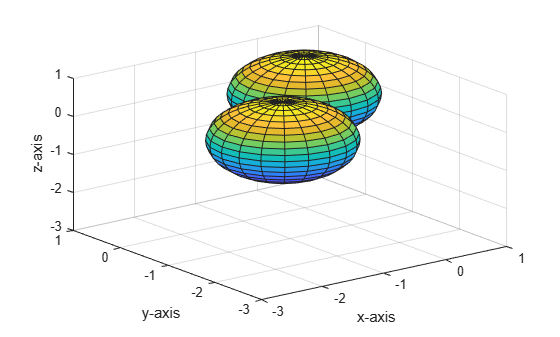
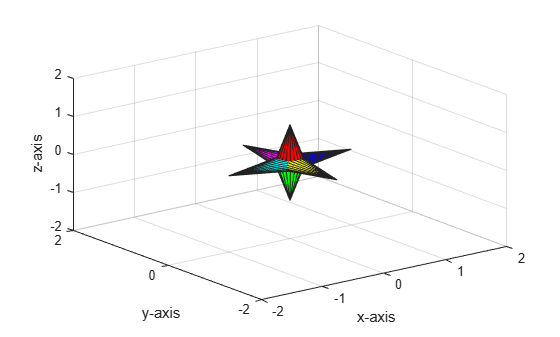
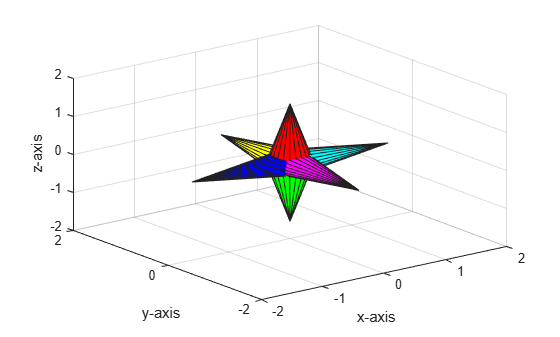
Animate a scaling and rotation transformation.Create a combined transform matrix composed of a scaling matrix that scales an object by 2 and a rotation matrix that rotates the object around the z-axis. Apply the transformation to the object, and display the animated effect of the scaling and rotation by incrementing the scale factor and angle of rotation in a loop.
Start by creating the axes and adjusting the view. Display grid lines and label the axes.
ax = axes("XLim",[-2 2],"YLim",[-2 2],"ZLim",[-2 2]);
view(3)
grid on
xlabel(ax,"x-axis");
ylabel(ax,"y-axis");
zlabel(ax,"z-axis");
Plot a 3-D star composed of multiple Surface objects. Because the surfaces represent a single shape, store them in a single array, s.
[x,y,z] = cylinder([0.2 0]);
s(1) = surface(x,y,z,FaceColor="red");
s(2) = surface(x,y,-z,FaceColor="green");
s(3) = surface(z,x,y,FaceColor="blue");
s(4) = surface(-z,x,y,FaceColor="cyan");
s(5) = surface(y,z,x,FaceColor="magenta");
s(6) = surface(y,-z,x,FaceColor="yellow");
To group the graphics objects for transformation, create a Transform object and parent the Surface objects to it.
h = hgtransform;
set(s,"Parent",h)
Create an animation that scales and rotates the group of surfaces at the same time. Define the scaling and rotation matrices, and multiply them to apply both transformations at the same time. Set the Matrix property of the transform to this combined transform matrix, and draw the 3-D star at each iteration of the loop.
for r = 1:.1:pi
    Rz = makehgtform("zrotate",r);
    Sxy = makehgtform("scale",r/2);
    h.Matrix = Rz*Sxy;
    drawnow
    pause(0.1)
end
Input Arguments
Name-Value Arguments
Limitations
A
Transformobject can be the parent to any number of graphics objects, but it can contain only objects from the same axes.
Tips
Many plotting functions clear the axes (remove axes children) before drawing the graph. Clearing the axes also deletes any
Transformobjects in the axes. For example, if you create aTransformobject and then useplot, theTransformobject is deleted.h = hgtransform; p = plot(1:10); h.Matrix;
Invalid or deleted object.
You can return the child objects of a
Transformobject to their original orientation, position, and size by setting the transform matrix to the identity matrix. For example, return the child objects of transformtto their original state after applying the transform matrixM.Transform operations are defined in absolute terms rather than relative to the current transform, so the identity matrix resets all previous transformations. For more information on the identity matrix, see thet = hgtransform(Matrix=M); ... t.Matrix = eye(4);eyefunction.You can parent a
Textobject to aTransformobject, but scaling and rotating transform has no effect on the text. To change the font size and orientation of the text, instead set text properties, such asTextSizeandRotation. For more information, see Text Properties.You can parent a
Lightobject to aTransformobject, but the transformations do not affect the position of the light. To modify the position and orientation of a light source, instead set thePositionproperty of theLightobject. For more information, see Light Properties.
Version History
Introduced before R2006a

