importdata
R2026bLoad data from file
Syntax
Description
A = importdata(___,delimiterIn)delimiterIn as the column separator
in ASCII file, filename, or the clipboard data.
You can use delimiterIn with any of the input arguments
in the above syntaxes.
A = importdata(___,delimiterIn,headerlinesIn)filename, or the clipboard,
reading numeric data starting from line headerlinesIn+1.
[ additionally returns the
detected delimiter character for the input ASCII file in A,delimiterOut,headerlinesOut]
= importdata(___)delimiterOut and
the detected number of header lines in headerlinesOut,
using any of the input arguments in the previous syntaxes.
Examples
Import and display the sample image, ngc6543a.jpg.
A = importdata('ngc6543a.jpg');
image(A)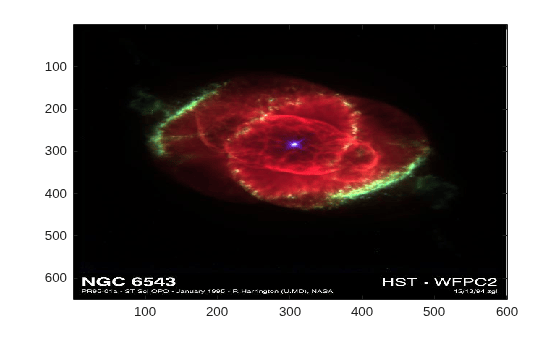
The output, A, is class uint8 because the helper function, imread, returns empty results for colormap and alpha.
Using a text editor, create a space-delimited ASCII file
with column headers called myfile01.txt.
Day1  Day2  Day3  Day4  Day5  Day6  Day7
95.01 76.21 61.54 40.57  5.79 20.28  1.53
23.11 45.65 79.19 93.55 35.29 19.87 74.68
60.68  1.85 92.18 91.69 81.32 60.38 44.51
48.60 82.14 73.82 41.03  0.99 27.22 93.18
89.13 44.47 17.63 89.36 13.89 19.88 46.60
Import the file, specifying the space delimiter and the single column header.
filename = 'myfile01.txt';
delimiterIn = ' ';
headerlinesIn = 1;
A = importdata(filename,delimiterIn,headerlinesIn);
View columns 3 and 5.
for k = [3, 5]
   disp(A.colheaders{1, k})
   disp(A.data(:, k))
   disp(' ')
end
Day3
   61.5400
   79.1900
   92.1800
   73.8200
   17.6300


Day5
    5.7900
   35.2900
   81.3200
    0.9900
13.8900Using a text editor, create a comma-delimited ASCII file
called myfile02.txt.
1,2,3
4,5,6
7,8,9
Import the file, and display the output data and detected delimiter character.
filename = 'myfile02.txt';
[A,delimiterOut]=importdata(filename)
A =

     1     2     3
     4     5     6
     7     8     9


delimiterOut =

,Copy the following lines to the clipboard. Select the text, right-click, and then select Copy.
1,2,3
4,5,6
7,8,9
Import the clipboard data into MATLAB® by typing the following.
A = importdata('-pastespecial')A =
1 2 3
4 5 6
7 8 9
Input Arguments
Output Arguments
Tips
To import ASCII files with nonnumeric characters outside of column or row headers, including columns of character data or formatted dates or times, use
readtableinstead ofimportdata.
Version History
Introduced before R2006a

