scatter3
3-D scatter plot

Syntax
Description
Vector and Matrix Data
scatter3(___,
fills in the markers, using any of the input argument combinations in the
previous syntaxes. The markers do not appear if you use this option with markers
that do not have faces ('filled')"+", "*",
".", "x", "_", or
"|").
scatter3(___,
specifies the marker type.markertype)
Table Data
scatter3(
plots the variables tbl,xvar,yvar,zvar)xvar, yvar, and
zvar from the table tbl. To plot one
data set, specify one variable each for xvar,
yvar, and zvar. To plot multiple data
sets, specify multiple variables for at least one of those arguments. The
arguments that specify multiple variables must specify the same number of
variables. (since R2021b)
Additional Options
scatter3( plots
into the axes specified by ax,___)ax instead of into the current
axes (gca). The ax option can precede any
of the input argument combinations in the previous syntaxes.
scatter3(___,
modifies the scatter plot using one or more name-value arguments to set
properties. For example:Name,Value)
scatter3(x,y,z,'LineWidth',2)creates a scatter plot with 2-point marker outlines.scatter3(tbl,'MyX','MyY','MyZ','ColorVariable','MyColors')creates a scatter plot from data in a table, and customizes the marker colors using data from the table.
For a full list of properties, see Scatter Properties.
Examples
Create a 3-D scatter plot. Use sphere to define vectors x, y, and z.
figure
[X,Y,Z] = sphere(16);
x = [0.5*X(:); 0.75*X(:); X(:)];
y = [0.5*Y(:); 0.75*Y(:); Y(:)];
z = [0.5*Z(:); 0.75*Z(:); Z(:)];
scatter3(x,y,z)

Use sphere to define vectors x, y, and z.
[X,Y,Z] = sphere(16);
x = [0.5*X(:); 0.75*X(:); X(:)];
y = [0.5*Y(:); 0.75*Y(:); Y(:)];
z = [0.5*Z(:); 0.75*Z(:); Z(:)];
Define vector s to specify the marker sizes.
S = repmat([100,50,5],numel(X),1);
s = S(:);
Create a 3-D scatter plot and use view to change the angle of the axes in the figure.
figure
scatter3(x,y,z,s)
view(40,35)
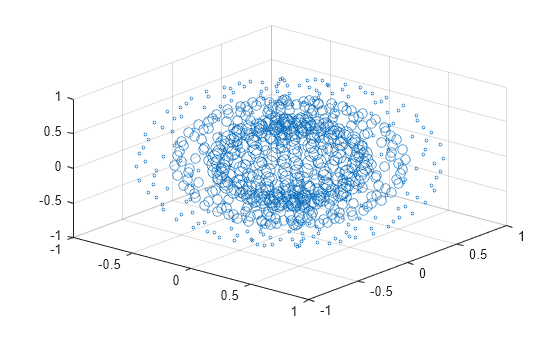
Corresponding entries in x, y, z, and s determine the location and size of each marker.
Use sphere to define vectors x, y, and z.
[X,Y,Z] = sphere(16);
x = [0.5*X(:); 0.75*X(:); X(:)];
y = [0.5*Y(:); 0.75*Y(:); Y(:)];
z = [0.5*Z(:); 0.75*Z(:); Z(:)];
Define vectors s and c to specify the size and color of each marker.
S = repmat([50,25,10],numel(X),1);
C = repmat([1,2,3],numel(X),1);
s = S(:);
c = C(:);
Create a 3-D scatter plot and use view to change the angle of the axes in the figure.
figure
scatter3(x,y,z,s,c)
view(40,35)

Corresponding entries in x, y, z, and c determine the location and color of each marker.
Create vectors x and y as cosine and sine values with random noise.
z = linspace(0,4*pi,250);
x = 2*cos(z) + rand(1,250);
y = 2*sin(z) + rand(1,250);
Create a 3-D scatter plot and fill in the markers. Use view to change the angle of the axes in the figure.
scatter3(x,y,z,'filled')
view(-30,10)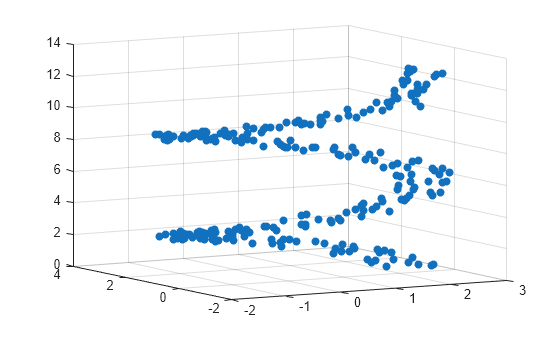
Initialize the random-number generator to make the output of rand repeatable. Define vectors x and y as cosine and sine values with random noise.
rng default
z = linspace(0,4*pi,250);
x = 2*cos(z) + rand(1,250);
y = 2*sin(z) + rand(1,250);
Create a 3-D scatter plot and set the marker type. Use view to change the angle of the axes in the figure.
figure
scatter3(x,y,z,'*')
view(-30,10)
Initialize the random-number generator to make the output of rand repeatable. Define vectors x and y as cosine and sine values with random noise.
rng default
z = linspace(0,4*pi,250);
x = 2*cos(z) + rand(1,250);
y = 2*sin(z) + rand(1,250);
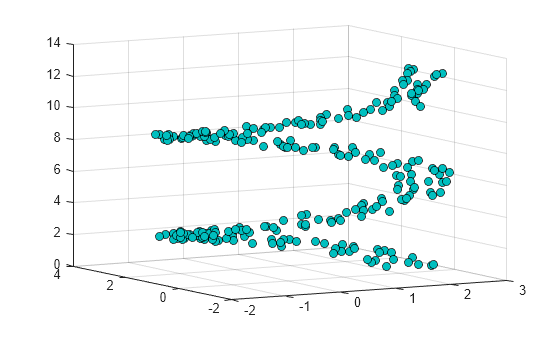
Create a 3-D scatter plot and set the marker edge color and the marker face color. Use view to change the angle of the axes in the figure.
figure
scatter3(x,y,z,...
        'MarkerEdgeColor','k',...
        'MarkerFaceColor',[0 .75 .75])
view(-30,10)
Since R2021b
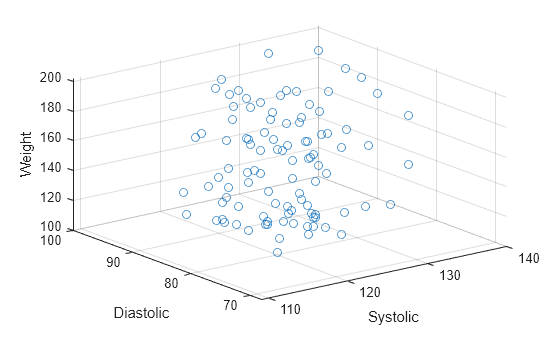
A convenient way to plot data from a table is to pass the table to the scatter3 function and specify the variables you want to plot. For example, read patients.xls as a table tbl. Plot the relationship between the Systolic, Diastolic, and Weight variables by passing tbl as the first argument to the scatter3 function followed by the variable names. By default, the axis labels match the variable names.
tbl = readtable('patients.xls');
scatter3(tbl,'Systolic','Diastolic','Weight');
You can also plot multiple variables at the same time. For example, plot both blood pressure variables on the x-axis by specifying the xvar argument as the cell array {'Systolic','Diastolic'}. Then add a legend. The legend labels match the variable names.
scatter3(tbl,{'Systolic','Diastolic'},'Age','Weight');
legend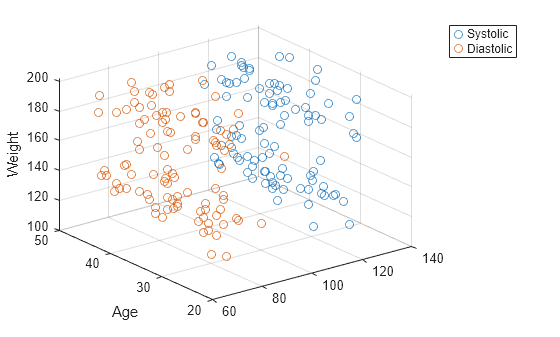
Since R2021b
One way to plot data from a table and customize the colors and marker sizes is to set the ColorVariable and SizeData properties. You can set these properties as name-value arguments when you call the scatter3 function, or you can set them on the Scatter object later.
For example, read patients.xls as a table tbl. Plot the relationship between the Systolic, Diastolic, and Weight variables with filled markers. Vary the marker colors by specifying the ColorVariable name-value argument. Return the Scatter object as s, so you can set other properties later.
tbl = readtable('patients.xls');
s = scatter3(tbl,'Systolic','Diastolic','Weight','filled', ...
    'ColorVariable','Diastolic');

Change the marker sizes to 100 points by setting the SizeData property. Then add a colorbar.
s.SizeData = 100;
colorbar

You can display a tiling of plots using the tiledlayout and nexttile functions.
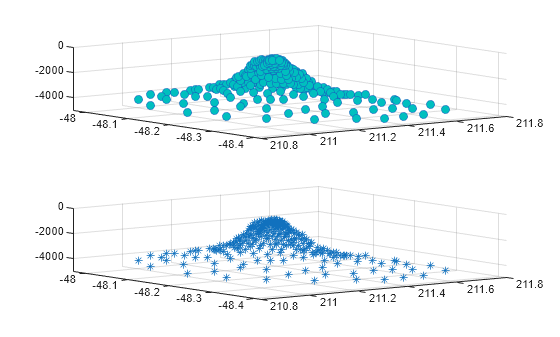
Load the seamount data set to get vectors x, y, and z. Call the tiledlayout function to create a 2-by-1 tiled chart layout. Call the nexttile function to create the axes objects ax1 and ax2. Then create separate scatter plots in the axes by specifying the axes object as the first argument to scatter3.
load seamount
tiledlayout(2,1)
ax1 = nexttile;
ax2 = nexttile;
scatter3(ax1,x,y,z,'MarkerFaceColor',[0 .75 .75])
scatter3(ax2,x,y,z,'*')
Use the sphere function to create vectors x, y, and z.
[X,Y,Z] = sphere(16);
x = [0.5*X(:); 0.75*X(:); X(:)];
y = [0.5*Y(:); 0.75*Y(:); Y(:)];
z = [0.5*Z(:); 0.75*Z(:); Z(:)];
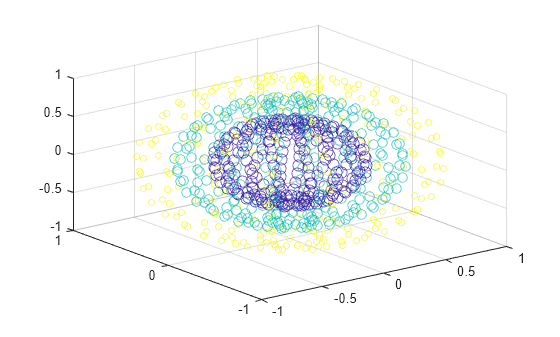
Create vectors s and c to specify the size and color for each marker.
S = repmat([70,50,20],numel(X),1);
C = repmat([1,2,3],numel(X),1);
s = S(:);
c = C(:);
Create a 3-D scatter plot and return the scatter series object.
h = scatter3(x,y,z,s,c);
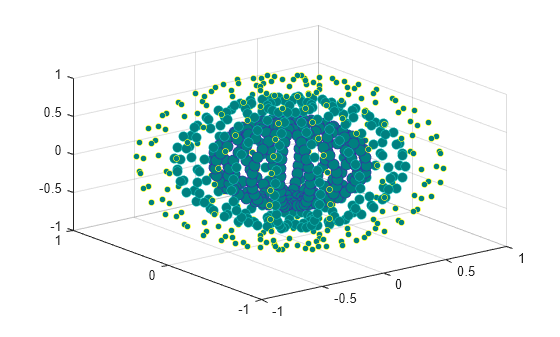
Use an RGB triplet color value to set the marker face color. Use dot notation to set properties.
h.MarkerFaceColor = [0 0.5 0.5];
Input Arguments
x-coordinates, specified as a scalar, vector, or
matrix. The size and shape of X depends on the shape of
your data. This table describes the most common situations.
| Type of Plot | How to Specify Coordinates |
|---|---|
| Single point | Specify scatter3(1,2,3) |
| One set of points | Specify X = [1 2 3 4]; Y = [5; 6; 7; 8]; Z = [9 10 11 12]; scatter3(X,Y,Z) |
| Multiple sets of points that are different colors | If all the data sets share coordinates in one or more dimensions, specify the shared coordinates as a vector and the other coordinates as matrices. The length of the vector must match one of the dimensions of the matrices. For example, plot two data sets that share the same x-coordinates. X = [1 2 3 4]; Y = [4 5 6 7; 8 9 10 11]; Z = [10 11 12 13; 14 15 16 17]; scatter3(X,Y,Z) scatter3 plots a separate set
of points for each column in the
matrices.Alternatively, specify
X = [1 3 5 6; 2 4 6 8]; Y = [10 25 45 61; 20 40 60 70]; Z = [12 5 6 8; 9 13 2 7]; scatter3(X,Y,Z) |
Data Types: single | double | int8 | int16 | int32 | int64 | uint8 | uint16 | uint32 | uint64 | categorical | datetime | duration
y-coordinates, specified as a scalar, vector, or
matrix. The size and shape of y depends on the shape of
your data. This table describes the most common situations.
| Type of Plot | How to Specify Coordinates |
|---|---|
| Single point | Specify scatter3(1,2,3) |
| One set of points | Specify X = [1 2 3 4]; Y = [5; 6; 7; 8]; Z = [9 10 11 12]; scatter3(X,Y,Z) |
| Multiple sets of points that are different colors | If all the data sets share coordinates in one or more dimensions, specify the shared coordinates as a vector and the other coordinates as matrices. The length of the vector must match one of the dimensions of the matrices. For example, plot two data sets that share the same x-coordinates. X = [1 2 3 4]; Y = [4 5 6 7; 8 9 10 11]; Z = [10 11 12 13; 14 15 16 17]; scatter3(X,Y,Z) scatter3 plots a separate set
of points for each column in the
matrices.Alternatively, specify
X = [1 3 5 6; 2 4 6 8]; Y = [10 25 45 61; 20 40 60 70]; Z = [12 5 6 8; 9 13 2 7]; scatter3(X,Y,Z) |
Data Types: single | double | int8 | int16 | int32 | int64 | uint8 | uint16 | uint32 | uint64 | categorical | datetime | duration
z-coordinates, specified as a scalar, vector, or
matrix. The size and shape of Z depends on the shape of
your data. This table describes the most common situations.
| Type of Plot | How to Specify Coordinates |
|---|---|
| Single point | Specify scatter3(1,2,3) |
| One set of points | Specify X = [1 2 3 4]; Y = [5; 6; 7; 8]; Z = [9 10 11 12]; scatter3(X,Y,Z) |
| Multiple sets of points that are different colors | If all the data sets share coordinates in one or more dimensions, specify the shared coordinates as a vector and the other coordinates as matrices. The length of the vector must match one of the dimensions of the matrices. For example, plot two data sets that share the same x-coordinates. X = [1 2 3 4]; Y = [4 5 6 7; 8 9 10 11]; Z = [10 11 12 13; 14 15 16 17]; scatter3(X,Y,Z) scatter3 plots a separate set
of points for each column in the
matrices.Alternatively, specify
X = [1 3 5 6; 2 4 6 8]; Y = [10 25 45 61; 20 40 60 70]; Z = [12 5 6 8; 9 13 2 7]; scatter3(X,Y,Z) |
Data Types: single | double | int8 | int16 | int32 | int64 | uint8 | uint16 | uint32 | uint64 | categorical | datetime | duration
Marker size, specified as a numeric scalar, vector, matrix, or empty array
([]). The size controls the area of each marker in
points squared. An empty array specifies the default size of 36 points. The
way you specify the size depends on how you specify X,
Y, and Z and how you want the plot
to look. This table describes the most common situations.
| Marker Size | X, Y, and
Z
| S | Example |
|---|---|---|---|
Same size for all points | Any valid combination of vectors or matrices
described for | Scalar | Specify X = [1 2 3 4]; Y = [5 6 7 8; 9 10 11 12]; Z = [13 14 15 16; 17 18 19 20]; scatter3(X,Y,Z,100) |
Different size for each point | Vectors of the same length |
| Specify X = [1 2 3 4]; Y = [4 5 6 7]; Z = [8 9 10 11]; S = [80 150 700 50]; scatter3(X,Y,Z,S) Specify
X = [1 2 3 4]; Y = [5 6 7 8]; Z = [9 10 11 12]; S = [80 30; 150 900; 50 500; 200 350]; scatter3(X,Y,Z,S) |
Different size for each point | At least one of |
| Specify X = [1 2 3 4]; Y = [1 6; 3 8; 2 7; 4 9]; Z = [2 8; 3 10; 4 7; 4 12]; S = [80 150 200 350]; scatter3(X,Y,Z,S) Specify
X = [1 2 3 4]; Y = [1 6; 3 8; 2 7; 4 9]; Z = [10 11; 12 13; 14 15; 16 17]; S = [80 30; 150 900; 50 2000; 200 350]; scatter3(X,Y,Z,S) |
Data Types: single | double | int8 | int16 | int32 | int64 | uint8 | uint16 | uint32 | uint64
Marker color, specified as a color name, RGB triplet, matrix of RGB triplets, or a vector of colormap indices.
Color name — A color name such as
"red", or a short name such as"r".RGB triplet — A three-element row vector whose elements specify the intensities of the red, green, and blue components of the color. The intensities must be in the range
[0,1]; for example,[0.4 0.6 0.7]. RGB triplets are useful for creating custom colors.Matrix of RGB triplets — A three-column matrix in which each row is an RGB triplet.
Vector of colormap indices — A vector of numeric values that is the same length as the
X,Y, andZvectors.
The way you specify the color depends on your preferred color scheme and whether you are plotting one set of coordinates or multiple sets of coordinates. This table describes the most common situations.
| Color Scheme | How to Specify the Color | Example |
|---|---|---|
Use one color for all the points. | Specify a color name or a short name from the table below, or specify one RGB triplet. | Plot one set of points, and specify the color
as X = [1 2 3 4];
Y = [2 5 3 6];
Z = [10 6 4 7];
S = 50;
scatter3(X,Y,Z,S,"red")Plot
two sets of points, and specify the color as red
using the RGB triplet X = [1 2 3 4]; Y = [2 5 3 6]; Z = [2 5; 1 2; 8 4; 7 9]; S = 50; scatter3(X,Y,Z,S,[1 0 0]) |
Assign different colors to each point using a colormap. | Specify a row or column vector of numbers. The numbers map into the current colormap array. The smallest value maps to the first row in the colormap, and the largest value maps to the last row. The intermediate values map linearly to the intermediate rows. If your plot has three points, specify a column vector to ensure the values are interpreted as colormap indices. You can use this method only
when | Create a vector C = [1 2 3 4];
X = [1 2 3 4];
Y = [1 0 6 2];
Z = [2 5 3 7];
S = 50;
scatter3(X,Y,Z,S,C)
colormap(gca,"winter") |
Create a custom color for each point. | Specify an m-by-3 matrix of RGB triplets, where m is the number of points in the plot. You can use this method only when
| Create a matrix C = [0 1 0; 1 0 0; 0.5 0.5 0.5; 0.6 0 1]; X = [1 2 3 4]; Y = [2 5 3 6]; Z = [10 6 4 7]; S = 50; scatter3(X,Y,Z,S,C) |
Create a different color for each data set. | Specify an n-by-3 matrix of RGB triplets, where n is the number of data sets. You can
use this method only when at least one of
| Create a matrix C = [1 0 0; 0.6 0 1]; X = [1 2 3 4]; Y = [5 6 7 8]; Z = [2 5; 1 2; 8 4; 11 9]; S = 50; scatter3(X,Y,Z,S,C) |
Color Names and RGB Triplets for Common Colors
| Color Name | Short Name | RGB Triplet | Hexadecimal Color Code | Appearance |
|---|---|---|---|---|
"red" | "r" | [1 0 0] | "#FF0000" |
|
"green" | "g" | [0 1 0] | "#00FF00" |
|
"blue" | "b" | [0 0 1] | "#0000FF" |
|
"cyan"
| "c" | [0 1 1] | "#00FFFF" |
|
"magenta" | "m" | [1 0 1] | "#FF00FF" |
|
"yellow" | "y" | [1 1 0] | "#FFFF00" |
|
"black" | "k" | [0 0 0] | "#000000" |
|
"white" | "w" | [1 1 1] | "#FFFFFF" |
|


This table lists the default color palettes for plots in the light and dark themes.
| Palette | Palette Colors |
|---|---|
Before R2025a: Most plots use these colors by default. |
|
|
|


You can get the RGB triplets and hexadecimal color codes for these palettes using the orderedcolors and rgb2hex functions. For example, get the RGB triplets for the "gem" palette and convert them to hexadecimal color codes.
RGB = orderedcolors("gem");
H = rgb2hex(RGB);
Before R2023b: Get the RGB triplets using RGB =
get(groot,"FactoryAxesColorOrder").
Before R2024a: Get the hexadecimal color codes using H =
compose("#%02X%02X%02X",round(RGB*255)).
Marker, specified as one of the markers in this table.
| Marker | Description | Resulting Marker |
|---|---|---|
"o" | Circle |
|
"+" | Plus sign |
|
"*" | Asterisk |
|
"." | Point |
|
"x" | Cross |
|
"_" | Horizontal line |
|
"|" | Vertical line |
|
"square" | Square |
|
"diamond" | Diamond |
|
"^" | Upward-pointing triangle |
|
"v" | Downward-pointing triangle |
|
">" | Right-pointing triangle |
|
"<" | Left-pointing triangle |
|
"pentagram" | Pentagram |
|
"hexagram" | Hexagram |
|
"none" | No markers | Not applicable |


Option to fill the interior of the markers, specified as
'filled'. Use this option with markers that have a
face, for example, 'o' or 'square'.
Markers without faces ("+", "*",
".", "x", "_",
and "|") do not appear in the plot when you specify this
option.
The 'filled' option sets the
MarkerFaceColor property of the Scatter object to 'flat' and
the MarkerEdgeColor property to
'none', so the marker faces draw, but the edges do
not.
Source table containing the data to plot, specified as a table or timetable.
Table variables containing the x-coordinates, specified as one or more table variable indices.
Specifying Table Indices
Use any of the following indexing schemes to specify the desired variable or variables.
| Indexing Scheme | Examples |
|---|---|
Variable names:
|
|
Variable indices:
|
|
Variable type:
|
|
Plotting Your Data
The table variables you specify can contain numeric, categorical, datetime, or duration values.
To plot one data set, specify one variable for xvar, one variable for
yvar, and one variable for zvar. For example, read
Patients.xls into the table tbl. Plot the
Height, Weight, and Diastolic
variables.
tbl = readtable("Patients.xls");
scatter3(tbl,"Height","Weight","Diastolic")
To plot multiple data sets together, specify multiple variables for at least one of
xvar, yvar, or zvar. If you
specify multiple variables for more than one argument, the number of variables must be the
same for each of those arguments.
For example, plot the Weight variable on the x-axis, the
Systolic and Diastolic variables on the
y-axis, and the Age variable on the
z-axis.
scatter3(tbl,"Weight",["Systolic","Diastolic"],"Age")
You can also use different indexing schemes for xvar,
yvar, and zvar. For example, specify
xvar as a variable name, yvar as an index number,
and zvar as a logical
vector.
scatter3(tbl,"Height",6,[false false true])Table variables containing the y-coordinates, specified as one or more table variable indices.
Specifying Table Indices
Use any of the following indexing schemes to specify the desired variable or variables.
| Indexing Scheme | Examples |
|---|---|
Variable names:
|
|
Variable indices:
|
|
Variable type:
|
|
Plotting Your Data
The table variables you specify can contain numeric, categorical, datetime, or duration values.
To plot one data set, specify one variable for xvar, one variable for
yvar, and one variable for zvar. For example, read
Patients.xls into the table tbl. Plot the
Height, Weight, and Diastolic
variables.
tbl = readtable("Patients.xls");
scatter3(tbl,"Height","Weight","Diastolic")
To plot multiple data sets together, specify multiple variables for at least one of
xvar, yvar, or zvar. If you
specify multiple variables for more than one argument, the number of variables must be the
same for each of those arguments.
For example, plot the Weight variable on the x-axis, the
Systolic and Diastolic variables on the
y-axis, and the Age variable on the
z-axis.
scatter3(tbl,"Weight",["Systolic","Diastolic"],"Age")
You can also use different indexing schemes for xvar,
yvar, and zvar. For example, specify
xvar as a variable name, yvar as an index number,
and zvar as a logical
vector.
scatter3(tbl,"Height",6,[false false true])Table variables containing the z-coordinates, specified as one or more table variable indices.
Specifying Table Indices
Use any of the following indexing schemes to specify the desired variable or variables.
| Indexing Scheme | Examples |
|---|---|
Variable names:
|
|
Variable indices:
|
|
Variable type:
|
|
Plotting Your Data
The table variables you specify can contain numeric, categorical, datetime, or duration values.
To plot one data set, specify one variable for xvar, one variable for
yvar, and one variable for zvar. For example, read
Patients.xls into the table tbl. Plot the
Height, Weight, and Diastolic
variables.
tbl = readtable("Patients.xls");
scatter3(tbl,"Height","Weight","Diastolic")
To plot multiple data sets together, specify multiple variables for at least one of
xvar, yvar, or zvar. If you
specify multiple variables for more than one argument, the number of variables must be the
same for each of those arguments.
For example, plot the Weight variable on the x-axis, the
Systolic and Diastolic variables on the
y-axis, and the Age variable on the
z-axis.
scatter3(tbl,"Weight",["Systolic","Diastolic"],"Age")
You can also use different indexing schemes for xvar,
yvar, and zvar. For example, specify
xvar as a variable name, yvar as an index number,
and zvar as a logical
vector.
scatter3(tbl,"Height",6,[false false true])Axes object. If you do not specify an axes, then scatter3 plots
into the current axes.
Name-Value Arguments
Specify optional pairs of arguments as
Name1=Value1,...,NameN=ValueN, where Name is
the argument name and Value is the corresponding value.
Name-value arguments must appear after other arguments, but the order of the
pairs does not matter.
Before R2021a, use commas to separate each name and value, and enclose
Name in quotes.
Example: 'MarkerFaceColor','red' sets the
marker face color to red.
The properties listed here are only a subset. For a complete list, see Scatter Properties.
Alternatively, you can specify some common colors by name. This table lists the named color options, the equivalent RGB triplets, and the hexadecimal color codes.
| Color Name | Short Name | RGB Triplet | Hexadecimal Color Code | Appearance |
|---|---|---|---|---|
"red" | "r" | [1 0 0] | "#FF0000" |
|
"green" | "g" | [0 1 0] | "#00FF00" |
|
"blue" | "b" | [0 0 1] | "#0000FF" |
|
"cyan"
| "c" | [0 1 1] | "#00FFFF" |
|
"magenta" | "m" | [1 0 1] | "#FF00FF" |
|
"yellow" | "y" | [1 1 0] | "#FFFF00" |
|
"black" | "k" | [0 0 0] | "#000000" |
|
"white" | "w" | [1 1 1] | "#FFFFFF" |
|
"none" | Not applicable | Not applicable | Not applicable | No color |
This table lists the default color palettes for plots in the light and dark themes.
| Palette | Palette Colors |
|---|---|
Before R2025a: Most plots use these colors by default. |
|
|
|
You can get the RGB triplets and hexadecimal color codes for these palettes using the orderedcolors and rgb2hex functions. For example, get the RGB triplets for the "gem" palette and convert them to hexadecimal color codes.
RGB = orderedcolors("gem");
H = rgb2hex(RGB);
Before R2023b: Get the RGB triplets using RGB =
get(groot,"FactoryAxesColorOrder").
Before R2024a: Get the hexadecimal color codes using H =
compose("#%02X%02X%02X",round(RGB*255)).
Example: [0.5 0.5 0.5]
Example: "blue"
Example: "#D2F9A7"
Alternatively, you can specify some common colors by name. This table lists the named color options, the equivalent RGB triplets, and the hexadecimal color codes.
| Color Name | Short Name | RGB Triplet | Hexadecimal Color Code | Appearance |
|---|---|---|---|---|
"red" | "r" | [1 0 0] | "#FF0000" |
|
"green" | "g" | [0 1 0] | "#00FF00" |
|
"blue" | "b" | [0 0 1] | "#0000FF" |
|
"cyan"
| "c" | [0 1 1] | "#00FFFF" |
|
"magenta" | "m" | [1 0 1] | "#FF00FF" |
|
"yellow" | "y" | [1 1 0] | "#FFFF00" |
|
"black" | "k" | [0 0 0] | "#000000" |
|
"white" | "w" | [1 1 1] | "#FFFFFF" |
|
"none" | Not applicable | Not applicable | Not applicable | No color |
This table lists the default color palettes for plots in the light and dark themes.
| Palette | Palette Colors |
|---|---|
Before R2025a: Most plots use these colors by default. |
|
|
|
You can get the RGB triplets and hexadecimal color codes for these palettes using the orderedcolors and rgb2hex functions. For example, get the RGB triplets for the "gem" palette and convert them to hexadecimal color codes.
RGB = orderedcolors("gem");
H = rgb2hex(RGB);
Before R2023b: Get the RGB triplets using RGB =
get(groot,"FactoryAxesColorOrder").
Before R2024a: Get the hexadecimal color codes using H =
compose("#%02X%02X%02X",round(RGB*255)).
Example: [0.3 0.2 0.1]
Example: "green"
Example: "#D2F9A7"
Table variable containing the color data, specified as a variable index into the source table.
Specifying the Table Index
Use any of the following indexing schemes to specify the desired variable.
| Indexing Scheme | Examples |
|---|---|
Variable name:
|
|
Variable index:
|
|
Variable type:
|
|
Specifying Color Data
Specifying the ColorVariable property controls the colors of the markers.
The data in the variable controls the marker fill color when the
MarkerFaceColor property is set to
"flat". The data can also control the marker outline color,
when the MarkerEdgeColor is set to
"flat".
The table variable you specify can contain values of any numeric type. The values can be in either of the following forms:
A column of numbers that linearly map into the current colormap.
A three-column array of RGB triplets. RGB triplets are three-element vectors whose values specify the intensities of the red, green, and blue components of specific colors. The intensities must be in the range
[0,1]. For example,[0.5 0.7 1]specifies a shade of light blue.
When you set the ColorVariable property, MATLAB® updates the CData property.
Output Arguments
Extended Capabilities
Version History
Introduced before R2006aWhen you pass a table and one or more variable names to the scatter3 function, the axis and legend labels now display any special characters that are included in the table variable names, such as underscores. Previously, special characters were interpreted as TeX or LaTeX characters.
For example, if you pass a table containing a variable named Sample_Number
to the scatter3 function, the underscore appears in the axis and
legend labels. In R2022a and earlier releases, the underscores are interpreted as
subscripts.
| Release | Label for Table Variable "Sample_Number" |
|---|---|
R2022b |
|
R2022a |
|


To display axis and legend labels with TeX or LaTeX formatting, specify the labels manually.
For example, after plotting, call the xlabel or
legend function with the desired label strings.
xlabel("Sample_Number")
legend(["Sample_Number" "Another_Legend_Label"])

