struct
R2026bStructure array
Description
A structure array is a data type that groups related data
using data containers called fields. Each field can contain any
type of data. Access data in a field using dot notation of the form
structName.fieldName.
Creation
When you have data to put into a new structure, create the structure using dot notation to name its fields one at a time.
s.a = 1;
s.b = {'A','B','C'}
s =
struct with fields:
a: 1
b: {'A' 'B' 'C'}Field names can contain ASCII letters (A–Z, a–z), digits (0–9), and underscores, and
must begin with a letter. The maximum length of a field name is
namelengthmax.
You also can create a structure array using the struct function,
described below. You can specify many fields simultaneously, or create a nonscalar
structure array.
Syntax
Description
s = struct creates a scalar (1-by-1) structure with
no fields.
s = struct(
creates a structure array with the specified field and value. The
field,value)value input argument can be any data type, such as a
numeric, logical, character, or cell array.
If
valueis not a cell array, or ifvalueis a scalar cell array, thensis a scalar structure. For instance,s = struct('a',[1 2 3])creates a 1-by-1 structure, wheres.a = [1 2 3].If
valueis a nonscalar cell array, thensis a structure array with the same dimensions asvalue. Each element ofscontains the corresponding element ofvalue. For example,s = struct('x',{'a','b'})returnss(1).x = 'a'ands(2).x = 'b'.If
valueis an empty cell array{}, thensis an empty (0-by-0) structure.
s = struct(field1,value1,...,fieldN,valueN) creates a
structure array with multiple fields.
If none of the
valueinputs are cell arrays, or if allvalueinputs that are cell arrays are scalars, thensis a scalar structure.If any of the
valueinputs is a nonscalar cell array, thenshas the same dimensions as that cell array. Also, if two or morevalueinputs are nonscalar cell arrays, then they all must have the same dimensions.For any
valuethat is a scalar cell array or an array of any other data type,structinserts the contents ofvaluein the relevant field for all elements ofs. For example,s = struct('x',{'a','b'},'y','c')returnss(1).x = 'a',s(2).x = 'b',s(1).y = 'c', ands(2).y = 'c'.If any
valueinput is an empty cell array,{}, then outputsis an empty (0-by-0) structure. To specify an empty field and keep the values of the other fields, use[]as avalueinput instead.
s = struct([]) creates an empty (0-by-0) structure
with no fields.
s = struct( creates a scalar
structure with field names and values that correspond to properties of
obj)obj. The struct function does not
convert obj, but rather creates s as a
new structure. This structure does not retain the class information, so
private, protected, and hidden properties become public fields in
s. The struct function issues a
warning when you use this syntax.
Input Arguments
Examples
Store related pieces of data in the fields of a structure. You can give the fields human-readable names that describe the data.
Create a structure by adding fields to it using dot notation. The fields contain x- and y-values for a sine wave, and text that describes the data.
data.x = linspace(0,2*pi);
data.y = sin(data.x);
data.title = 'y = sin(x)'
data = struct with fields:
x: [0 0.0635 0.1269 0.1904 0.2539 0.3173 0.3808 0.4443 0.5077 0.5712 0.6347 0.6981 0.7616 0.8251 0.8885 0.9520 1.0155 1.0789 1.1424 1.2059 1.2693 1.3328 1.3963 1.4597 1.5232 1.5867 1.6501 1.7136 1.7771 1.8405 1.9040 1.9675 … ] (1×100 double)
y: [0 0.0634 0.1266 0.1893 0.2511 0.3120 0.3717 0.4298 0.4862 0.5406 0.5929 0.6428 0.6901 0.7346 0.7761 0.8146 0.8497 0.8815 0.9096 0.9341 0.9549 0.9718 0.9848 0.9938 0.9989 0.9999 0.9969 0.9898 0.9788 0.9638 0.9450 0.9224 … ] (1×100 double)
title: 'y = sin(x)'
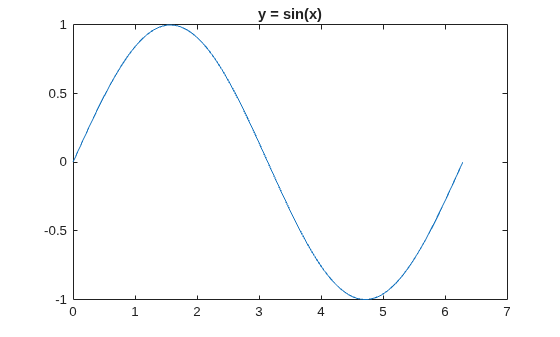
Plot the sine wave. You can refer to the arrays of x- and y-values by their field names. Then add the title.
plot(data.x,data.y)
title(data.title)
Create a nonscalar structure that contains a single field.
field = 'f';
value = {'some text';
         [10, 20, 30];
         magic(5)};
s = struct(field,value)
s = 3×1 struct array with fields:
    f
View the contents of each element.
s.f
ans =
'some text'
ans = 1×3

    10    20    30
ans = 5×5

    17    24     1     8    15
    23     5     7    14    16
     4     6    13    20    22
    10    12    19    21     3
    11    18    25     2     9
When you access a field of a nonscalar structure, such as s.f, MATLAB® returns a comma-separated list. In this case, s.f is equivalent to s(1).f, s(2).f, s(3).f.
Create a nonscalar structure that contains several fields.
field1 = 'f1';  value1 = zeros(1,10);
field2 = 'f2';  value2 = {'a', 'b'};
field3 = 'f3';  value3 = {pi, pi.^2};
field4 = 'f4';  value4 = {'fourth'};

s = struct(field1,value1,field2,value2,field3,value3,field4,value4)
s = 1×2 struct array with fields:
    f1
    f2
    f3
    f4
The cell arrays for value2 and value3 are 1-by-2, so s is also 1-by-2. Because value1 is a numeric array and not a cell array, both s(1).f1 and s(2).f1 have the same contents. Similarly, because the cell array for value4 has a single element, s(1).f4 and s(2).f4 have the same contents.
s(1)
ans = struct with fields:
    f1: [0 0 0 0 0 0 0 0 0 0]
    f2: 'a'
    f3: 3.1416
    f4: 'fourth'
s(2)
ans = struct with fields:
    f1: [0 0 0 0 0 0 0 0 0 0]
    f2: 'b'
    f3: 9.8696
    f4: 'fourth'
Create a structure that contains an empty field. Use [] to specify the value of the empty field.
s = struct('f1','a','f2',[])
s = struct with fields:
    f1: 'a'
    f2: []
Create a structure with a field that contains a cell array.
field = 'mycell';
value = {{'a','b','c'}};
s = struct(field,value)
s = struct with fields:
    mycell: {'a'  'b'  'c'}
Create an empty structure that contains several fields.
s = struct('a',{},'b',{},'c',{})
s =

  0×0 empty struct array with fields:

    a
    b
    c
Assign a value to a field in an empty structure.
s(1).a = 'a's = struct with fields:
a: 'a'
b: []
c: []
Create a nested structure, where a is a structure with a field that contains another structure.
a.b = struct('c',{},'d',{})
a = struct with fields:
    b: [0×0 struct]
View the names of the fields of a.b.
fieldnames(a.b)
ans = 2×1 cell
    {'c'}
    {'d'}

