switch, case, otherwise
R2026bExecute one of several groups of statements
Syntax
switchswitch_expressioncasecase_expressionstatementscasecase_expressionstatements... otherwisestatementsend
Description
switch evaluates
an expression and chooses to execute one of several groups of statements.
Each choice is a case. switch_expression,
case case_expression, end
The switch block tests each case until one
of the case expressions is true. A case is true when:
For numbers,
case_expression==switch_expressionFor character vectors and strings,
strcmp(. Cell arrays of character vectors are a special case wherecase_expression,switch_expression) == 1casewill match if at least one element of the cell array matches.For objects that support the
eqfunction,case_expression==switch_expressioneqfunction must be either a logical value or convertible to a logical value.For a cell array
case_expression, at least one of the elements of the cell array matchesswitch_expression, as defined above for numbers, character vectors, and objects.
When a case expression is true, MATLAB® executes the corresponding
statements and exits the switch block.
An evaluated switch_expression must
be a scalar or character vector. An evaluated case_expression must
be a scalar, a character vector, or a cell array of scalars or character
vectors.
The otherwise block is optional. MATLAB executes
the statements only when no case is true.
Examples
Display different text conditionally, depending on a value entered at the command prompt.
n = input('Enter a number: ');

switch n
    case -1
        disp('negative one')
    case 0
        disp('zero')
    case 1
        disp('positive one')
    otherwise
        disp('other value')
end
At the command prompt, enter the number 1.
positive one
Repeat the code and enter the number 3.
other value
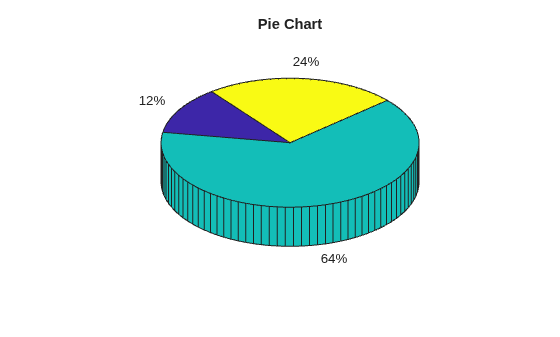
Determine which type of plot to create based on the value of plottype. If plottype is either 'pie' or 'pie3', create a 3-D pie chart. Use a cell array to contain both values.
x = [12 64 24];
plottype = 'pie3';

switch plottype
    case 'bar'
        bar(x)
        title('Bar Graph')
    case {'pie','pie3'}
        pie3(x)
        title('Pie Chart')
    otherwise
        warning('Unexpected plot type. No plot created.')
end
Tips
Avoid using relational operators such as
<or>in thecase_expressionwhen comparing against theswitch_expression. To test for inequality, useif, elseif, elsestatements.The MATLAB
switchstatement does not fall through like a C languageswitchstatement. If the firstcasestatement istrue, MATLAB does not execute the othercasestatements. For example:result = 52; switch(result) case 52 disp('result is 52') case {52, 78} disp('result is 52 or 78') end
result is 52
Define all variables necessary for code in a particular case within that case. Since MATLAB executes only one case of any
switchstatement, variables defined within one case are not available for other cases. For example, if your current workspace does not contain a variablex, only cases that definexcan use it:switch choice case 1 x = -pi:0.01:pi; case 2 % does not know anything about x end
The MATLAB
breakstatement ends execution of afororwhileloop, but does not end execution of aswitchstatement. This behavior is different than the behavior ofbreakandswitchin C.
Extended Capabilities
Version History
Introduced before R2006a

