faceNormals
(Not recommended) Unit normals to specified triangles
faceNormals(TriRep) is not recommended. Use faceNormal(triangulation) instead.
TriRep is not recommended. Use triangulation instead.
Description
Examples
Triangulate a sample of random points on the surface of a sphere.
numpts = 100;
thetha = rand(numpts,1)*2*pi;
phi = rand(numpts,1)*pi;
x = cos(thetha).*sin(phi);
y = sin(thetha).*sin(phi);
z = cos(phi);
dt = DelaunayTri(x,y,z);
[tri,Xb] = freeBoundary(dt);
tr = TriRep(tri,Xb);
Use the TriRep object to compute the normal vectors for each triangle.
fn = faceNormals(tr);
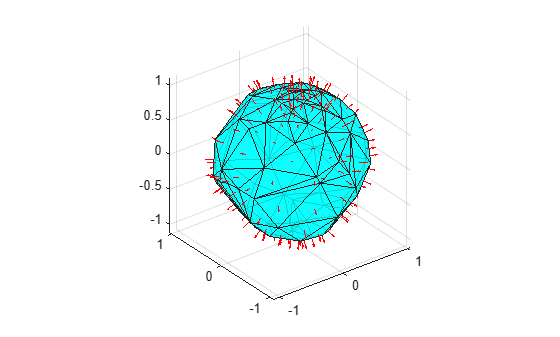
Display the results by plotting the triangulation with an overlaid quiver plot of the normal vectors. Use incenters to place the vectors at the center of each triangle.
P = incenters(tr);
trisurf(tri,Xb(:,1),Xb(:,2),Xb(:,3), ...
     'FaceColor','cyan','faceAlpha',0.8)
axis equal
hold on
quiver3(P(:,1),P(:,2),P(:,3), ...
     fn(:,1),fn(:,2),fn(:,3),0.5,'color','r')
hold off
Input Arguments
Output Arguments
Version History
Introduced in R2009a

