waterfall
Waterfall plot

Syntax
Description
waterfall(
creates a waterfall plot, which is a mesh plot with a partial curtain along the
y dimension. This results in a "waterfall" effect. The
function plots the values in matrix X,Y,Z)Z as heights above a grid
in the xy-plane defined by
X and Y. The edge colors vary
according to the heights specified by Z.
waterfall( creates a waterfall
plot, and uses the column and row indices of the elements in
Z)Z as the x- and
y-coordinates.
waterfall(___,
sets properties of the waterfall plot using one or more name-value arguments.
For example, you can specify the color and thickness of the plot edges. For a
list of properties, see Patch Properties. (since R2024b)Name=Value)
waterfall( plots
into the axes specified by ax,___)ax instead of the current axes.
Specify the axes as the first input argument. This argument can be used with any
of the previous input syntaxes.
p = waterfall(___) returns the patch object.
Use p to modify the waterfall plot after it is created. For a
list of properties, see Patch Properties.
Examples
Create three matrices of the same size. Then plot them as a waterfall plot. The mesh plot uses Z for both height and color.
[X,Y] = meshgrid(-3:.125:3);
Z = peaks(X,Y);
waterfall(X,Y,Z)
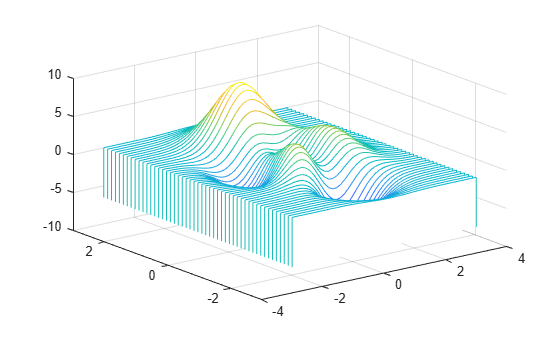
Specify the colors for a waterfall plot by including a fourth matrix input, C. The waterfall plot uses Z for height and C for color. Add a color bar to the graph to show how the data values in C correspond to the colors in the colormap.
[X,Y] = meshgrid(-3:.125:3);
Z = peaks(X,Y);
C = gradient(Z);
waterfall(X,Y,Z,C)
colorbar

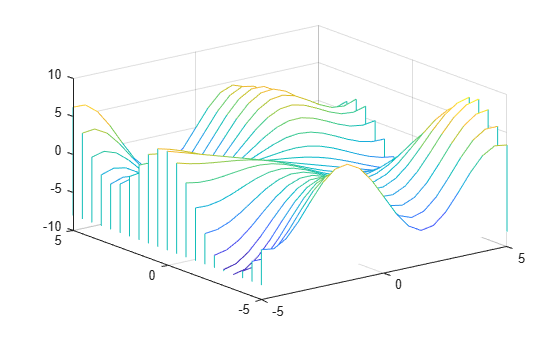
Create a waterfall plot. To allow further modifications, assign the patch object to the variable p.
[X,Y] = meshgrid(-5:.5:5);
Z = Y.*sin(X) - X.*cos(Y);
p = waterfall(X,Y,Z)
p =
  Patch with properties:

    FaceColor: [1 1 1]
    FaceAlpha: 1
    EdgeColor: 'flat'
    LineStyle: '-'
        Faces: [21×26 double]
     Vertices: [546×3 double]

  Show all properties
Use p to access and modify properties of the waterfall plot after it is created. For example, change the color of the plot edges by setting the EdgeColor property.
p.EdgeColor = 'b';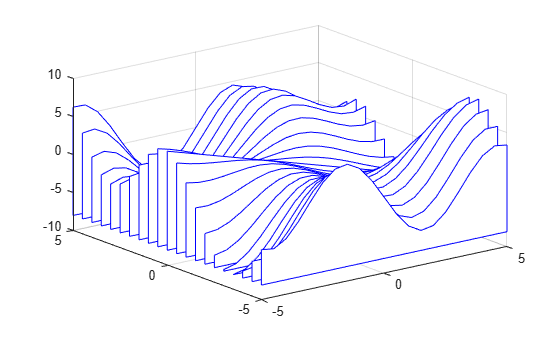
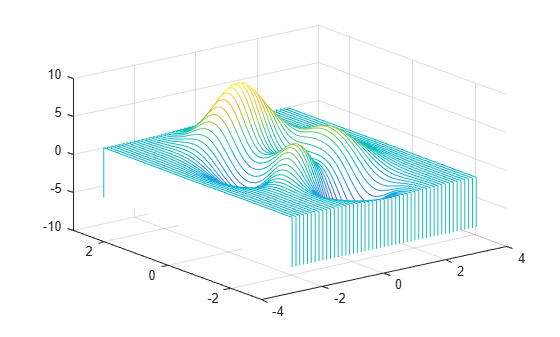
Display a partial curtain along the x-dimension (instead of the y-dimension) by transposing the input arguments.
[X,Y] = meshgrid(-3:.125:3);
Z = peaks(X,Y);
waterfall(X',Y',Z')
Input Arguments
Name-Value Arguments
Specify optional pairs of arguments as
Name1=Value1,...,NameN=ValueN, where Name is
the argument name and Value is the corresponding value.
Name-value arguments must appear after other arguments, but the order of the
pairs does not matter.
Example: waterfall(peaks,LineStyle="--") creates a waterfall
plot using dashed lines.
Note
The properties listed here are only a subset. For a full list, see Patch Properties.
Edge colors, specified as one of the values in this table. The default edge color is black
with a value of [0 0 0]. If multiple polygons share an edge, then the
first polygon drawn controls the displayed edge color.
| Value | Description | Result |
|---|---|---|
RGB triplet, hexadecimal color code, or color name | Single color for all of the edges. See the following table for more details. |
|
'flat' | Different color for each edge. Use the vertex colors to set
the color of the edge that follows it. You must first specify
|
|
'interp' | Interpolated edge color. You must first specify
|
|
'none' | No edges displayed. | No edges displayed. |


RGB triplets and hexadecimal color codes are useful for specifying custom colors.
An RGB triplet is a three-element row vector whose elements specify the intensities of the red, green, and blue components of the color. The intensities must be in the range
[0,1]; for example,[0.4 0.6 0.7].A hexadecimal color code is a character vector or a string scalar that starts with a hash symbol (
#) followed by three or six hexadecimal digits, which can range from0toF. The values are not case sensitive. Thus, the color codes"#FF8800","#ff8800","#F80", and"#f80"are equivalent.
Alternatively, you can specify some common colors by name. This table lists the named color options, the equivalent RGB triplets, and hexadecimal color codes.
| Color Name | Short Name | RGB Triplet | Hexadecimal Color Code | Appearance |
|---|---|---|---|---|
"red" | "r" | [1 0 0] | "#FF0000" |
|
"green" | "g" | [0 1 0] | "#00FF00" |
|
"blue" | "b" | [0 0 1] | "#0000FF" |
|
"cyan"
| "c" | [0 1 1] | "#00FFFF" |
|
"magenta" | "m" | [1 0 1] | "#FF00FF" |
|
"yellow" | "y" | [1 1 0] | "#FFFF00" |
|
"black" | "k" | [0 0 0] | "#000000" |
|
"white" | "w" | [1 1 1] | "#FFFFFF" |
|


This table lists the default color palettes for plots in the light and dark themes.
| Palette | Palette Colors |
|---|---|
Before R2025a: Most plots use these colors by default. |
|
|
|


You can get the RGB triplets and hexadecimal color codes for these palettes using the orderedcolors and rgb2hex functions. For example, get the RGB triplets for the "gem" palette and convert them to hexadecimal color codes.
RGB = orderedcolors("gem");
H = rgb2hex(RGB);
Before R2023b: Get the RGB triplets using RGB =
get(groot,"FactoryAxesColorOrder").
Before R2024a: Get the hexadecimal color codes using H =
compose("#%02X%02X%02X",round(RGB*255)).
Line style, specified as one of the options listed in this table.
| Line Style | Description | Resulting Line |
|---|---|---|
"-" | Solid line |
|
"--" | Dashed line |
|
":" | Dotted line |
|
"-." | Dash-dotted line |
|
"none" | No line | No line |


Tips
To analyze the data as columns instead of rows, call
waterfallwith transposed arguments:[X,Y] = meshgrid(-3:.125:3); Z = peaks(X,Y); waterfall(X',Y',Z')
To create a mesh surface object instead of a patch object, use the
meshzfunction. To create a plot similar to a waterfall plot, set theMeshStyleproperty of the surface to'Row'.
Algorithms
The
XLim,YLim, andZLimproperties of the axes store the limits for the x-, y-, and z-axis. These limits are based on the ranges of theX,Y, andZinput arguments.The
CLimproperty of the axes determines the distribution of colors across the range ofC. For more information, see Control Colormap Limits.

