blackman
Blackman window
Description
Examples
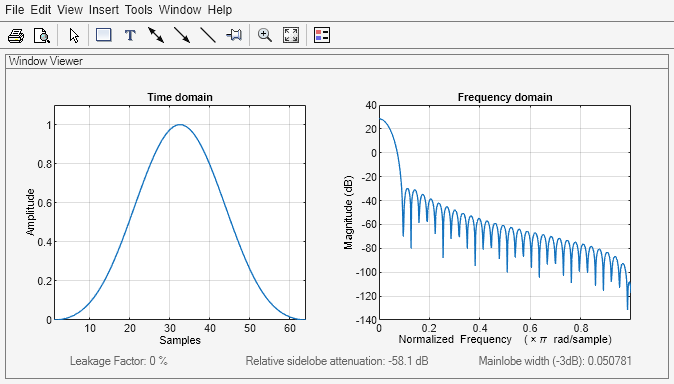
Create a 64-point Blackman window. Display the result using wvtool.
L = 64;
wvtool(blackman(L))
Input Arguments
Output Arguments
Algorithms
The following equation defines the Blackman window of length N:
where M is N/2 when N is even and (N + 1)/2 when N is odd.
In the symmetric case, the second half of the Blackman window, M ≤ n ≤ N – 1, is obtained by reflecting the first half around the midpoint. The symmetric option is the preferred method when using a Blackman window in FIR filter design.
The periodic Blackman window is constructed by extending the desired window length by one sample to N + 1, constructing a symmetric window, and removing the last sample. The periodic version is the preferred method when using a Blackman window in spectral analysis because the discrete Fourier transform assumes periodic extension of the input vector.
References
[1] Oppenheim, Alan V., Ronald W. Schafer, and John R. Buck. Discrete-Time Signal Processing. Upper Saddle River, NJ: Prentice Hall, 1999, pp. 468–471.

