To File
Write data to file

Libraries:
Simulink /
Sinks
HDL Coder /
Sinks
Description
The To File block writes input signal data into a MAT-file. The block writes to the output file incrementally, with minimal memory overhead during simulation. If the output file exists when the simulation starts, the block overwrites the file. The file automatically closes when you pause the simulation or the simulation completes. If simulation terminates abnormally, the To File block saves the data it has logged up until the point of the abnormal termination.
The To File block icon shows the name of the output file.
Control Amount of Data Saved
If you specify data logging intervals with the Configuration Parameters > Data Import/Export > Logging intervals parameter, the To File block logs only data inside of
the intervals. For example, the block logs no data if the intervals are empty
([]). The block stores the logged data in the file associated
with the block instead of in the variable that you specify for the Single
simulation output parameter.
For variable-step solvers, to control the amount of data available to the
To File block, use the Configuration Parameters > Data Import/Export > Additional parameters > Output options parameter. For example, to write data at identical time points over
multiple simulations, select the Produce specified output only
option.
Block parameters also control the amount of data saved. See Decimation and Sample time.
Pause Simulation
After pausing a simulation, do not alter any file that a To File
block logs into. For example, do not save such a file with the MATLAB®
save command. Altering the file can cause an error when you
resume the simulation. If you want to alter the file after pausing, copy the file
and work with the copy of the file.
If you pause using the Simulation Stepper, the To File block captures the simulation data up to the point of the pause. When you step back, the To File data file no longer contains any simulation data past the new reduced time of the last output.
Examples
Write Data to File
The To File block writes signal data to a MAT-file.
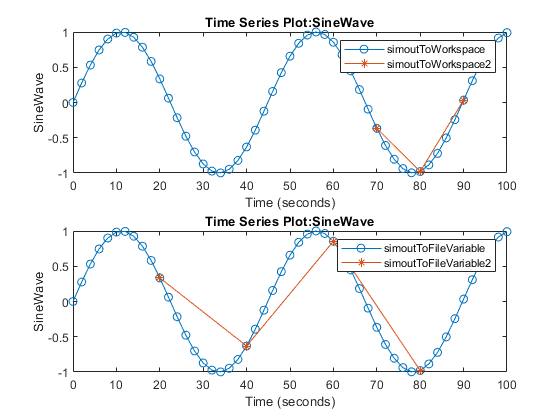
For example, simulate the model SineToFile. The model contains a To File block that is configured to log signal data from the Sine Wave block to a MAT-file named SineWave with the variable name sineSig.

Extended Examples
Limitations
When a To File block is in a referenced model, that model must be a single-instance model. Only one instance of such a model can exist in a model hierarchy. See Model Reuse for more information.
Ports
Input
Parameters
Block Characteristics
Tips
If MATLAB encounters memory issues when you log many signals in a long simulation that has many time steps, consider logging to persistent storage. When you log to persistent storage, the
Datasetformat logging data is stored in a MAT-file. Compared to logging to persistent storage, connecting a To File block to signals:Is a per-signal approach that can clutter a model with several To File blocks attached to individual signals.
Creates a separate MAT-file for each To File block, compared to the one MAT-file that logging to persistent storage uses.
For details, see Log Data to Persistent Storage.
To avoid the overhead of compressing data in real time, the To File block writes an uncompressed Version 7.3 MAT-file. To compress the data within the MAT-file, load and save the file in MATLAB. The resaved file is smaller than the original MAT-file that the To File block created, because the Save command compresses the data in the MAT-file.
Extended Capabilities
Version History
Introduced before R2006a

You can also select a web site from the following list:
Americas
- América Latina (Español)
- Canada (English)
- United States (English)
Europe
- Belgium (English)
- Denmark (English)
- Deutschland (Deutsch)
- España (Español)
- Finland (English)
- France (Français)
- Ireland (English)
- Italia (Italiano)
- Luxembourg (English)
- Netherlands (English)
- Norway (English)
- Österreich (Deutsch)
- Portugal (English)
- Sweden (English)
- Switzerland
- United Kingdom (English)