Main Content

fitrtree

Fit binary decision tree for regression

Description

Mdl = fitrtree(Tbl,ResponseVarName) returns a regression tree based on the input variables (also known as predictors, features, or attributes) in the table Tbl and the output (response) contained in Tbl.ResponseVarName. The returned Mdl is a binary tree where each branching node is split based on the values of a column of Tbl.

Mdl = fitrtree(Tbl,formula) returns a regression tree based on the input variables contained in the table Tbl. The input formula is an explanatory model of the response and a subset of predictor variables in Tbl used to fit Mdl.

Mdl = fitrtree(Tbl,Y) returns a regression tree based on the input variables contained in the table Tbl and the output in vector Y.

Mdl = fitrtree(X,Y) returns a regression tree based on the input variables X and the output Y. The returned Mdl is a binary tree where each branching node is split based on the values of a column of X.

example

Mdl = fitrtree(___,Name=Value) specifies options using one or more name-value arguments in addition to any of the input argument combinations in previous syntaxes. For example, you can specify observation weights or train a cross-validated model.

example

[Mdl,AggregateOptimizationResults] = fitrtree(___) also returns AggregateOptimizationResults, which contains hyperparameter optimization results when you specify the OptimizeHyperparameters and HyperparameterOptimizationOptions name-value arguments. You must also specify the ConstraintType and ConstraintBounds options of HyperparameterOptimizationOptions. You can use this syntax to optimize on compact model size instead of cross-validation loss, and to perform a set of multiple optimization problems that have the same options but different constraint bounds.

Note

For a list of supported syntaxes when the input variables are tall arrays, see Tall Arrays.

Examples

collapse all

Load the sample data.

load carsmall

Construct a regression tree using the sample data. The response variable is miles per gallon, MPG.

tree = fitrtree([Weight, Cylinders],MPG,...
                'CategoricalPredictors',2,'MinParentSize',20,...
                'PredictorNames',{'W','C'})
tree = 
  RegressionTree
           PredictorNames: {'W'  'C'}
             ResponseName: 'Y'
    CategoricalPredictors: 2
        ResponseTransform: 'none'
          NumObservations: 94


  Properties, Methods

Predict the mileage of 4,000-pound cars with 4, 6, and 8 cylinders.

MPG4Kpred = predict(tree,[4000 4; 4000 6; 4000 8])
MPG4Kpred = 3×1

   19.2778
   19.2778
   14.3889

fitrtree grows deep decision trees by default. You can grow shallower trees to reduce model complexity or computation time. To control the depth of trees, use the 'MaxNumSplits', 'MinLeafSize', or 'MinParentSize' name-value pair arguments.

Load the carsmall data set. Consider Displacement, Horsepower, and Weight as predictors of the response MPG.

load carsmall
X = [Displacement Horsepower Weight];

The default values of the tree-depth controllers for growing regression trees are:

  • n - 1 for MaxNumSplits. n is the training sample size.

  • 1 for MinLeafSize.

  • 10 for MinParentSize.

These default values tend to grow deep trees for large training sample sizes.

Train a regression tree using the default values for tree-depth control. Cross-validate the model using 10-fold cross-validation.

rng(1); % For reproducibility
MdlDefault = fitrtree(X,MPG,'CrossVal','on');

Draw a histogram of the number of imposed splits on the trees. The number of imposed splits is one less than the number of leaves. Also, view one of the trees.

numBranches = @(x)sum(x.IsBranch);
mdlDefaultNumSplits = cellfun(numBranches, MdlDefault.Trained);

figure;
histogram(mdlDefaultNumSplits)
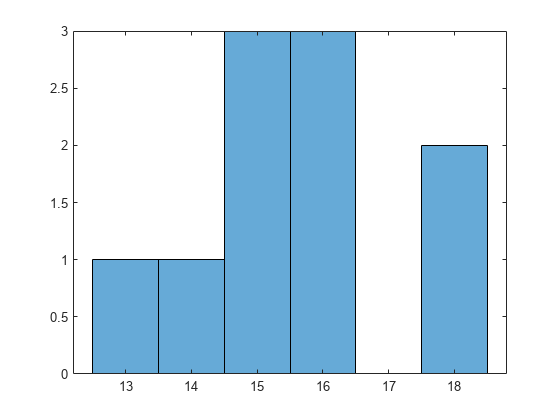
Figure contains an axes object. The axes object contains an object of type histogram.

view(MdlDefault.Trained{1},'Mode','graph')
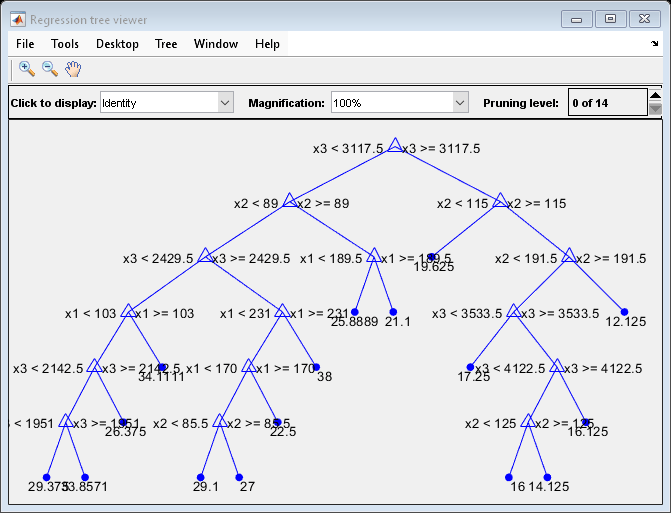
Figure Regression tree viewer contains an axes object and other objects of type uimenu, uicontrol. The axes object contains 51 objects of type line, text. One or more of the lines displays its values using only markers

The average number of splits is between 14 and 15.

Suppose that you want a regression tree that is not as complex (deep) as the ones trained using the default number of splits. Train another regression tree, but set the maximum number of splits at 7, which is about half the mean number of splits from the default regression tree. Cross-validate the model using 10-fold cross-validation.

Mdl7 = fitrtree(X,MPG,'MaxNumSplits',7,'CrossVal','on');
view(Mdl7.Trained{1},'Mode','graph')
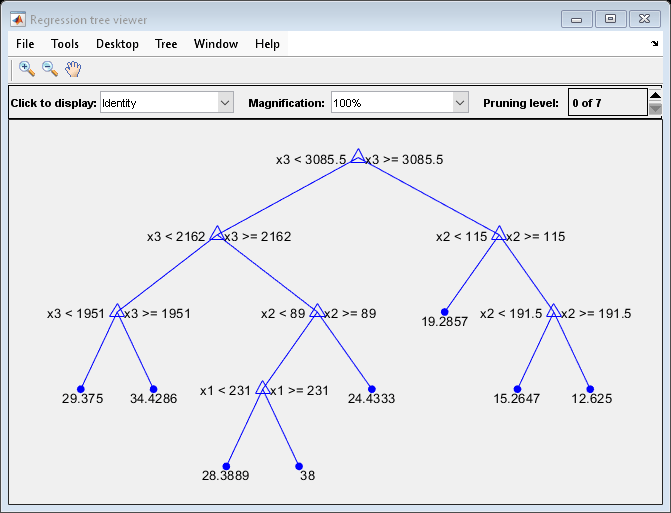
Figure Regression tree viewer contains an axes object and other objects of type uimenu, uicontrol. The axes object contains 27 objects of type line, text. One or more of the lines displays its values using only markers

Compare the cross-validation mean squared errors (MSEs) of the models.

mseDefault = kfoldLoss(MdlDefault)
mseDefault = 
25.7383
mse7 = kfoldLoss(Mdl7)
mse7 = 
26.5748

Mdl7 is much less complex and performs only slightly worse than MdlDefault.

Automatically optimize hyperparameters of a regression tree model by using fitrtree.

Load the carsmall data set.

load carsmall

Specify Horsepower and Weight as the predictor variables (X) and MPG as the response variable (Y).

X = [Horsepower Weight];
Y = MPG;

Find hyperparameters that minimize the 5-fold cross-validation loss by using automatic hyperparameter optimization. For reproducibility, set the random seed and use the "expected-improvement-plus" acquisition function.

rng(0,"twister")
hpoOptions = hyperparameterOptimizationOptions(AcquisitionFunctionName="expected-improvement-plus");
Mdl = fitrtree(X,Y,OptimizeHyperparameters="auto", ...
    HyperparameterOptimizationOptions=hpoOptions)
|======================================================================================|
| Iter | Eval   | Objective:  | Objective   | BestSoFar   | BestSoFar   |  MinLeafSize |
|      | result | log(1+loss) | runtime     | (observed)  | (estim.)    |              |
|======================================================================================|
|    1 | Best   |      3.2818 |     0.22434 |      3.2818 |      3.2818 |           28 |
|    2 | Accept |      3.4183 |    0.041183 |      3.2818 |      3.2888 |            1 |
|    3 | Best   |      3.1457 |    0.033462 |      3.1457 |      3.1628 |            4 |
|    4 | Best   |      2.9885 |     0.03489 |      2.9885 |      2.9885 |            9 |
|    5 | Accept |      2.9978 |    0.036753 |      2.9885 |      2.9885 |            7 |
|    6 | Accept |      3.0203 |    0.027979 |      2.9885 |      3.0013 |            8 |
|    7 | Accept |      2.9885 |    0.036313 |      2.9885 |      2.9981 |            9 |
|    8 | Best   |      2.9589 |    0.032478 |      2.9589 |      2.9589 |           10 |
|    9 | Accept |       3.078 |    0.031265 |      2.9589 |      2.9888 |           13 |
|   10 | Accept |      4.1881 |    0.034638 |      2.9589 |      2.9592 |           50 |
|   11 | Accept |      3.4182 |    0.050318 |      2.9589 |      2.9592 |            2 |
|   12 | Accept |      3.0376 |    0.024148 |      2.9589 |      2.9591 |            6 |
|   13 | Accept |      3.1453 |    0.022925 |      2.9589 |      2.9591 |           20 |
|   14 | Accept |      2.9589 |    0.031924 |      2.9589 |       2.959 |           10 |
|   15 | Accept |      3.0123 |    0.026502 |      2.9589 |      2.9728 |           11 |
|   16 | Accept |      2.9589 |    0.025416 |      2.9589 |      2.9593 |           10 |
|   17 | Accept |      3.3055 |    0.029169 |      2.9589 |      2.9593 |            3 |
|   18 | Accept |      2.9589 |    0.023451 |      2.9589 |      2.9592 |           10 |
|   19 | Accept |      3.4577 |    0.026011 |      2.9589 |      2.9591 |           37 |
|   20 | Accept |      3.2166 |    0.041208 |      2.9589 |       2.959 |           16 |
|======================================================================================|
| Iter | Eval   | Objective:  | Objective   | BestSoFar   | BestSoFar   |  MinLeafSize |
|      | result | log(1+loss) | runtime     | (observed)  | (estim.)    |              |
|======================================================================================|
|   21 | Accept |      3.1073 |    0.026594 |      2.9589 |      2.9591 |            5 |
|   22 | Accept |      3.2818 |    0.022941 |      2.9589 |       2.959 |           24 |
|   23 | Accept |      3.3226 |    0.023155 |      2.9589 |       2.959 |           32 |
|   24 | Accept |      4.1881 |    0.024017 |      2.9589 |      2.9589 |           43 |
|   25 | Accept |      3.1789 |    0.026557 |      2.9589 |      2.9589 |           18 |
|   26 | Accept |      3.0992 |    0.042702 |      2.9589 |      2.9589 |           14 |
|   27 | Accept |      3.0556 |    0.024676 |      2.9589 |      2.9589 |           22 |
|   28 | Accept |      3.0522 |    0.034223 |      2.9589 |      2.9589 |           12 |
|   29 | Accept |      3.2818 |    0.034522 |      2.9589 |      2.9589 |           26 |
|   30 | Accept |      3.4361 |    0.031322 |      2.9589 |      2.9589 |           34 |

__________________________________________________________
Optimization completed.
MaxObjectiveEvaluations of 30 reached.
Total function evaluations: 30
Total elapsed time: 20.0495 seconds
Total objective function evaluation time: 1.1251

Best observed feasible point:
    MinLeafSize
    ___________

        10     

Observed objective function value = 2.9589
Estimated objective function value = 2.9589
Function evaluation time = 0.032478

Best estimated feasible point (according to models):
    MinLeafSize
    ___________

        10     

Estimated objective function value = 2.9589
Estimated function evaluation time = 0.032458

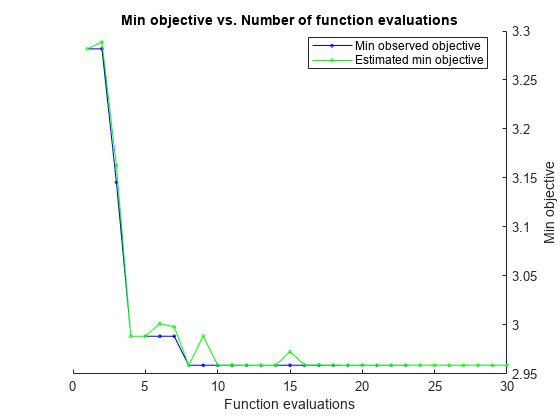
Figure contains an axes object. The axes object with title Min objective vs. Number of function evaluations, xlabel Function evaluations, ylabel Min objective contains 2 objects of type line. These objects represent Min observed objective, Estimated min objective.

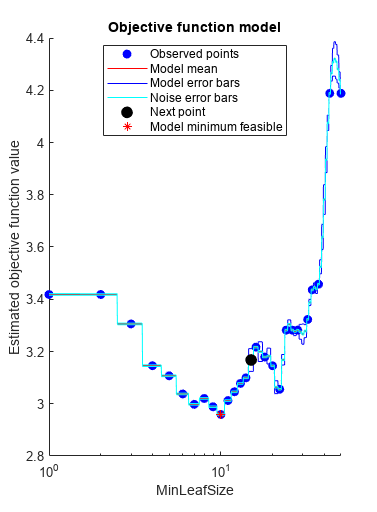
Figure contains an axes object. The axes object with title Objective function model, xlabel MinLeafSize, ylabel Estimated objective function value contains 8 objects of type line. One or more of the lines displays its values using only markers These objects represent Observed points, Model mean, Model error bars, Noise error bars, Next point, Model minimum feasible.

Mdl = 
  RegressionTree
                         ResponseName: 'Y'
                CategoricalPredictors: []
                    ResponseTransform: 'none'
                      NumObservations: 94
    HyperparameterOptimizationResults: [1×1 classreg.learning.paramoptim.SupervisedLearningBayesianOptimization]


  Properties, Methods

The trained model Mdl corresponds to the best estimated feasible point and uses the same MinLeafSize hyperparameter value.

Find the hyperparameter value used to train Mdl by using the bestPoint function. By default, bestPoint uses the same best point criterion used by fitrtree during the hyperparameter optimization ("min-visited-upper-confidence-interval"). In general, fit functions determine the best hyperparameter values based on the "min-visited-upper-confidence-interval" criterion (instead of the "min-observed" criterion) to avoid overfitting to noise in the data set.

bestEstimatedPoint = bestPoint(Mdl.HyperparameterOptimizationResults)
bestEstimatedPoint=table
    MinLeafSize
    ___________

        10     

Verify that the result matches the property of Mdl.

Mdl.ModelParameters.MinLeaf
ans = 
10

Load the carsmall data set. Consider a model that predicts the mean fuel economy of a car given its acceleration, number of cylinders, engine displacement, horsepower, manufacturer, model year, and weight. Consider Cylinders, Mfg, and Model_Year as categorical variables.

load carsmall
Cylinders = categorical(Cylinders);
Mfg = categorical(cellstr(Mfg));
Model_Year = categorical(Model_Year);
X = table(Acceleration,Cylinders,Displacement,Horsepower,Mfg, ...
    Model_Year,Weight,MPG);

Display the number of categories represented in the categorical variables.

numCylinders = numel(categories(Cylinders))
numCylinders = 
3
numMfg = numel(categories(Mfg))
numMfg = 
28
numModelYear = numel(categories(Model_Year))
numModelYear = 
3

Because there are 3 categories only in Cylinders and Model_Year, the standard CART, predictor-splitting algorithm prefers splitting a continuous predictor over these two variables.

Train a regression tree using the entire data set. To grow unbiased trees, specify usage of the curvature test for splitting predictors. Because there are missing values in the data, specify usage of surrogate splits.

Mdl = fitrtree(X,"MPG",PredictorSelection="curvature",Surrogate="on");

Estimate predictor importance values by summing changes in the risk due to splits on every predictor and dividing the sum by the number of branch nodes. Compare the estimates using a bar graph.

imp = predictorImportance(Mdl);

figure
bar(imp)
title("Predictor Importance Estimates")
ylabel("Estimates")
xlabel("Predictors")
h = gca;
h.XTickLabel = Mdl.PredictorNames;
h.XTickLabelRotation = 45;
h.TickLabelInterpreter = "none";
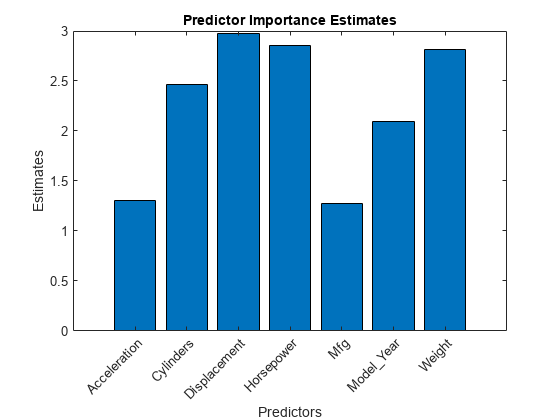
Figure contains an axes object. The axes object with title Predictor Importance Estimates, xlabel Predictors, ylabel Estimates contains an object of type bar.

In this case, Displacement is the most important predictor, followed by Horsepower.

fitrtree grows deep decision trees by default. Build a shallower tree that requires fewer passes through a tall array. Use the 'MaxDepth' name-value pair argument to control the maximum tree depth.

When you perform calculations on tall arrays, MATLAB® uses either a parallel pool (default if you have Parallel Computing Toolbox™) or the local MATLAB session. If you want to run the example using the local MATLAB session when you have Parallel Computing Toolbox, you can change the global execution environment by using the mapreducer function.

Load the carsmall data set. Consider Displacement, Horsepower, and Weight as predictors of the response MPG.

load carsmall
X = [Displacement Horsepower Weight];

Convert the in-memory arrays X and MPG to tall arrays.

tx = tall(X);
Starting parallel pool (parpool) using the 'local' profile ...
Connected to the parallel pool (number of workers: 6).
ty = tall(MPG);

Grow a regression tree using all observations. Allow the tree to grow to the maximum possible depth.

For reproducibility, set the seeds of the random number generators using rng and tallrng. The results can vary depending on the number of workers and the execution environment for the tall arrays. For details, see Control Where Your Code Runs.

rng('default') 
tallrng('default')
Mdl = fitrtree(tx,ty);
Evaluating tall expression using the Parallel Pool 'local':
- Pass 1 of 2: Completed in 4.1 sec
- Pass 2 of 2: Completed in 0.71 sec
Evaluation completed in 6.7 sec
Evaluating tall expression using the Parallel Pool 'local':
- Pass 1 of 7: Completed in 1.4 sec
- Pass 2 of 7: Completed in 0.29 sec
- Pass 3 of 7: Completed in 1.5 sec
- Pass 4 of 7: Completed in 3.3 sec
- Pass 5 of 7: Completed in 0.63 sec
- Pass 6 of 7: Completed in 1.2 sec
- Pass 7 of 7: Completed in 2.6 sec
Evaluation completed in 12 sec
Evaluating tall expression using the Parallel Pool 'local':
- Pass 1 of 7: Completed in 0.36 sec
- Pass 2 of 7: Completed in 0.27 sec
- Pass 3 of 7: Completed in 0.85 sec
- Pass 4 of 7: Completed in 2 sec
- Pass 5 of 7: Completed in 0.55 sec
- Pass 6 of 7: Completed in 0.92 sec
- Pass 7 of 7: Completed in 1.6 sec
Evaluation completed in 7.4 sec
Evaluating tall expression using the Parallel Pool 'local':
- Pass 1 of 7: Completed in 0.32 sec
- Pass 2 of 7: Completed in 0.29 sec
- Pass 3 of 7: Completed in 0.89 sec
- Pass 4 of 7: Completed in 1.9 sec
- Pass 5 of 7: Completed in 0.83 sec
- Pass 6 of 7: Completed in 1.2 sec
- Pass 7 of 7: Completed in 2.4 sec
Evaluation completed in 9 sec
Evaluating tall expression using the Parallel Pool 'local':
- Pass 1 of 7: Completed in 0.33 sec
- Pass 2 of 7: Completed in 0.28 sec
- Pass 3 of 7: Completed in 0.89 sec
- Pass 4 of 7: Completed in 2.4 sec
- Pass 5 of 7: Completed in 0.76 sec
- Pass 6 of 7: Completed in 1 sec
- Pass 7 of 7: Completed in 1.7 sec
Evaluation completed in 8.3 sec
Evaluating tall expression using the Parallel Pool 'local':
- Pass 1 of 7: Completed in 0.34 sec
- Pass 2 of 7: Completed in 0.26 sec
- Pass 3 of 7: Completed in 0.81 sec
- Pass 4 of 7: Completed in 1.7 sec
- Pass 5 of 7: Completed in 0.56 sec
- Pass 6 of 7: Completed in 1 sec
- Pass 7 of 7: Completed in 1.9 sec
Evaluation completed in 7.4 sec
Evaluating tall expression using the Parallel Pool 'local':
- Pass 1 of 7: Completed in 0.35 sec
- Pass 2 of 7: Completed in 0.28 sec
- Pass 3 of 7: Completed in 0.81 sec
- Pass 4 of 7: Completed in 1.8 sec
- Pass 5 of 7: Completed in 0.76 sec
- Pass 6 of 7: Completed in 0.96 sec
- Pass 7 of 7: Completed in 2.2 sec
Evaluation completed in 8 sec
Evaluating tall expression using the Parallel Pool 'local':
- Pass 1 of 7: Completed in 0.35 sec
- Pass 2 of 7: Completed in 0.32 sec
- Pass 3 of 7: Completed in 0.92 sec
- Pass 4 of 7: Completed in 1.9 sec
- Pass 5 of 7: Completed in 1 sec
- Pass 6 of 7: Completed in 1.5 sec
- Pass 7 of 7: Completed in 2.1 sec
Evaluation completed in 9.2 sec
Evaluating tall expression using the Parallel Pool 'local':
- Pass 1 of 7: Completed in 0.33 sec
- Pass 2 of 7: Completed in 0.28 sec
- Pass 3 of 7: Completed in 0.82 sec
- Pass 4 of 7: Completed in 1.4 sec
- Pass 5 of 7: Completed in 0.61 sec
- Pass 6 of 7: Completed in 0.93 sec
- Pass 7 of 7: Completed in 1.5 sec
Evaluation completed in 6.6 sec

View the trained tree Mdl.

view(Mdl,'Mode','graph')
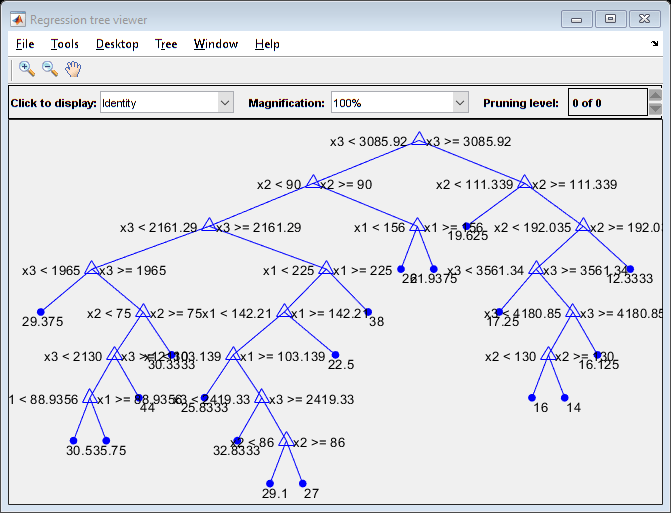
Mdl is a tree of depth 8.

Estimate the in-sample mean squared error.

MSE_Mdl = gather(loss(Mdl,tx,ty))
Evaluating tall expression using the Parallel Pool 'local':
- Pass 1 of 1: Completed in 1.6 sec
Evaluation completed in 1.9 sec
MSE_Mdl = 4.9078

Grow a regression tree using all observations. Limit the tree depth by specifying a maximum tree depth of 4.

Mdl2 = fitrtree(tx,ty,'MaxDepth',4);
Evaluating tall expression using the Parallel Pool 'local':
- Pass 1 of 2: Completed in 0.27 sec
- Pass 2 of 2: Completed in 0.28 sec
Evaluation completed in 0.84 sec
Evaluating tall expression using the Parallel Pool 'local':
- Pass 1 of 7: Completed in 0.36 sec
- Pass 2 of 7: Completed in 0.3 sec
- Pass 3 of 7: Completed in 0.95 sec
- Pass 4 of 7: Completed in 1.6 sec
- Pass 5 of 7: Completed in 0.55 sec
- Pass 6 of 7: Completed in 0.93 sec
- Pass 7 of 7: Completed in 1.5 sec
Evaluation completed in 7 sec
Evaluating tall expression using the Parallel Pool 'local':
- Pass 1 of 7: Completed in 0.34 sec
- Pass 2 of 7: Completed in 0.3 sec
- Pass 3 of 7: Completed in 0.95 sec
- Pass 4 of 7: Completed in 1.7 sec
- Pass 5 of 7: Completed in 0.57 sec
- Pass 6 of 7: Completed in 0.94 sec
- Pass 7 of 7: Completed in 1.8 sec
Evaluation completed in 7.7 sec
Evaluating tall expression using the Parallel Pool 'local':
- Pass 1 of 7: Completed in 0.34 sec
- Pass 2 of 7: Completed in 0.3 sec
- Pass 3 of 7: Completed in 0.87 sec
- Pass 4 of 7: Completed in 1.5 sec
- Pass 5 of 7: Completed in 0.57 sec
- Pass 6 of 7: Completed in 0.81 sec
- Pass 7 of 7: Completed in 1.7 sec
Evaluation completed in 6.9 sec
Evaluating tall expression using the Parallel Pool 'local':
- Pass 1 of 7: Completed in 0.32 sec
- Pass 2 of 7: Completed in 0.27 sec
- Pass 3 of 7: Completed in 0.85 sec
- Pass 4 of 7: Completed in 1.6 sec
- Pass 5 of 7: Completed in 0.63 sec
- Pass 6 of 7: Completed in 0.9 sec
- Pass 7 of 7: Completed in 1.6 sec
Evaluation completed in 7 sec

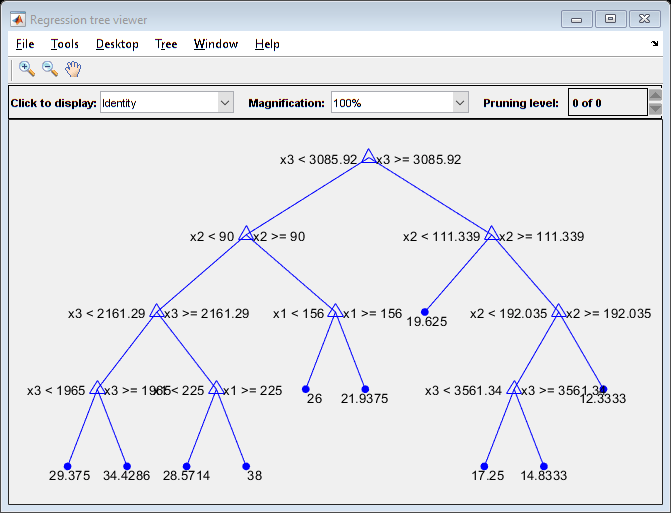
View the trained tree Mdl2.

view(Mdl2,'Mode','graph')
Estimate the in-sample mean squared error.

MSE_Mdl2 = gather(loss(Mdl2,tx,ty))
Evaluating tall expression using the Parallel Pool 'local':
- Pass 1 of 1: Completed in 0.73 sec
Evaluation completed in 1 sec
MSE_Mdl2 = 9.3903

Mdl2 is a less complex tree with a depth of 4 and an in-sample mean squared error that is higher than the mean squared error of Mdl.

Input Arguments

collapse all

Sample data used to train the model, specified as a table. Each row of Tbl corresponds to one observation, and each column corresponds to one predictor variable. Optionally, Tbl can contain one additional column for the response variable. Multicolumn variables and cell arrays other than cell arrays of character vectors are not allowed.

  • If Tbl contains the response variable, and you want to use all remaining variables in Tbl as predictors, then specify the response variable by using ResponseVarName.

  • If Tbl contains the response variable, and you want to use only a subset of the remaining variables in Tbl as predictors, then specify a formula by using formula.

  • If Tbl does not contain the response variable, then specify a response variable by using Y. The length of the response variable and the number of rows in Tbl must be equal.

Response variable name, specified as the name of a variable in Tbl. The response variable must be a numeric vector.

You must specify ResponseVarName as a character vector or string scalar. For example, if Tbl stores the response variable Y as Tbl.Y, then specify it as "Y". Otherwise, the software treats all columns of Tbl, including Y, as predictors when training the model.

Data Types: char | string

Explanatory model of the response variable and a subset of the predictor variables, specified as a character vector or string scalar in the form "Y~x1+x2+x3". In this form, Y represents the response variable, and x1, x2, and x3 represent the predictor variables.

To specify a subset of variables in Tbl as predictors for training the model, use a formula. If you specify a formula, then the software does not use any variables in Tbl that do not appear in formula.

The variable names in the formula must be both variable names in Tbl (Tbl.Properties.VariableNames) and valid MATLAB® identifiers. You can verify the variable names in Tbl by using the isvarname function. If the variable names are not valid, then you can convert them by using the matlab.lang.makeValidName function.

Data Types: char | string

Response data, specified as a numeric column vector with the same number of rows as X. Each entry in Y is the response to the data in the corresponding row of X.

The software considers NaN values in Y to be missing values. fitrtree does not use observations with missing values for Y in the fit.

Data Types: single | double

Predictor data, specified as a numeric matrix. Each column of X represents one variable, and each row represents one observation.

fitrtree considers NaN values in X as missing values. fitrtree does not use observations with all missing values for X in the fit. fitrtree uses observations with some missing values for X to find splits on variables for which these observations have valid values.

Data Types: single | double

Name-Value Arguments

expand all

Specify optional pairs of arguments as Name1=Value1,...,NameN=ValueN, where Name is the argument name and Value is the corresponding value. Name-value arguments must appear after other arguments, but the order of the pairs does not matter.

Example: CrossVal="on",MinParentSize=30 specifies a cross-validated regression tree with a minimum of 30 observations per branch node.

Note

You cannot use any cross-validation name-value argument together with the OptimizeHyperparameters name-value argument. You can modify the cross-validation for OptimizeHyperparameters only by using the HyperparameterOptimizationOptions name-value argument.

Model Parameters

expand all

Categorical predictors list, specified as one of the values in this table.

ValueDescription
Vector of positive integers

Each entry in the vector is an index value indicating that the corresponding predictor is categorical. The index values are between 1 and p, where p is the number of predictors used to train the model.

If fitrtree uses a subset of input variables as predictors, then the function indexes the predictors using only the subset. The CategoricalPredictors values do not count any response variable, observation weights variable, or other variable that the function does not use.

Logical vector

A true entry means that the corresponding predictor is categorical. The length of the vector is p.

Character matrixEach row of the matrix is the name of a predictor variable. The names must match the entries in PredictorNames. Pad the names with extra blanks so each row of the character matrix has the same length.
String array or cell array of character vectorsEach element in the array is the name of a predictor variable. The names must match the entries in PredictorNames.
"all"All predictors are categorical.

By default, if the predictor data is a table (Tbl), fitrtree assumes that a variable is categorical if it is a logical vector, unordered categorical vector, character array, string array, or cell array of character vectors. If the predictor data is a matrix (X), fitrtree assumes that all predictors are continuous. To identify any other predictors as categorical predictors, specify them by using the CategoricalPredictors name-value argument.

Example: CategoricalPredictors="all"

Data Types: single | double | logical | char | string | cell

Maximum tree depth, specified as a positive integer. Specify a value for this argument to return a tree that has fewer levels and requires fewer passes through the tall array to compute. Generally, the algorithm of fitrtree takes one pass through the data and an additional pass for each tree level. The function does not set a maximum tree depth, by default.

Note

This option applies only when you use fitrtree on tall arrays. See Tall Arrays for more information.

Leaf merge flag, specified as "on" or "off".

If MergeLeaves is "on", then fitrtree:

  • Merges leaves that originate from the same parent node and yield a sum of risk values greater than or equal to the risk associated with the parent node

  • Estimates the optimal sequence of pruned subtrees, but does not prune the regression tree

Otherwise, fitrtree does not merge leaves.

Example: MergeLeaves="off"

Minimum number of branch node observations, specified as a positive integer value. Each branch node in the tree has at least MinParentSize observations. If you supply both MinParentSize and MinLeafSize, fitrtree uses the setting that gives larger leaves: MinParentSize = max(MinParentSize,2*MinLeafSize).

Example: MinParentSize=8

Data Types: single | double

Number of bins for numeric predictors, specified as a positive integer scalar.

  • If the NumBins value is empty (default), then fitrtree does not bin any predictors.

  • If you specify the NumBins value as a positive integer scalar (numBins), then fitrtree bins every numeric predictor into at most numBins equiprobable bins, and then grows trees on the bin indices instead of the original data.

    • The number of bins can be less than numBins if a predictor has fewer than numBins unique values.

    • fitrtree does not bin categorical predictors.

When you use a large training data set, this binning option speeds up training but might cause a potential decrease in accuracy. You can try NumBins=50 first, and then change the value depending on the accuracy and training speed.

A trained model stores the bin edges in the BinEdges property.

Example: NumBins=50

Data Types: single | double

Predictor variable names, specified as a string array of unique names or cell array of unique character vectors. The functionality of PredictorNames depends on the way you supply the training data.

  • If you supply X and Y, then you can use PredictorNames to assign names to the predictor variables in X.

    • The order of the names in PredictorNames must correspond to the column order of X. That is, PredictorNames{1} is the name of X(:,1), PredictorNames{2} is the name of X(:,2), and so on. Also, size(X,2) and numel(PredictorNames) must be equal.

    • By default, PredictorNames is {'x1','x2',...}.

  • If you supply Tbl, then you can use PredictorNames to choose which predictor variables to use in training. That is, fitrtree uses only the predictor variables in PredictorNames and the response variable during training.

    • PredictorNames must be a subset of Tbl.Properties.VariableNames and cannot include the name of the response variable.

    • By default, PredictorNames contains the names of all predictor variables.

    • A good practice is to specify the predictors for training using either PredictorNames or formula, but not both.

Example: PredictorNames=["SepalLength","SepalWidth","PetalLength","PetalWidth"]

Data Types: string | cell

Algorithm used to select the best split predictor at each node, specified as a value in this table.

ValueDescription
"allsplits"

Standard CART — Selects the split predictor that maximizes the split-criterion gain over all possible splits of all predictors [1].

"curvature"Curvature test — Selects the split predictor that minimizes the p-value of chi-square tests of independence between each predictor and the response [2]. Training speed is similar to standard CART.
"interaction-curvature"Interaction test — Chooses the split predictor that minimizes the p-value of chi-square tests of independence between each predictor and the response (that is, conducts curvature tests), and that minimizes the p-value of a chi-square test of independence between each pair of predictors and response [2]. Training speed can be slower than standard CART.

For "curvature" and "interaction-curvature", if all tests yield p-values greater than 0.05, then fitrtree stops splitting nodes.

Tip

  • Standard CART tends to select split predictors containing many distinct values, e.g., continuous variables, over those containing few distinct values, e.g., categorical variables [3]. Consider specifying the curvature or interaction test if any of the following are true:

    • If there are predictors that have relatively fewer distinct values than other predictors, for example, if the predictor data set is heterogeneous.

    • If an analysis of predictor importance is your goal. For more on predictor importance estimation, see predictorImportance and Introduction to Feature Selection.

  • Trees grown using standard CART are not sensitive to predictor variable interactions. Also, such trees are less likely to identify important variables in the presence of many irrelevant predictors than the application of the interaction test. Therefore, to account for predictor interactions and identify importance variables in the presence of many irrelevant variables, specify the interaction test.

  • Prediction speed is unaffected by the value of PredictorSelection.

For details on how fitrtree selects split predictors, see Node Splitting Rules and Choose Split Predictor Selection Technique.

Example: PredictorSelection="curvature"

Flag to estimate the optimal sequence of pruned subtrees, specified as "on" or "off".

If Prune is "on", then fitrtree grows the regression tree and estimates the optimal sequence of pruned subtrees, but does not prune the regression tree. If Prune is "off" and MergeLeaves is also "off", then fitrtree grows the regression tree without estimating the optimal sequence of pruned subtrees.

To prune a trained regression tree, pass the regression tree to prune.

Example: Prune="off"

Pruning criterion, specified as "mse".

Quadratic error tolerance per node, specified as a positive scalar value. The function stops splitting nodes when the weighted mean squared error per node drops below QuadraticErrorTolerance*ε, where ε is the weighted mean squared error of all n responses computed before growing the decision tree.

ε=i=1nwi(yiy¯)2.

wi is the weight of observation i, given that the weights of all the observations sum to one (i=1nwi=1), and

y¯=i=1nwiyi

is the weighted average of all the responses.

For more details on node splitting, see Node Splitting Rules.

Example: QuadraticErrorTolerance=1e-4

Flag to enforce reproducibility over repeated runs of training a model, specified as either false or true.

If NumVariablesToSample is not "all", then the software selects predictors at random for each split. To reproduce the random selections, you must specify Reproducible=true and set the seed of the random number generator by using rng. Note that setting Reproducible to true can slow down training.

Example: Reproducible=true

Data Types: logical

Response variable name, specified as a character vector or string scalar.

  • If you supply Y, then you can use ResponseName to specify a name for the response variable.

  • If you supply ResponseVarName or formula, then you cannot use ResponseName.

Example: ResponseName="response"

Data Types: char | string

Function for transforming raw response values, specified as a function handle or function name. The default is "none", which means @(y)y, or no transformation. The function should accept a vector (the original response values) and return a vector of the same size (the transformed response values).

Example: Suppose you create a function handle that applies an exponential transformation to an input vector by using myfunction = @(y)exp(y). Then, you can specify the response transformation as ResponseTransform=myfunction.

Data Types: char | string | function_handle

Split criterion, specified as 'MSE', meaning mean squared error.

Example: SplitCriterion="MSE"

Surrogate decision splits flag, specified as "on", "off", "all", or a positive integer.

  • When "on", fitrtree finds at most 10 surrogate splits at each branch node.

  • When set to a positive integer, fitrtree finds at most the specified number of surrogate splits at each branch node.

  • When set to "all", fitrtree finds all surrogate splits at each branch node. The "all" setting can use much time and memory.

Use surrogate splits to improve the accuracy of predictions for data with missing values. The setting also enables you to compute measures of predictive association between predictors.

Example: Surrogate="on"

Data Types: single | double | char | string

Observation weights, specified as a vector of scalar values or the name of a variable in Tbl. The software weights the observations in each row of X or Tbl with the corresponding value in Weights. The size of Weights must equal the number of rows in X or Tbl.

If you specify the input data as a table Tbl, then Weights can be the name of a variable in Tbl that contains a numeric vector. In this case, you must specify Weights as a character vector or string scalar. For example, if weights vector W is stored as Tbl.W, then specify it as "W". Otherwise, the software treats all columns of Tbl, including W, as predictors when training the model.

fitrtree normalizes the values of Weights to sum to 1. Inf weights are not supported.

Data Types: single | double | char | string

Cross-Validation

expand all

Cross-validation flag, specified as either "on" or "off".

If "on", fitrtree grows a cross-validated decision tree with 10 folds. You can override this cross-validation setting using one of the KFold, Holdout, Leaveout, or CVPartition name-value arguments. You can only use one of these four options (KFold, Holdout, Leaveout, or CVPartition) at a time when creating a cross-validated tree.

Alternatively, cross-validate Mdl later using the crossval method.

Example: CrossVal="on"

Cross-validation partition, specified as a cvpartition object that specifies the type of cross-validation and the indexing for the training and validation sets.

To create a cross-validated model, you can specify only one of these four name-value arguments: CVPartition, Holdout, KFold, or Leaveout.

Example: Suppose you create a random partition for 5-fold cross-validation on 500 observations by using cvp = cvpartition(500,KFold=5). Then, you can specify the cross-validation partition by setting CVPartition=cvp.

Fraction of the data used for holdout validation, specified as a scalar value in the range (0,1). If you specify Holdout=p, then the software completes these steps:

  1. Randomly select and reserve p*100% of the data as validation data, and train the model using the rest of the data.

  2. Store the compact trained model in the Trained property of the cross-validated model.

To create a cross-validated model, you can specify only one of these four name-value arguments: CVPartition, Holdout, KFold, or Leaveout.

Example: Holdout=0.1

Data Types: double | single

Number of folds to use in the cross-validated model, specified as a positive integer value greater than 1. If you specify KFold=k, then the software completes these steps:

  1. Randomly partition the data into k sets.

  2. For each set, reserve the set as validation data, and train the model using the other k – 1 sets.

  3. Store the k compact trained models in a k-by-1 cell vector in the Trained property of the cross-validated model.

To create a cross-validated model, you can specify only one of these four name-value arguments: CVPartition, Holdout, KFold, or Leaveout.

Example: KFold=5

Data Types: single | double

Leave-one-out cross-validation flag, specified as "on" or "off". If you specify Leaveout="on", then for each of the n observations (where n is the number of observations, excluding missing observations, specified in the NumObservations property of the model), the software completes these steps:

  1. Reserve the one observation as validation data, and train the model using the other n – 1 observations.

  2. Store the n compact trained models in an n-by-1 cell vector in the Trained property of the cross-validated model.

To create a cross-validated model, you can specify only one of these four name-value arguments: CVPartition, Holdout, KFold, or Leaveout.

Example: Leaveout="on"

Data Types: char | string

Hyperparameters

expand all

Maximal number of decision splits (or branch nodes), specified as a nonnegative scalar. fitrtree splits MaxNumSplits or fewer branch nodes. For more details on splitting behavior, see Tree Depth Control.

Example: MaxNumSplits=5

Data Types: single | double

Minimum number of leaf node observations, specified as a positive integer value. Each leaf has at least MinLeafSize observations per tree leaf. If you supply both MinParentSize and MinLeafSize, fitrtree uses the setting that gives larger leaves: MinParentSize = max(MinParentSize,2*MinLeafSize).

Example: MinLeafSize=3

Data Types: single | double

Number of predictors to select at random for each split, specified a positive integer value. Alternatively, you can specify "all" to use all available predictors.

If the training data includes many predictors and you want to analyze predictor importance, then specify NumVariablesToSample as "all". Otherwise, the software might not select some predictors, underestimating their importance.

To reproduce the random selections, you must set the seed of the random number generator by using rng and specify Reproducible=true.

Example: NumVariablesToSample=3

Data Types: char | string | single | double

Hyperparameter Optimization

expand all

Parameters to optimize, specified as one of the following:

  • "none" — Do not optimize.

  • "auto" — Use "MinLeafSize".

  • "all" — Optimize all eligible parameters.

  • String array or cell array of eligible parameter names.

  • Vector of optimizableVariable objects, typically the output of hyperparameters.

The optimization attempts to minimize the cross-validation loss (error) for fitrtree by varying the parameters. To control the cross-validation type and other aspects of the optimization, use the HyperparameterOptimizationOptions name-value argument. When you use HyperparameterOptimizationOptions, you can use the (compact) model size instead of the cross-validation loss as the optimization objective by setting the ConstraintType and ConstraintBounds options.

Note

The values of OptimizeHyperparameters override any values you specify using other name-value arguments. For example, setting OptimizeHyperparameters to "auto" causes fitrtree to optimize hyperparameters corresponding to the "auto" option and to ignore any specified values for the hyperparameters.

The eligible parameters for fitrtree are:

  • MaxNumSplitsfitrtree searches among integers, by default log-scaled in the range [1,max(2,NumObservations-1)].

  • MinLeafSizefitrtree searches among integers, by default log-scaled in the range [1,max(2,floor(NumObservations/2))].

  • NumVariablesToSamplefitrtree does not optimize over this hyperparameter. If you pass NumVariablesToSample as a parameter name, fitrtree simply uses the full number of predictors. However, fitrensemble does optimize over this hyperparameter.

Set nondefault parameters by passing a vector of optimizableVariable objects that have nondefault values. For example,

load carsmall
params = hyperparameters("fitrtree",[Horsepower,Weight],MPG);
params(1).Range = [1,30];

Pass params as the value of OptimizeHyperparameters.

By default, the iterative display appears at the command line, and plots appear according to the number of hyperparameters in the optimization. For the optimization and plots, the objective function is log(1 + cross-validation loss). To control the iterative display, set the Verbose option of the HyperparameterOptimizationOptions name-value argument. To control the plots, set the ShowPlots option of the HyperparameterOptimizationOptions name-value argument.

For an example, see Optimize Regression Tree.

Example: OptimizeHyperparameters="auto"

Options for optimization, specified as a HyperparameterOptimizationOptions object or a structure. This argument modifies the effect of the OptimizeHyperparameters name-value argument. If you specify HyperparameterOptimizationOptions, you must also specify OptimizeHyperparameters. All the options are optional. However, you must set ConstraintBounds and ConstraintType to return AggregateOptimizationResults. The options that you can set in a structure are the same as those in the HyperparameterOptimizationOptions object.

OptionValuesDefault
Optimizer
  • "bayesopt" — Use Bayesian optimization. Internally, this setting calls bayesopt.

  • "gridsearch" — Use grid search with NumGridDivisions values per dimension. "gridsearch" searches in a random order, using uniform sampling without replacement from the grid. After optimization, you can get a table in grid order by using the sortrows function.

  • "randomsearch" — Search at random among MaxObjectiveEvaluations points.

"bayesopt"
ConstraintBounds

Constraint bounds for N optimization problems, specified as an N-by-2 numeric matrix or []. The columns of ConstraintBounds contain the lower and upper bound values of the optimization problems. If you specify ConstraintBounds as a numeric vector, the software assigns the values to the second column of ConstraintBounds, and zeros to the first column. If you specify ConstraintBounds, you must also specify ConstraintType.

[]
ConstraintTarget

Constraint target for the optimization problems, specified as "matlab" or "coder". If ConstraintBounds and ConstraintType are [] and you set ConstraintTarget, then the software sets ConstraintTarget to []. The values of ConstraintTarget and ConstraintType determine the objective and constraint functions. For more information, see HyperparameterOptimizationOptions.

If you specify ConstraintBounds and ConstraintType, then the default value is "matlab". Otherwise, the default value is [].
ConstraintType

Constraint type for the optimization problems, specified as "size" or "loss". If you specify ConstraintType, you must also specify ConstraintBounds. The values of ConstraintTarget and ConstraintType determine the objective and constraint functions. For more information, see HyperparameterOptimizationOptions.

[]
AcquisitionFunctionName

Type of acquisition function:

  • "expected-improvement-per-second-plus"

  • "expected-improvement"

  • "expected-improvement-plus"

  • "expected-improvement-per-second"

  • "lower-confidence-bound"

  • "probability-of-improvement"

Acquisition functions whose names include per-second do not yield reproducible results, because the optimization depends on the run time of the objective function. Acquisition functions whose names include plus modify their behavior when they overexploit an area. For more details, see Acquisition Function Types.

"expected-improvement-per-second-plus"
LossFunType of validation loss to optimize, specified as "auto" or "mse". In the case of fitrtree, the two options are equivalent, and the software uses the mean squared error."auto"
MaxObjectiveEvaluationsMaximum number of objective function evaluations. If you specify multiple optimization problems using ConstraintBounds, the value of MaxObjectiveEvaluations applies to each optimization problem individually.30 for "bayesopt" and "randomsearch", and the entire grid for "gridsearch"
MaxTime

Time limit for the optimization, specified as a nonnegative real scalar. The time limit is in seconds, as measured by tic and toc. The software performs at least one optimization iteration, regardless of the value of MaxTime. The run time can exceed MaxTime because MaxTime does not interrupt function evaluations. If you specify multiple optimization problems using ConstraintBounds, the time limit applies to each optimization problem individually.

Inf
NumGridDivisionsFor Optimizer="gridsearch", the number of values in each dimension. The value can be a vector of positive integers giving the number of values for each dimension, or a scalar that applies to all dimensions. The software ignores this option for categorical variables.10
ShowPlotsLogical value indicating whether to show plots of the optimization progress. If this option is true, the software plots the best observed objective function value against the iteration number. If you use Bayesian optimization (Optimizer="bayesopt"), the software also plots the best estimated objective function value. The best observed objective function values and best estimated objective function values correspond to the values in the BestSoFar (observed) and BestSoFar (estim.) columns of the iterative display, respectively. You can find these values in the properties ObjectiveMinimumTrace and EstimatedObjectiveMinimumTrace of the SupervisedLearningBayesianOptimization object. If the problem includes one or two optimization parameters for Bayesian optimization, then ShowPlots also plots a model of the objective function against the parameters.true
SaveIntermediateResultsLogical value indicating whether to save the optimization results. If this option is true, the software overwrites a workspace variable named SupervisedLearningBayesoptResults at each iteration. The variable is a SupervisedLearningBayesianOptimization object. If you specify multiple optimization problems using ConstraintBounds, the workspace variable is an AggregateBayesianOptimization object named AggregateBayesoptResults.false
Verbose

Display level at the command line:

  • 0 — No iterative display

  • 1 — Iterative display

  • 2 — Iterative display with additional information

For details, see the bayesopt Verbose name-value argument and the example Optimize Classifier Fit Using Bayesian Optimization.

1
UseParallelLogical value indicating whether to run the Bayesian optimization in parallel, which requires Parallel Computing Toolbox™. Due to the nonreproducibility of parallel timing, parallel Bayesian optimization does not necessarily yield reproducible results. For details, see Parallel Bayesian Optimization.false
Repartition

Logical value indicating whether to repartition the cross-validation at every iteration. If this option is false, the optimizer uses a single partition for the optimization.

A value of true usually gives the most robust results because this setting takes partitioning noise into account. However, for optimal results, true requires at least twice as many function evaluations.

false
Specify only one of the following three options.
CVPartitioncvpartition object created by cvpartitionKFold=5 if you do not specify a cross-validation option
HoldoutScalar in the range (0,1) representing the holdout fraction
KFoldInteger greater than 1

Example: HyperparameterOptimizationOptions=struct(UseParallel=true)

Output Arguments

collapse all

Trained regression tree model, returned as a RegressionTree object, a RegressionPartitionedModel object, or a cell array of model objects.

  • If you set any of the name-value arguments CrossVal, CVPartition, Holdout, KFold, or Leaveout, then Mdl is a RegressionPartitionedModel object.

  • If you specify OptimizeHyperparameters and set the ConstraintType and ConstraintBounds options of HyperparameterOptimizationOptions, then Mdl is an N-by-1 cell array of model objects, where N is equal to the number of rows in ConstraintBounds. If none of the optimization problems yields a feasible model, then each cell array value is [].

  • Otherwise, Mdl is a RegressionTree model object.

To reference properties of a model object, use dot notation.

Aggregate optimization results for multiple optimization problems, returned as an AggregateBayesianOptimization object. To return AggregateOptimizationResults, you must specify OptimizeHyperparameters and HyperparameterOptimizationOptions. You must also specify the ConstraintType and ConstraintBounds options of HyperparameterOptimizationOptions. For an example that shows how to produce this output, see Hyperparameter Optimization with Multiple Constraint Bounds.

More About

collapse all

Tips

Algorithms

collapse all

References

[1] Breiman, L., J. Friedman, R. Olshen, and C. Stone. Classification and Regression Trees. Boca Raton, FL: CRC Press, 1984.

[2] Loh, W.Y. “Regression Trees with Unbiased Variable Selection and Interaction Detection.” Statistica Sinica, Vol. 12, 2002, pp. 361–386.

[3] Loh, W.Y. and Y.S. Shih. “Split Selection Methods for Classification Trees.” Statistica Sinica, Vol. 7, 1997, pp. 815–840.

Extended Capabilities

expand all

Version History

Introduced in R2014a

expand all