del2
R2026bDiscrete Laplacian
Description
L = del2(U)U using the default
spacing, h = 1, between all points.
L = del2(U,hx,hy,...,hN)hx,hy,...,hN between points in each
dimension of U. Specify each spacing input as a scalar or a
vector of coordinates. The number of spacing inputs must equal the number of
dimensions in U.
The first spacing value
hxspecifies the x-spacing (as a scalar) or x-coordinates (as a vector) of the points. If it is a vector, its length must be equal tosize(U,2).The second spacing value
hyspecifies the y-spacing (as a scalar) or y-coordinates (as a vector) of the points. If it is a vector, its length must be equal tosize(U,1).All other spacing values specify the spacing (as scalars) or coordinates (as vectors) of the points in the corresponding dimension in
U. If, forn > 2, thenth spacing input is a vector, then its length must be equal tosize(U,n).
Examples
Calculate the acceleration of an object from a vector of position data.
Create a vector of position data.
p = [1 3 6 10 16 18 29];
To find the acceleration of the object, use del2 to calculate the second numerical derivative of p. Use the default spacing h = 1 between data points.
L = 4*del2(p)
L = 1×7

     1     1     1     2    -4     9    22
Each value of L is an approximation of the instantaneous acceleration at that point.
Calculate the discrete 1-D Laplacian of a cosine vector.
Define the domain of the function.
x = linspace(-2*pi,2*pi);
This produces 100 evenly spaced points in the range .
Create a vector of cosine values in this domain.
U = cos(x);
Calculate the Laplacian of U using del2. Use the domain vector x to define the 1-D coordinate of each point in U.
L = 4*del2(U,x);
Analytically, the Laplacian of this function is equal to .
Plot the results.
plot(x,U,x,L)
legend('U(x)','L(x)','Location','Best')
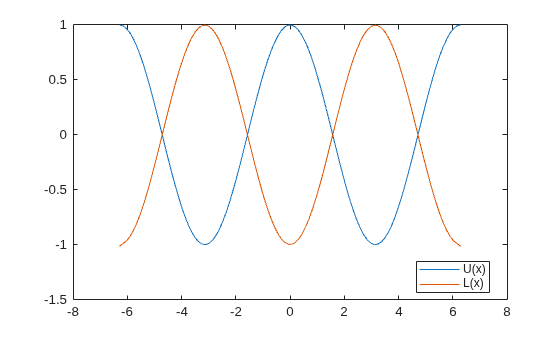
The graph of U and L agrees with the analytic result for the Laplacian.
Calculate and plot the discrete Laplacian of a multivariate function.
Define the x and y domain of the function.
[x,y] = meshgrid(-5:0.25:5,-5:0.25:5);
Define the function over this domain.
U = 1/3.*(x.^4+y.^4);
Calculate the Laplacian of this function using del2. The spacing between the points in U is equal in all directions, so you can specify a single spacing input, h.
h = 0.25;
L = 4*del2(U,h);
Analytically, the Laplacian of this function is equal to .
Plot the discrete Laplacian, L.
figure
surf(x,y,L)
grid on
title('Plot of $\Delta U(x,y) = 4x^2+4y^2$','Interpreter','latex')
xlabel('x')
ylabel('y')
zlabel('z')
view(35,14)
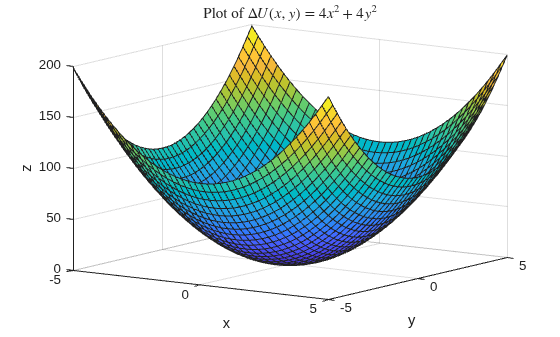
The graph of L agrees with the analytic result for the Laplacian.
Calculate the discrete Laplacian of a natural logarithm function.
Define the x and y domain of the function on a grid of real numbers.
[x,y] = meshgrid(-5:5,-5:0.5:5);
Define the function over this domain.
U = 0.5*log(x.^2.*y);
The logarithm is complex-valued when the argument y is negative.
Use del2 to calculate the discrete Laplacian of this function. Specify the spacing between grid points in each direction.
hx = 1;
hy = 0.5;
L = 4*del2(U,hx,hy);
Analytically, the Laplacian is equal to . This function is not defined on the lines or .
Plot the real parts of U and L on the same graph.
figure
surf(x,y,real(L))
hold on
surf(x,y,real(U))
grid on
title('Plot of U(x,y) and $\Delta$ U(x,y)','Interpreter','latex')
xlabel('x')
ylabel('y')
zlabel('z')
view(41,58)
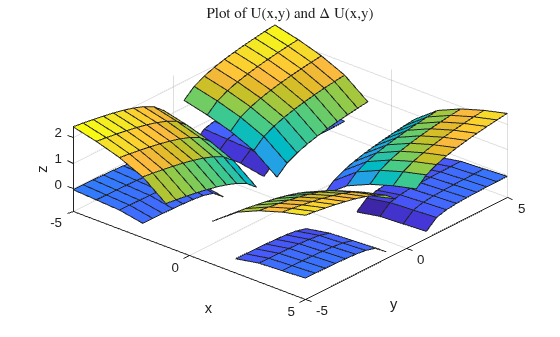
The top surface is U and the bottom surface is L.
Input Arguments
Output Arguments
More About
Algorithms
If the input U is a matrix, the interior
points of L are found by taking the difference
between a point in U and the average of its four
neighbors:
Then, del2 calculates the values on the edges
of L by linearly extrapolating the second differences
from the interior. This formula is extended for multidimensional U.
Extended Capabilities
Version History
Introduced before R2006a

