bwareaopen
Remove small objects from binary image
Description
Examples
Read binary image.
BW = imread('text.png');Remove objects containing fewer than 50 pixels using bwareaopen function.
BW2 = bwareaopen(BW, 50);
Display original image next to morphologically opened image.
imshowpair(BW,BW2,'montage')
Input Arguments
Binary image, specified as a logical or numeric array of any dimension.
Data Types: single | double | int8 | int16 | int32 | int64 | uint8 | uint16 | uint32 | uint64 | logical
Maximum number of pixels in objects, specified as a nonnegative integer.
Example: 50
Data Types: double
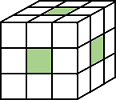
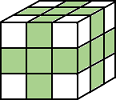
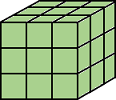
Pixel connectivity, specified as one of the values in this table. The
default connectivity is 8 for 2-D images, and
26 for 3-D images.
Value | Meaning | |
|---|---|---|
Two-Dimensional Connectivities | ||
| Pixels are connected if their edges touch. Two adjoining pixels are part of the same object if they are both on and are connected along the horizontal or vertical direction. |
Current pixel is shown in gray. |
| Pixels are connected if their edges or corners touch. Two adjoining pixels are part of the same object if they are both on and are connected along the horizontal, vertical, or diagonal direction. |
Current pixel is shown in gray. |
Three-Dimensional Connectivities | ||
| Pixels are connected if their faces touch. Two adjoining pixels are part of the same object if they are both on and are connected in:
|
Current pixel is center of cube. |
| Pixels are connected if their faces or edges touch. Two adjoining pixels are part of the same object if they are both on and are connected in:
|
Current pixel is center of cube. |
| Pixels are connected if their faces, edges, or corners touch. Two adjoining pixels are part of the same object if they are both on and are connected in:
|
Current pixel is center of cube. |


For higher dimensions, bwareaopen uses the default
value conndef(ndims(BW),"maximal")
Data Types: double | logical
Output Arguments
Algorithms
The basic steps are
Determine the connected components:
CC = bwconncomp(BW, conn);
Compute the area of each component:
S = regionprops(CC, 'Area');Remove small objects:
L = labelmatrix(CC);
BW2 = ismember(L, find([S.Area] >= P));
Extended Capabilities
Version History
Introduced before R2006a

