imfill
Fill image regions and holes
Syntax
Description
Binary Images
Grayscale Images
Interactive Behavior
BW2 = imfill(BW)BW on the screen and lets
you define the region to fill by selecting points interactively with the
mouse. To use this syntax, BW must be a 2-D
image.
Press Backspace or Delete to remove the previously selected point. Shift-click, right-click, or double-click to select a final point and start the fill operation. Press Return to finish the selection without adding a point.
[
returns the locations of points selected interactively in
BW2, locations_out] = imfill(BW)locations_out. To use this syntax,
BW must be a 2-D image.
Examples
Create an 8-by-8 binary image.
BW1 = logical([1 0 0 0 0 0 0 0
               1 1 1 1 1 0 0 0
               1 0 0 0 1 0 1 0
               1 0 0 0 1 1 1 0
               1 1 1 1 0 1 1 1
               1 0 0 1 1 0 1 0
               1 0 0 0 1 0 1 0
               1 0 0 0 1 1 1 0]);
Perform a flood-fill operation starting at the location BW1(3,3). Specify the third input argument as 4 to fill the image using 4-connectivity. The operation fills the hole in the top-left region of the image.
BW2 = imfill(BW1,[3 3],4)
BW2 = 8×8 logical array

   1   0   0   0   0   0   0   0
   1   1   1   1   1   0   0   0
   1   1   1   1   1   0   1   0
   1   1   1   1   1   1   1   0
   1   1   1   1   0   1   1   1
   1   0   0   1   1   0   1   0
   1   0   0   0   1   0   1   0
   1   0   0   0   1   1   1   0
Perform a flood-fill operation from the same pixel, this time using 8-connectivity. The filled area now also includes the hole in the bottom-right region of the image.
BW3 = imfill(BW1,[3 3],8)
BW3 = 8×8 logical array

   1   0   0   0   0   0   0   0
   1   1   1   1   1   0   0   0
   1   1   1   1   1   0   1   0
   1   1   1   1   1   1   1   0
   1   1   1   1   1   1   1   1
   1   0   0   1   1   1   1   0
   1   0   0   0   1   1   1   0
   1   0   0   0   1   1   1   0
Read image into workspace.
I = imread('coins.png');
figure
imshow(I)
title('Original Image')

Convert image to binary image.
BW = imbinarize(I);
figure
imshow(BW)
title('Original Image Converted to Binary Image')
Fill holes in the binary image and display the result.
BW2 = imfill(BW,'holes');
figure
imshow(BW2)
title('Filled Image')

I = imread('tire.tif');
I2 = imfill(I);
figure, imshow(I), figure, imshow(I2)

Input Arguments
Binary image, specified as a logical array of any dimension.
Data Types: logical
Indices identifying pixel locations, specified as one of these options.
To specify p locations using their subscript indices, specify a p-by-
ndims(BW)matrix of positive integers. Here,ndims(BW)is the number of dimensions in the input image, and each row contains the subscript indices for one location.To specify p locations using their linear indices, specify a p-element column vector of positive integers.
Example: [3 4] specifies one location within a 2-D
input image with the row and column indices (3, 4).
Example: [2 2 2; 4 5 6] specifies two locations
within a 3-D input image with subscript indices (2, 2, 2) and (4, 5,
6)
Example: 2 specifies a single location
corresponding to the linear index 2.
Example: [2; 8; 16] specifies three locations
corresponding to the linear indices 2, 8, and 16.
Data Types: double
Pixel connectivity, specified as one of the values in this table. The
default connectivity is 4 for 2-D images, and
6 for 3-D images.
Value | Meaning | |
|---|---|---|
Two-Dimensional Connectivities | ||
| Pixels are connected if their edges touch. The neighborhood of a pixel are the adjacent pixels in the horizontal or vertical direction. |
Current pixel is shown in gray. |
| Pixels are connected if their edges or corners touch. The neighborhood of a pixel are the adjacent pixels in the horizontal, vertical, or diagonal direction. |
Current pixel is shown in gray. |
Three-Dimensional Connectivities | ||
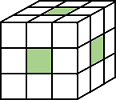
| Pixels are connected if their faces touch. The neighborhood of a pixel are the adjacent pixels in:
|
Current pixel is shown in gray. |
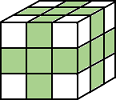
| Pixels are connected if their faces or edges touch. The neighborhood of a pixel are the adjacent pixels in:
|
Current pixel is center of cube. |
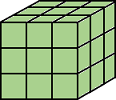
| Pixels are connected if their faces, edges, or corners touch. The neighborhood of a pixel are the adjacent pixels in:
|
Current pixel is center of cube. |


For higher dimensions, imfill uses the default
value conndef(ndims(BW),"minimal")
Data Types: double | logical
Grayscale image, specified as a numeric array of any dimension.
Data Types: single | double | int8 | int16 | int32 | int64 | uint8 | uint16 | uint32 | uint64
Output Arguments
Algorithms
imfill uses an algorithm based on morphological
reconstruction [1].
References
[1] Soille, P., Morphological Image Analysis: Principles and Applications, Springer-Verlag, 1999, pp. 173–174.

