Interpreted MATLAB Function
R2026b(To be removed) Apply MATLAB function or expression to input
The Interpreted MATLAB Function block will be removed in a future release. Use built-in blocks instead. For more information on updating your code, see Version History.
Interpreted MATLAB Function block
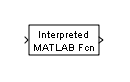
To add a block to a model, double-click the canvas and start typing the block name. Then, select the block from the list.
Libraries:
Simulink /
User-Defined Functions
Description
The Interpreted MATLAB Function block applies the specified MATLAB® function or expression to the input. The output of the function must match the output dimensions of the block. Use the Interpreted MATLAB Function block only in the current workspace.
Some valid expressions for this block are:
sin
atan2(u(1), u(2))
u(1)^u(2)
Note
This block is slow because it calls the MATLAB parser during each integration step. Consider using built-in blocks such as the Math Function block instead. Alternatively, you can write the function as a MEX file S-function, then access it using the S-Function block.
Ports
Input
Output
Parameters
Block Characteristics
Data Types |
|
Direct Feedthrough |
|
Multidimensional Signals |
|
Variable-Size Signals |
|
Zero-Crossing Detection |
|

