Code covered by the BSD License  

Highlights from
ploterr

5.0

5.0 | 12 ratings Rate this file 89 Downloads (last 30 days) File Size: 5.86 KB File ID: #22216
image thumbnail

ploterr

by Felix Zoergiebel


23 Nov 2008 (Updated 14 Feb 2009)

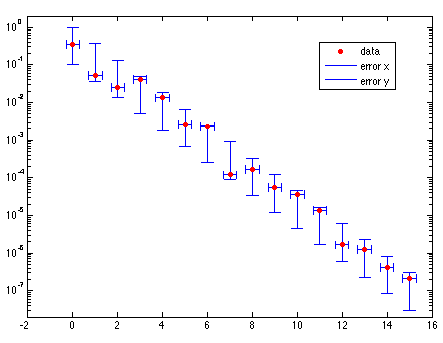
plots data with x and/or y error bars and supports logarithmic scaling for both axes.

| Watch this File

File Information
Description

ploterr is a universal tool for plotting data with error bars. The following features are supported:

- linear/logarithmic scaling
- x and/or y error bars
- relative/absolute errors
- width of bar handles adjustable

Basically it unifies the features of errorbarxy, errorbarloglog, errorbar_x and errorbar in one single program.

For a detailed description and examples see the documentation in the file.

The technique for plotting the error bars is adapted from MATLAB's v6 errorbar, which is also used by Goetz Huesken's errorbar_x. With this technique the x error bars as well as the y error bars are one big line object, in contrast to errorbarloglog where each single error bar consists of three separate lines. That prevents an overflow of the legend with lots of separate line objects and makes it a lot easier to change the line style of the error bars.

Acknowledgements

The author wishes to acknowledge the following in the creation of this submission:
errorbar_x

MATLAB release MATLAB 7.4 (R2007a)
Tags for This File  
Everyone's Tags
Tags I've Applied
Add New Tags Please login to tag files.
Comments and Ratings (24)
13 Dec 2008 Sergei

>> x = 2:11;
>> y = sin(x);
>> e = std(y)*ones(size(x));
>> ploterr(x,y,e)

??? Index exceeds matrix dimensions.

Error in ==> ploterr>getproperties at 318
[k,k,k,errmsg]=colstyle(A{1});

Error in ==> ploterr at 136
[symbol,logx,logy,hhx,hhy]=getproperties(varargin);

13 Dec 2008 Felix Zoergiebel

I'm sorry about that. I forgot to test the last update for use with no options. Here's a fix you can use until the new version is online:

Add those to lines to the beginning of the getproperties function:

function [sym,lx,ly,hx,hy] = getproperties(A)
lx=0; ly=0; hx=2/3; hy=2/3; sym='-'; % presets
if isempty(A), return, end

15 Dec 2008 Felix Zoergiebel

The bugfix is online, I am looking forward to your comments!

29 Dec 2008 Sergei

with the bugfix it works fine

15 Jan 2009 Daniel Hauser

hi, first of all, your programm is great!!! but is it possible to add your errorbars to an interpolated function:
eg:

phi1=[-2,-1,-0.5,0,1,1.5,2,3];
Iphi1=[0,20,120,180,170,115,50,0];
x1=-2:0.01:3;
y1=interp1(phi1,Iphi1,x1,'cubic');

with error: xerr=0.02, yerr=0.5

thx daniel

15 Jan 2009 Felix Zoergiebel

I do not really understand what you want to do, but I guess it's either of the following:
If you want to have errorbars on each of the interpolated points, do

ploterr(x1,y1,0.02,0.5).

If you want the interpolated points plotted as a line and only the "raw data" as points with errorbars, you can do that with two consecutive plot commands:

ploterr(phi1,Iphi1,0.02,0.5,'o')
hold on, plot(x1,y1), hold off

Hope that helps,
Felix

16 Jan 2009 Daniel Hauser  
16 Jan 2009 Daniel Hauser

thx, it everything works really fine, your m-file helps me alot with my analyses!

daniel

01 Feb 2009 Madhusudhan  
17 Feb 2009 cabrego

Can this function handle more than one plot?

e.g., ploterr(x1,y1,errx1,errx2,x2,y2,errx2,erry2...)

Also I think the nomenclature is backwards:

e.g. ploterr(x1,y1,erry1,errx1) is how it really works.

17 Feb 2009 Felix Zoergiebel

1. The function can handle more than one plot, however the syntax you proposed is not supported. If all data is of the same length, you can plot several graphs at one time with
ploterr([x1 x2 ... xn],[y1 y2 ... yn],....)
Each column will plot to one line. See the help for details. (doc ploterr)
If you want to plot several lines with different numbers of data points, plot them one after the other:
for i=1:n, ploterr(x{i},y{i},xerr{i},yerr{i}), hold all, end

2. The nomenclature works fine for me. erry makes "vertical" error bars, errx makes "horizontal" error bars.

Felix

13 Mar 2009 Erik Benkler

this is the swiss army knife for errorbar plots. Earlier, I have made a similar submission on file exchange, but I recommend to use ploterr.m

29 Apr 2009 Anna Avdeeva

I have read your comment, that function can handle more than one plot, using
ploterr([x1 x2 ... xn],[y1 y2 ... yn],....) .
However I am having difficulties with plotting two curves using two user set styles ('^r','logxy' and 'ob','logxy').
Could you please let me know how to solve this?

Thank you in advance,
Anna

29 Apr 2009 Anna Avdeeva  
04 Jul 2009 Ken

Thank you, Felix, for this excellent function! Erik Benkler (who posted above) is right: ploterr really is the Swiss Army Knife of error bar plots.

15 Jan 2010 Nicholas Valles

Thank you for this file, it does just what I want it too.

11 Feb 2010 Abhinand Jha

How can i change the width of the horizontal errorbars?

29 Mar 2010 TIAN ZHOU  
31 Jul 2010 Boris

Hi, can someone give an example how more then 1 line can be plotted together?
for example: x = 0:15;
      x1 = 5:20;
      x2 = 10:25;
      y =exp(-x).*(rand(1,16)*0.9+0.1);
      y1=exp(-x).*(rand(1,16)*0.7+0.3);
      y2=exp(-x).*(rand(1,16)*0.2+0.5);
      
I could not figure out how to do it by ploterr([x1 x2 ... xn],[y1 y2 ... yn],....) so I tried it the way as below, but can not get the legend of all entries.
     
      h =ploterr(x,y,0.3,{exp(-x)*0.1 exp(-x)},'r.','logx','hhxy',0.5)
      set(h(2),'Color','b'), set(h(3),'Color','b')
        hold all;
      h =ploterr(x1,y1,0.4,{exp(-x)*0.2 exp(-x)},'k.','logx','hhxy',0.4)
      set(h(2),'Color','k'), set(h(2),'Color','k')
      h =ploterr(x2,y2,0.5,{exp(-x)*0.3 exp(-x)},'b.','logx','hhxy',0.3)
      set(h(2),'Color','r'), set(h(3),'Color','r')
      legend(h,{'data' 'error x' 'error y'})

Thanks.

Boris

14 Nov 2010 Nitay Megides

Another issue with the legend: The plots order is reversed

14 Nov 2010 Nitay Megides

I'd like to report a bug:
When using several plots with ploterr, the legend acts a bit funny:
1. The colors of the different plots is the same as the first plot (only in the legend)
2. The plot order is reversed

31 Dec 2010 Eddie

Hi Felix,
Here's a small mistake catching mechanism that can be added:
I'm using ploterr with the toggle for 'logxy' on, and I didn't realize that there were some points that would be negative with error bars, and I tried plotting them, and ploterr "did" without returning any error. I thought the plot looked a little sparse, and I couldn't figure it out until I finally noticed these tiny pixels on my graph. I'm not quite sure what they are because I haven't looked into ploterr, but it seems that feeding points where data-error<=0 (I tried 0 as well), makes ploterr plot these tiny pixels on your graph instead of the real points you wanted. They're very hard to see, and I missed them the first dozen time I look at my graph; so, it may be handy to provide some kind of error message when that happens.

19 Jan 2011 Jiaxin Han  
02 May 2011 James Hickey

Is there a way to change the width/length of the 'T' marks at the end of the errorbars?

Please login to add a comment or rating.
Updates
03 Dec 2008

Changed the user interface. Handle sizes and logarithmic scaling can now be set via properties. Passing LineSpec is not compulsory anymore when manually setting logscale or handle sizes.

13 Dec 2008

Bugfix. It is now possible to use no options.

14 Feb 2009

Added properties hhabsx, hhabsy and hhabsxy: Set the handle size to an absolute value rather than a fraction of the mean distance of the datapoints.

Tag Activity for this File
Tag Applied By Date/Time
plot data Felix Zoergiebel 24 Nov 2008 14:07:43
error bar Felix Zoergiebel 24 Nov 2008 14:07:43
errorbar Felix Zoergiebel 04 Dec 2008 14:57:29
plot Felix Zoergiebel 04 Dec 2008 14:57:29
horizontal errorbar Felix Zoergiebel 04 Dec 2008 14:57:29
data exploration Felix Zoergiebel 04 Dec 2008 14:57:29
logarithmic errobar Felix Zoergiebel 04 Dec 2008 14:57:29
errorbar logarithmic Felix Zoergiebel 17 Feb 2009 10:14:56
errorbar_x Felix Zoergiebel 17 Feb 2009 10:14:56
errorbarloglog Felix Zoergiebel 17 Feb 2009 10:14:56
errorbar horizontal Felix Zoergiebel 17 Feb 2009 10:14:56
herrorbar Felix Zoergiebel 17 Feb 2009 10:14:56
errorbar logarithmic Anna Chernogorova 17 Aug 2010 04:03:09
error bar Zhang 17 Nov 2011 13:37:12

Contact us at files@mathworks.com