
Code covered by the BSD License  

Highlights from
Texture Patch

5.0

5.0 | 4 ratings Rate this file 37 Downloads (last 30 days) File Size: 182.56 KB File ID: #28106
image thumbnail

Texture Patch

by Dirk-Jan Kroon


02 Jul 2010

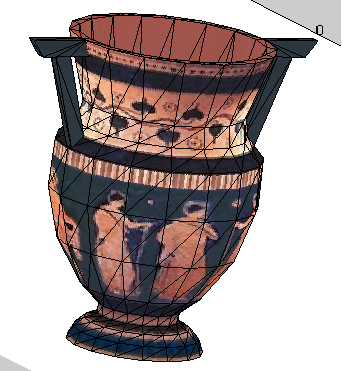
Show a 3D triangulated mesh ( patch ) with a texture

| Watch this File

File Information
Description

This function PATCHT, will show a triangulated mesh like Matlab function Patch but then with a texture.
 
  patcht(FF,VV,TF,VT,I,Options);
 
  inputs,
    FF : Face list 3 x N with vertex indices
    VV : Vertices 3 x M
    TF : Texture list 3 x N with texture vertex indices
    VT : Texture Coordinates s 2 x K, range must be [0..1] or real pixel postions
    I : The texture-image RGB [O x P x 3] or Grayscale [O x P]
    Options : Structure with options for the textured patch such as
            EdgeColor, EdgeAlpha see help "Surface Properties :: Functions"
 
    Options.PSize : Special option, defines the image texturesize for each
            individual polygon, a low number gives a more block
            like texture, defaults to 64;
 
  note:
    On a normal PC displaying 10,000 faces will take about 6 sec.
 
  Example,
 
   % Load Data;
    load testdata;
   % Show the textured patch
    figure, patcht(FF,VV,TF,VT,I);
   % Allow Camera Control (with left, right and center mouse button)
    mouse3d

MATLAB release MATLAB 7.10 (2010a)
Tags for This File  
Everyone's Tags
Tags I've Applied
Add New Tags Please login to tag files.
Comments and Ratings (6)
26 Oct 2010 Peter Bone

I'm using 2008b. The example did not texture map correctly. I did not get the image shown. Something is wrong.

27 Oct 2010 Dirk-Jan Kroon

*Peter-bone,
You can try to change the figure “Renderer” (painters, z-buffer or OpenGL), after you displayed your textured-object.
set(gcf,'Renderer','OpenGl');

But it can also be a problem with your video-card driver.

05 Jan 2011 Paulo  
20 Jan 2011 Nikolay Chumerin

Perfect job! Thank you! You saved a lot of my time. Just one remark: in the comments/help you wrongly specified the size of the input matrices FF, VV, TF and VT. They should be transposed.

23 Jan 2011 Luca Baglivo

It would be appreciated to change the help with the correct matrix sizes.
A strange thing I found is that it works correctly only if I flip the x and y image coordinate in the matrix, could you check?
Finally, with gray images it show color-mapped texture. The work-around I found is to use three equal layer of gray levels like a color image.

21 Mar 2012 Gabriel Peyre

This is awesome, I have been looking for such a code for a such a long time. Congrats.

Please login to add a comment or rating.
Tag Activity for this File
Tag Applied By Date/Time
texture Dirk-Jan Kroon 02 Jul 2010 09:34:11
patch Dirk-Jan Kroon 02 Jul 2010 09:34:11
3d Dirk-Jan Kroon 02 Jul 2010 09:34:11
triangulated Dirk-Jan Kroon 02 Jul 2010 09:34:11
textures Dirk-Jan Kroon 02 Jul 2010 09:34:11
vertices Dirk-Jan Kroon 02 Jul 2010 09:34:11
texture vertices Dirk-Jan Kroon 02 Jul 2010 09:34:11
texture coordinates Dirk-Jan Kroon 02 Jul 2010 09:34:11
coordinates Dirk-Jan Kroon 02 Jul 2010 09:34:11
show Dirk-Jan Kroon 02 Jul 2010 09:34:11
render Dirk-Jan Kroon 02 Jul 2010 09:34:11
polygons Dirk-Jan Kroon 02 Jul 2010 09:34:11
textureimage Dirk-Jan Kroon 02 Jul 2010 09:34:11
image Dirk-Jan Kroon 02 Jul 2010 09:34:11
visualisation Dirk-Jan Kroon 02 Jul 2010 09:34:11
visualization Dirk-Jan Kroon 02 Jul 2010 09:34:11
visible Dirk-Jan Kroon 02 Jul 2010 09:34:11
patch Clint 13 Jan 2011 13:46:33
textures James Gerber 18 Apr 2011 16:28:36
triangulated AM 04 Aug 2011 10:56:23

Contact us at files@mathworks.com