
Code covered by the BSD License  

Highlights from
PLOT2AXES

3.33333

3.3 | 6 ratings Rate this file 29 Downloads (last 30 days) File Size: 5.56 KB File ID: #7426
image thumbnail

PLOT2AXES

by Jiro Doke


12 Apr 2005 (Updated 30 Dec 2009)

Plot a set of data with two different axes.

| Watch this File

File Information
Description

PLOT2AXES(X, Y, 'Param1', 'Value1', ...) plots X versus Y with secondary axes. The following parameters are accepted [default values]:

  xloc ['top']: location of secondary X-axis
  yloc ['right']: location of secondary Y-axis
  xscale [1]: scaling factor for secondary X-axis (scalar)
  yscale [1]: scaling factor for secondary Y-axis (scalar)

xscale and yscale can also be an anonymous function that describes the relationship between the 2 axes, such as the equation relating Celsius and Fahrenheit: @(x) 5/9*(x-32)

  xlim [NaN NaN]
  ylim [NaN NaN]:
xlim/ylim in the primary axes (secondary is adjusted accordingly). The default is naturally selected by the plotting function.

PLOT2AXES(@FUN, ...) uses the plotting function @FUN instead of PLOT to produce the plot. @FUN should be a function handle to a plotting function, e.g. @plot, @semilogx, @semilogy, @loglog ,@stem, etc. that accepts the syntax H = FUN(...). Optional arguments accepted by these plotting functions are also allowed (e.g. PLOT2AXES(X, Y, 'r*', ...))

[AX, H] = PLOT2AXES(...) returns the handles of the primary and secondary axes (in that order) in AX, and the handles of the graphic objects in H.

Right-click on the axes to bring up a context menu for adding grids to the axes.

The actual data is plotted in the primary axes. The primary axes lie on top of the secondary axes. After the execution of this function, the primary axes become the current axes. If the next plot replaces the axes, the secondary axes are automatically deleted.

When you zoom and pan, the secondary axes will automatically adjust itself (only available on R2006b or later). For older releases of MATLABĀ®, there will be a "Fix Axes" menu, which let's you adjust the limits.

PLOT2AXES('FixAxes') fixes the secondary limits of all figures created using plot2axes.

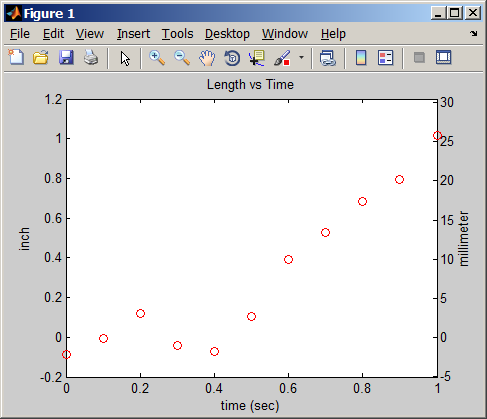
Example 1:
  x = 0:.1:1;
  y = x.^2 + 0.1*randn(size(x));
  [ax, h] = plot2axes(x, y, 'ro', 'yscale', 25.4);
  title('Length vs Time');
  ylabel(ax(1), 'inch');
  ylabel(ax(2), 'millimeter');
  xlabel('time (sec)');

Example 2:
  x = 1:10;
  y = 50*rand(size(x));
  [ax, h] = plot2axes(x, y, 'ro', 'yscale', @(x) 5/9*(x-32), ...
      'xscale', 2.20);
  xlabel(ax(1), 'kg'); ylabel(ax(1), 'Fahrenheit');
  xlabel(ax(2), 'lb'); ylabel(ax(2), 'Celcius');

MATLAB release MATLAB 7.9 (2009b)
Other requirements Tested R14 - R2009b
Tags for This File  
Everyone's Tags
Tags I've Applied
Add New Tags Please login to tag files.
Comments and Ratings (7)
27 Apr 2005 adi sayoga

good

13 Jul 2005 Garner Izru

Useful

18 Aug 2005 Frode Seland  
30 Nov 2005 Sloane Wiktorowicz

Runs into trouble when having inversely proportional axes (e.g., wavelength on bottom and energy on top), because one axis must be reversed. This can be overcome by editing the function plotxx.

28 Feb 2006 Kevin Turner

For the most part, this is a great tool. However, in cases where the parent of the current axes is not a figure (i.e. in a GUI application the parent may be a uipanel), then the function will not work as is.

02 Mar 2006 Jiro Doke

Kevin: I have uploaded an updated version that should let you plot on a uipanel.

Sloane: Yes, that is a limitation. I have indicated in the help text that the axes relation must be linear.

26 Feb 2009 Yuri Kotliarov

When you add large enough title to the primary axes (which is current), it get shifted down, but not the secondary axes. If title applied to the secondary axes, no shift, but the title may appear too high. Took me some time to figure out the problem. Anyway, great function. Thanks

Please login to add a comment or rating.
Updates
28 Apr 2005

v1.2 - remove tick labels for secondary axes if no scaling factors are specified. Also, fixed bug in matching the scaling type (linear or log).
v1.3 - added the 'Fix Axes' menu for adjusting the secondary axes limits after zooming.

16 Jun 2005

Added option for specifying an equation for XScale and YScale

03 Mar 2006

Fixed problem plotting on uipanel, where the parent of the axes is not a figure.

30 Dec 2009

Added auto adjust of axes limits (works R2006b and later). Now works with nonlinear scaling. Added ability to add grids interactively. Use of function handles instead of strings.

Tag Activity for this File
Tag Applied By Date/Time
specialized Jiro Doke 22 Oct 2008 07:45:41
plotting Jiro Doke 22 Oct 2008 07:45:41
double axes Jiro Doke 22 Oct 2008 07:45:41
plot Jiro Doke 22 Oct 2008 07:45:41
plotyy Jiro Doke 22 Oct 2008 07:45:41
plotxx Jiro Doke 22 Oct 2008 07:45:41
axis Jiro Doke 22 Oct 2008 07:45:41
double axes JePo 05 Oct 2009 10:38:57
double axes Phillip 13 Oct 2009 08:40:24
plotyy Felipe G. Nievinski 04 Mar 2010 13:19:33
double axes Gregory 09 Feb 2012 14:02:57

Contact us at files@mathworks.com