Convert Identical Functions Called with Different Data Types
R2026bThis example shows how to convert a MATLAB® algorithm containing specialized functions to fixed point using automated
fixed-point conversion. Each instance of the specialized function can have a different
data type after conversion. This example uses the MATLAB
Coder™
codegen command. You can also perform the conversion using
fiaccel.
In a local writable folder, create the function
mtictac.m. The input is a Tic-Tac-Toe game board. The output is the winning player. The output is0if there is no winner.function a = mtictac(b) % Input is a Tic-Tac-Toe board. % The output is the winning player % or zero if none. % Copyright 2022 The MathWorks, Inc. for i = 1:3 a = winner(b(i,:)); if a > 0 return; end a = winner(b(:,i)); if a > 0 return; end end a = winner(diag(b)); if a>0 return; end a = winner(diag(flip(b)));
In the same folder, create the function,
winner.m. Thewinner.mfunction is called by the functionmtictac.m.function a = winner(b) % Copyright 2022 The MathWorks, Inc. x = mean(b); if x <= - 1 a = 1; elseif x >= 1 a = 2; else a = 0; end
In the same folder, create a test file,
mtictac_test.m, that calls themtictacfunction.mtictac([-1 0 0; 0 -1 0; 0 0 0]); mtictac([1 0 0; 0 1 0; 0 0 1]); mtictac([0 0 -1; 0 0 -1; 0 0 -1]);
At the command line, create a
coder.FixPtConfigobject, and specify the test bench asmtictac_test.m.fixptcfg = coder.config('fixpt'); fixptcfg.TestBenchName = 'mtictac_test';
Generate fixed-point code for
mtictac.mcodegen -float2fixed fixptcfg mtictac
When code generation is complete, click View report in the command window.
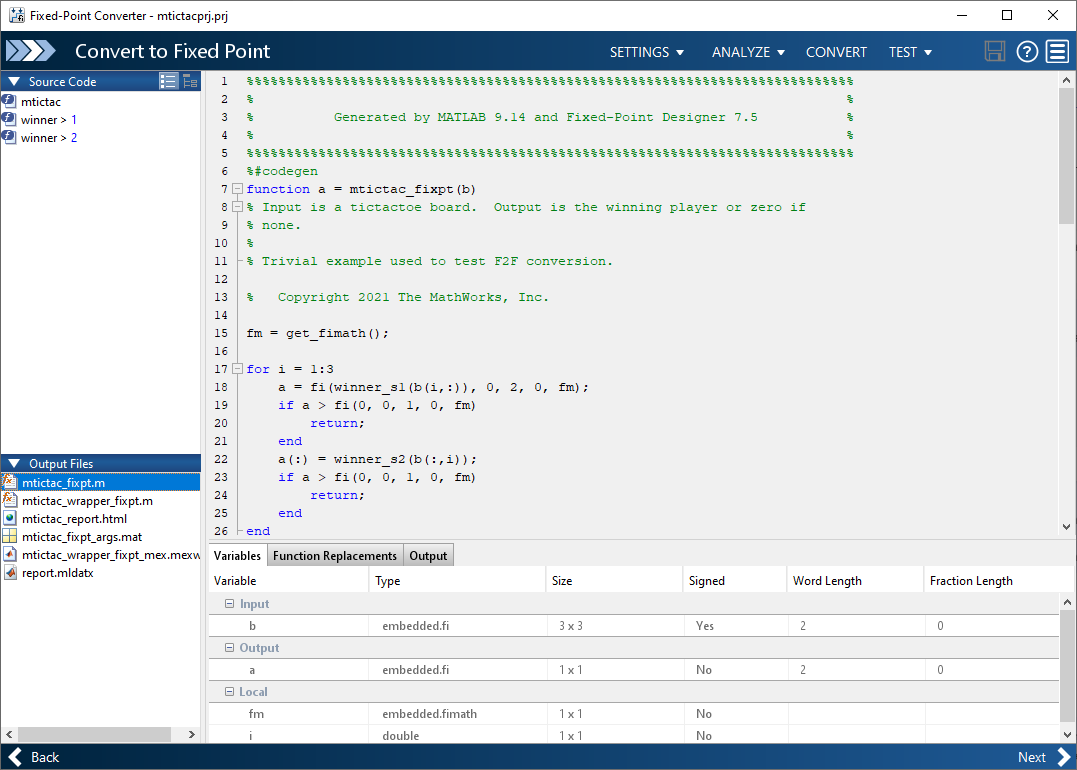
Observe that the data types for each individual call of the
winnerfunction are customized to use different data types.