Simulate, Detect, and Track Anomalies in a Landing Approach
The example shows how to automatically detect deviations and anomalies in aircraft making final approaches to an airport runway. In this example, you will model an ideal landing approach trajectory and generate variants from it, simulate radar tracks, and issue warnings as soon as the tracks deviate from safe landing rules.
Introduction
Landing is a safety critical stage of flight. An aircraft in final approach to landing must align itself with the runway, gradually descend to the ground, and reduce its ground speed while keeping it safely above stall speed. All these steps are done to ensure that the aircraft touches the ground softly to reduce the risk to passengers and to avoid physical damage to the aircraft or the runway. These rules can be easily defined by an aviation professional or they can be inferred from tracking data using machine learning [1]. In this example, you assume that the rules are already defined.
Major airports usually have multiple runways oriented in different directions. Approaching aircraft are guided by the air traffic controllers in the airport tower to land on one of the runways that is best aligned against the direction of wind at that time. During the approach, controllers monitor the aircraft based on tracking systems. Airport traffic has increased over the last decades and, with it, the workload on air traffic controllers has increased as well. As a result, there is a need to automatically and reliably alert air traffic controllers to aircraft that approach the landing point in an unsafe manner: not aligned well with the runway, descending too quickly or too slowly, or approaching too quickly or too slowly.
Generate and Label Truths
You define a landing approach trajectory into Logan International Airport in Boston, MA using a geoTrajectory object. The trajectory waypoints are aligned with runway 22L, which runs from north-east to south-west, and a glide slope of 3 degrees. The time of arrival and climb rate are defined to slow the approaching aircraft to a safe speed and a smooth touchdown. Note that the positive value of climb rate is used for a descending trajectory. You use helperPertScenarioGlobeViewer (see the supporting file) to visualize the trajectory on the map.
baselineApproachTrajectory = geoTrajectory([42.7069 -70.8395 1500; 42.5403 -70.9203 950; 42.3736 -71.001 0],[0;180;400],...
    'ClimbRate', [6; 3.75; 3.75]);

viewer = helperPertScenarioGlobeViewer;
viewer.TargetHistoryLength = 0;
viewer.TrackHistoryLength = 0;
viewer.TrackLabelScale = 0.75;
positionCamera(viewer, [42.3072 -70.8463 12455], [0 -34 335]);
plotTrajectory(viewer, baselineApproachTrajectory, 'Color', [15 255 255]/255, "Width", 1);
For a trajectory coming to land at Logan airport on runway 22L to be safe, the trajectory must satisfy the following rules:
The trajectory must be closely aligned with the runway direction.
The glide slope must be between 2.5 and 4 degrees in the last 20963 meters. At distances above 20963 meters, the altitude must be at least 3000 ft.
The speed must be between 120 knots and 180 knots at the landing point. The upper speed bound can increase linearly with distance from the landing point.
You define these rules using the helperTrajectoryValidationRule (see the supporting file) and visualize the rules on the map.
% Define and show trajectory rules.
trajRules = defineTrajectoryRules();
showRules(viewer, trajRules)
snap(viewer)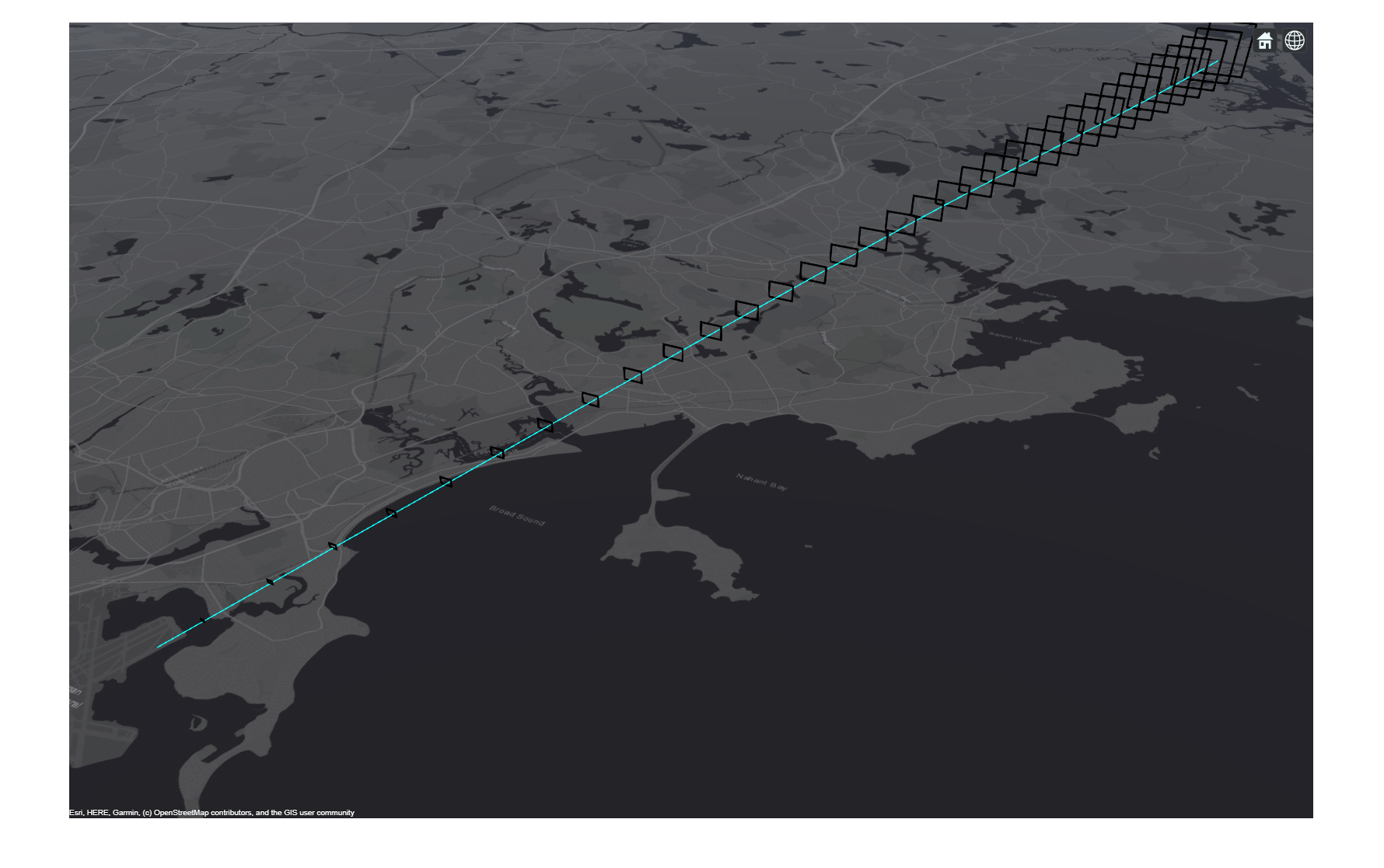
You use the perturbations object function to define a normal distribution around the baseline trajectory, approachTrajectory. Each waypoint in the trajectory is perturbed with a zero-mean normal distribution and a standard deviation that gets smaller from the first waypoint to the last (the landing point). At the first waypoint, the standard deviation is 5e-3 degrees in longitude and 300 meters in altitude. The standard deviation decreases to 1e-3 degrees in longitude and 150 meters in altitude in the mid-point and then to 1e-4 degrees in longitude and 0 in altitude at the end-point on the ground.
% Define perturbation to the approach trajectory
perturbations(baselineApproachTrajectory, 'Waypoints', 'Normal', zeros(3,3), [0 5e-3 300; 0 1e-3 150; 0 1e-4 0]);
To create 20 trajectories that are perturbed from the baseline trajectory, first clone the trajectory and then perturb it.
% Generate perturbed trajectories
s = rng(2021, 'twister'); % Set random noise generator for repeatable results
numTrajectories = 20;
trajectories = cell(1,numTrajectories);
for i = 1:numTrajectories
    trajectories{i} = clone(baselineApproachTrajectory);
    perturb(trajectories{i});
end
To see which perturbed trajectories satisfy the rules of a safe approach to landing, you use the helper function validateTrajectory, provided at the bottom of this page. The function declares a trajectory to be anomalous if at least 1% of the points sampled from it violate any trajectory rule.
[truthAnomalyFlags, truthPercentAnomalousSteps] = validateTrajectory(trajectories, trajRules);
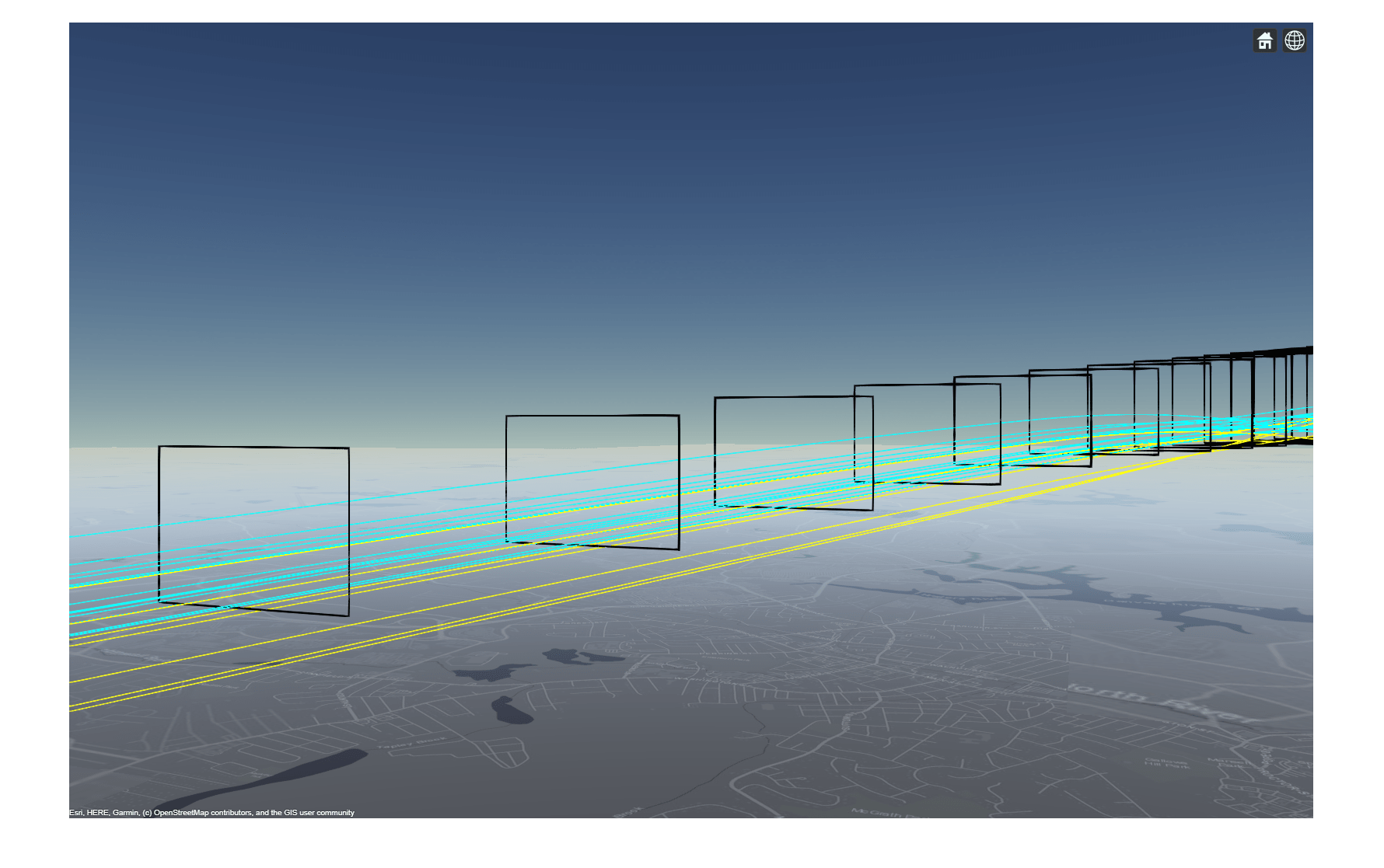
Plot the trajectories in yellow for anomalous trajectories and cyan for safe approaches. Overall, there are 7 anomalous trajectories out of the 20 generated trajectories.
plotTrajectory(viewer, trajectories(truthAnomalyFlags), 'Color', [255 255 17]/255, "Width", 1);
plotTrajectory(viewer, trajectories(~truthAnomalyFlags), 'Color', [15 255 255]/255, "Width", 1);
positionCamera(viewer, [42.4808 -70.916 1136], [0 0 340]);
snap(viewer)
Define a Scenario
Detecting anomalies in real time based on tracking data is a challenge for several reasons. First, since the tracking data is imperfect with noise, the tracking results are uncertain. As a result, some tolerances must be provided to avoid issuing false warnings. Second, the sensors report false detections, and the tracking system must be careful not to confirm tracks based on these false detections. The careful confirmation requires that the tracking system takes more time to confirm the tracks. To avoid excessive warnings on false tracks, you issue warnings only after a track is confirmed.
You define an Earth-centered tracking scenario.
% Create an Earth-centered tracking scenario
scenario = trackingScenario('UpdateRate', 1, 'IsEarthCentered', true);
Aircraft approaching landing in an airport are scheduled to avoid aerodynamic impact from one aircraft on the one following in its wake. The minimum safe time difference between two aircraft is one minute.
You use the perturbations and perturb object functions again to perturb the TimeOfArrival of each trajectory and to make sure no additional perturbations are applied to the Waypoints. Then you attach each trajectory to a new platform. To perturb the entire scenario, you use the perturb object function.
% Schedule the trajectories and attach each to a platform.
for i = 1:numTrajectories
    perturbations(trajectories{i}, 'TimeOfArrival', 'Uniform',(i-1)*60, (i-1)*60+10);
    perturbations(trajectories{i}, 'Waypoints', 'None');
    platform(scenario, 'Trajectory', trajectories{i});
end
perturb(scenario);
Like other major airports in the USA, Logan uses an Airport Surface Detection Equipment - Model X (ASDE-X) to track aircraft during final approach and on the ground [2]. ASDE-X relies on an airport surveillance radar, automatic dependent surveillance–broadcast (ADS–B) reports from the approaching aircraft, and other methods to provide accurate tracking which is updated every second (for more details, see [1]).
To simplify the model of this tracking system, you use a statistical radar model, fusionRadarSensor, attached to the airport tower, and connect the sensor to a trackerGNN object. You configure the tracker to be conservative about confirming tracks by setting the ConfirmationThreshold to confirm if a track receives 4-out-of-5 updates.
asdex = fusionRadarSensor(1, ...
    'ScanMode', 'No Scanning', ...
    'MountingAngles', [0 0 0], ...
    'FieldOfView', [360;20], ...
    'UpdateRate', 1, ...
    'ReferenceRange', 40000,...
    'RangeLimits', [0 50000], ...
    'RangeResolution', 100, ...
    'HasElevation', true, ...
    'HasINS', true, ...
    'DetectionCoordinates', 'Scenario', ...
    'FalseAlarmRate', 1e-7, ...
    'ElevationResolution', 0.4, ...
    'AzimuthResolution', 0.4);
p = platform(scenario, 'Position', [42.3606 -71.011 0], 'Sensors', asdex);
tracker = trackerGNN("AssignmentThreshold", [100 2000], "ConfirmationThreshold", [4 5]);
tam = trackAssignmentMetrics('AssignmentThreshold', 100, 'DivergenceThreshold', 200);
Run the Scenario and Detect Anomalous Tracks
In the following lines, you simulate the scenario and track the approaching aircraft. You use the validateTracks helper function to generate anomaly warnings for the tracks. You can see the code for the function at the bottom of this page.
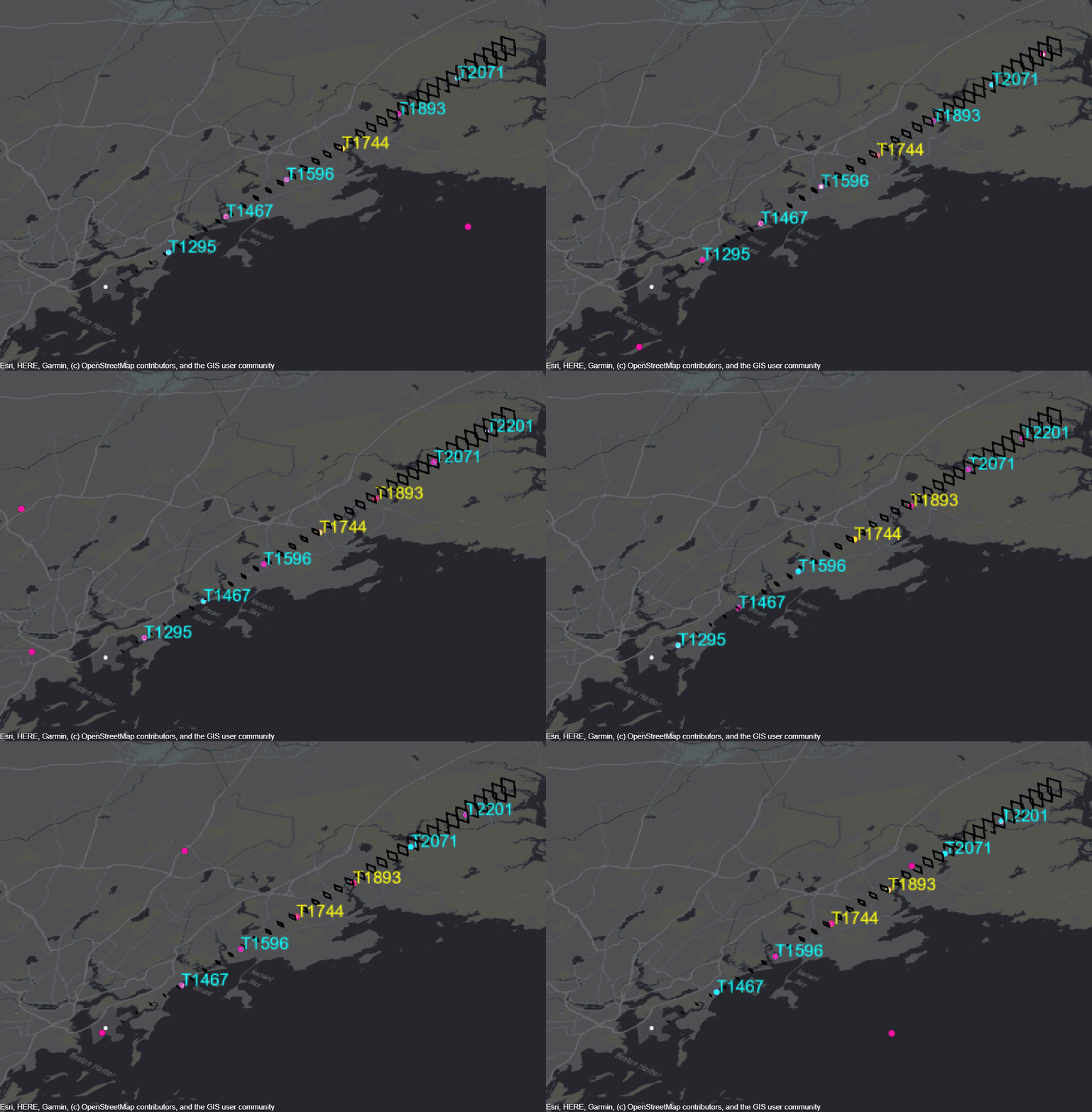
Tracks that violate the safe approach rules are shown in yellow while tracks that follow these rules are shown in cyan. Note that the warning is issued immediately when the track violates any rule and is removed when it satisfies all the rules.
% Clean the display and prepare it for the simulation.
clear(viewer)
positionCamera(viewer, [42.3072 -70.8463 12455], [0 -34 335]);
showRules(viewer, trajRules)
clear validateTracks

% Main loop
while advance(scenario)
    % Collect detections
    dets = detect(scenario);

    % Update the tracker and output tracks.
    if ~isempty(dets) || isLocked(tracker)
        tracks = tracker(dets, scenario.SimulationTime);
    else
        tracks = objectTrack.empty;
    end

    % Get platform poses and assignment between tracks and truths.
    poses = platformPoses(scenario,"Quaternion","CoordinateSystem","Cartesian");
    tam(tracks,poses);
    [assignedTrackIDs, assignedTruthIDs] = currentAssignment(tam);

    % Validate the tracks with rules to find anomalous tracks.
    [tracks, trackAnomalyHistory] = validateTracks(tracks, trajRules, assignedTrackIDs, assignedTruthIDs);

    % Visualize
    updateDisplay(viewer,scenario.SimulationTime,[scenario.Platforms{:}],dets,[],tracks);
end
The following gif was taken when for a minute of simulation from the 900 seconds to the 960 seconds. It shows tracks identified as safe in cyan and tracks identified as anomalous in yellow. This identification is done at every simulation step as can be seen for track 1893.
Compare Track Anomaly Reports to Truth
To verify that the anomaly warnings were issued for the right tracks, you use the analyze helper function, shown at the bottom of this page.
The function uses the trackAnomalyHistory collected during the simulation and compares it to the truthPercentAnomalousSteps calculated for each trajectory. Similar to truth, tracks are assigned anomaly flags if they were declared anomalous at least 1% of the time steps. You can see that the anomalies are issued correctly for the seven trajectories that were found to be anomalous.
comparisonTable = analyze(trackAnomalyHistory ,truthPercentAnomalousSteps);
disp(comparisonTable)
    TruthID    Truth Anomaly Flag    Track Anomaly Flag
    _______    __________________    __________________

       1             false                 false
       2             false                 false
       3             false                 false
       4             false                 false
       5             false                 false
       6             false                 false
       7             true                  true
       8             true                  true
       9             false                 false
      10             true                  true
      11             false                 false
      12             false                 false
      13             true                  true
      14             true                  true
      15             false                 false
      16             false                 false
      17             false                 false
      18             false                 false
      19             true                  true
      20             true                  true
Summary
In this example, you learned how to use tracking data to generate real-time warnings for anomalies like an unsafe landing approach.
You used geoTrajectory to define an ideal landing approach trajectory in geographic coordinates. You then used perturbations and perturb to create 20 trajectories that deviate from the ideal landing approach trajectory and to schedule the trajectories one after the other in the trackingScenario. To model an airport tracking system, you simplified the system model using a statistic radar model, by the fusionRadarSensor System object, and a tracker, by the trackerGNN System object.
References
Raj Deshmukh and Inseok Hwang, "Anomaly Detection Using Temporal Logic Based Learning for Terminal Airspace Operations", AIAA SciTech Forum, 2019.
Federal Aviation Administration, "Fact Sheet - Airport Surface Detection Equipment, Model X (ASDE-X)". Retrieved May 2020.
Supporting Functions
defineTrajectoryRules Define trajectory rules
function trajRules = defineTrajectoryRules
% This function defines rules for safe approach to landing on runway 22L at
% Logan International Airport in Boston, MA.

% The function uses the helperTrajectoryValidationRule attached as a
% supporting file to this example

% The trajectory must be closely aligned with the runway direction.
longitudeRule = helperTrajectoryValidationRule([42.37 42.71], [0.4587, -90.4379], [0.5128, -92.730]);

% The glide slope must be between 2.5 and 4 degrees in the last 20963
% meters. At distances above 20963 meters, the altitude must be at least
% 3000 ft. The rules are relative to range from the runway landing point.
altitudeRule1 = helperTrajectoryValidationRule([100 20963], [sind(2.5) 0], [sind(4) 0]);
altitudeRule2 = helperTrajectoryValidationRule([20963 40000], 3000 * 0.3048, [sind(4) 0]);

% The speed must be between 120 knots and 180 knots at the landing point.
% The upper speed bound can increase linearly with distance from the
% landing point.
speedRule = helperTrajectoryValidationRule([0 40000], 61.733, [1e-3 100]);

% Collect all the rules.
trajRules = [longitudeRule;altitudeRule1;altitudeRule2;speedRule];
end
validateTrajectory Validate each trajectory
function [truthAnomalyFlags, percentAnomalousSteps] = validateTrajectory(trajectories, rules)
numTrajectories = numel(trajectories);
numAnomalousSteps = zeros(1, numTrajectories);
for tr = 1:numTrajectories
    if iscell(trajectories)
        traj = trajectories{tr};
    elseif numTrajectories == 1
        traj = trajectories;
    else
        traj = trajectories(tr);
    end
    timesamples = (traj.TimeOfArrival(1):traj.TimeOfArrival(end));
    [pos,~,vel] = lookupPose(traj, timesamples);
    posECEF = lookupPose(traj, timesamples, 'ECEF');
    landingPoint = [1.536321  -4.462053   4.276352]*1e6;

    for i = 1:numel(timesamples)
        distance = norm(posECEF(i,:) - landingPoint);
        isLongitudeValid = validate(rules(1),pos(i,1),pos(i,2));
        isAltitudeValid = (validate(rules(2),distance,pos(i,3)) && validate(rules(3),distance,pos(i,3)));
        isSpeedValid = validate(rules(4),distance,norm(vel(i,:)));
        isValid = isLongitudeValid && isAltitudeValid && isSpeedValid;
        numAnomalousSteps(tr) = numAnomalousSteps(tr) + ~isValid;
    end
end
percentAnomalousSteps = numAnomalousSteps ./ numel(timesamples) * 100;
truthAnomalyFlags = (percentAnomalousSteps > 1);
end
validateTrack Validate tracks vs anomaly rules
function [tracks, history] = validateTracks(tracks, rules, assignedTrackIDs, assignedTruthIDs)
persistent trackAnomalyHistory
if isempty(trackAnomalyHistory)
    trackAnomalyHistory = repmat(struct('TrackID', 0, 'AssignedTruthID', 0, 'NumSteps', 0, 'NumAnomalousSteps', 0),30,1);
end

posECEF = getTrackPositions(tracks, [1 0 0 0 0 0; 0 0 1 0 0 0; 0 0 0 0  1 0]);
pos = fusion.internal.frames.ecef2lla(posECEF);
vel = getTrackVelocities(tracks, [0 1 0 0 0 0; 0 0 0 1 0 0; 0 0 0 0 0 1]);
numTracks = numel(tracks);
landingPoint = [1.536321  -4.462053   4.276352]*1e6;

trackIDs = [trackAnomalyHistory.TrackID];

for tr = 1:numTracks
    % Only validate tracks if altitude is greater than 0
    if pos(tr,3) > 15
        distance = norm(posECEF(tr,:) - landingPoint);
        isLongitudeValid = validate(rules(1),pos(tr,1),pos(tr,2));
        isAltitudeValid = (validate(rules(2),distance,pos(tr,3)) && validate(rules(3),distance,pos(tr,3)));
        isSpeedValid = validate(rules(4),distance,norm(vel(tr,:)));
        isValid = isLongitudeValid && isAltitudeValid && isSpeedValid;
    else
        isValid = true;
    end

    tracks(tr).ObjectClassID = uint8(~isValid) + uint8(isValid)*6; % To get the right color for tracks

    % Update anomlay history
    inHistory = (tracks(tr).TrackID == trackIDs);
    if any(inHistory)
        trackAnomalyHistory(inHistory).NumSteps = trackAnomalyHistory(inHistory).NumSteps + 1;
        trackAnomalyHistory(inHistory).NumAnomalousSteps = trackAnomalyHistory(inHistory).NumAnomalousSteps + ~isValid;
    else
        ind = find(trackIDs == 0, 1, 'first');
        trackAnomalyHistory(ind).AssignedTruthID = assignedTruthIDs(tracks(tr).TrackID == assignedTrackIDs);
        trackAnomalyHistory(ind).TrackID = tracks(tr).TrackID;
        trackAnomalyHistory(ind).NumSteps = 1;
        trackAnomalyHistory(ind).NumAnomalousSteps = ~isValid;
    end
end
history = trackAnomalyHistory;
end
analyze - Analyze the track anomaly history and compare it to the truth anomaly percentage
function comparisonTable = analyze(trackAnomalyHistory, percentTruthAnomalous)
trackAnomalyHistory = trackAnomalyHistory([trackAnomalyHistory.TrackID] > 0);
anomalousSteps = [trackAnomalyHistory.NumAnomalousSteps];
numSteps = [trackAnomalyHistory.NumSteps];
trackAssignedTruths = [trackAnomalyHistory.AssignedTruthID];
assignedTruths = unique(trackAssignedTruths);
numTrackAnomalousSteps = zeros(numel(assignedTruths),1);
numTrackSteps = zeros(numel(assignedTruths),1);

for i = 1:numel(assignedTruths)
    inds = (assignedTruths(i) == trackAssignedTruths);
    numTrackAnomalousSteps(i) = sum(anomalousSteps(inds));
    numTrackSteps(i) = sum(numSteps(inds));
end
percentTrackAnomalous = numTrackAnomalousSteps ./ numTrackSteps * 100;
trueAnomaly = (percentTruthAnomalous > 1)';
anomalyFlags = (percentTrackAnomalous > 1);
comparisonTable = table((1:20)',trueAnomaly, anomalyFlags,...
    'VariableNames', {'TruthID', 'Truth Anomaly Flag', 'Track Anomaly Flag'});
end

