

You are now following this Submission
- You will see updates in your followed content feed
- You may receive emails, depending on your communication preferences
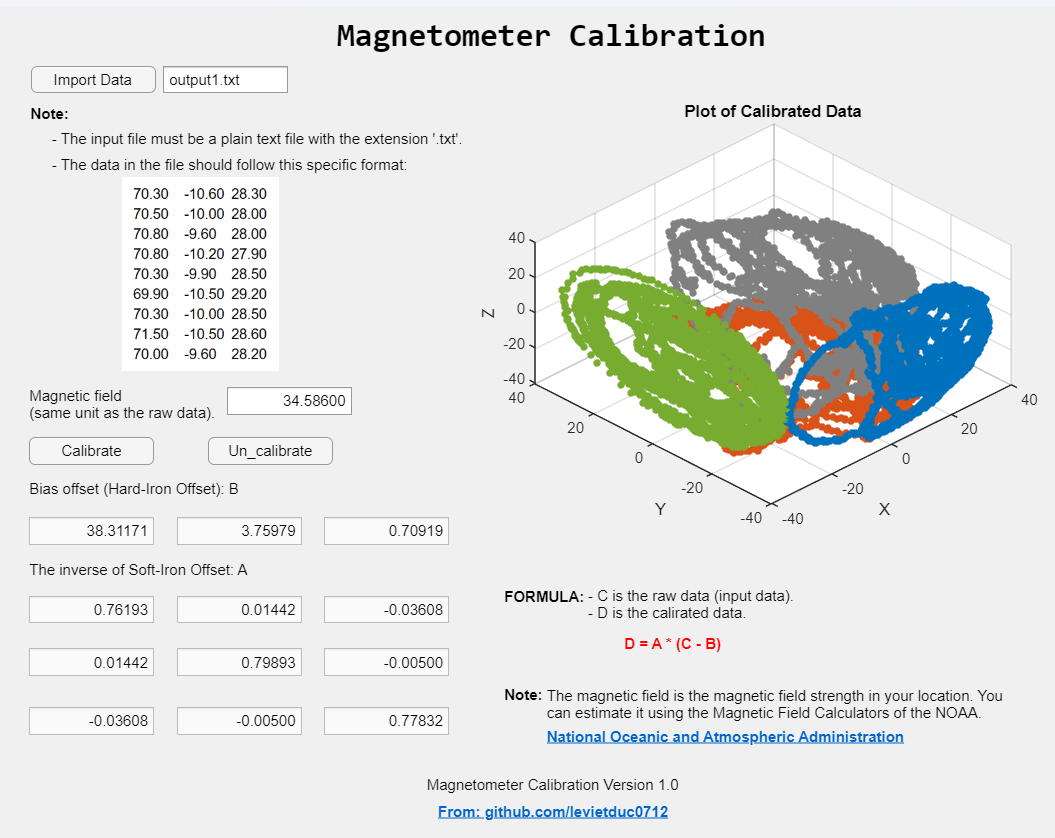
The Magnetometer Calibration App is designed to help users calibrate their magnetometers by correcting for hard-iron and soft-iron distortions. This ensures accurate and reliable magnetic field measurements.
- Easy-to-use interface for uploading and processing data
- Automatic calculation of hard-iron and soft-iron offsets
- Output of calibrated magnetometer data
- Visualization of raw and calibrated data.
-
Prepare your data file:
- The input file must be a plain text file with the extension
.txt. - Data format: Each line should contain three floating.
- Point numbers separated by a tab (
\t), representing the X, Y, and Z values respectively. - Example:
70.30 -10.60 28.30 70.50 -10.00 28.00 70.80 -9.60 28.00 70.80 -10.20 27.90 70.30 -9.90 28.50 69.90 -10.50 29.20 70.30 -10.00 28.50 71.50 -10.50 28.60 70.00 -9.60 28.20 - The input file must be a plain text file with the extension
- Run the app:
- Follow the on-screen instructions to upload your data file and perform the calibration.
- The app will output the calibrated magnetometer data and display visualizations comparing raw and calibrated data.
This project is licensed under the GPL-3.0 license. See the LICENSE file for details.
For any questions or support, please contact levietduc0712@gmail.com.
Cite As
Le Duc (2026). CalibMag (https://github.com/levietduc0712/CalibMag), GitHub. Retrieved .
General Information
- Version 1.0.0 (141 KB)
-
 View License on GitHub
MATLAB Release Compatibility
- Compatible with any release
Platform Compatibility
- Windows
- macOS
- Linux
Versions that use the GitHub default branch cannot be downloaded
| Version | Published | Release Notes | Action |
|---|---|---|---|
| 1.0.0 |
To view or report issues in this GitHub add-on, visit the GitHub Repository.
To view or report issues in this GitHub add-on, visit the GitHub Repository.

