Matlab Project File
Editor's Note: This file was selected as MATLAB Central Pick of the Week
What is it for?
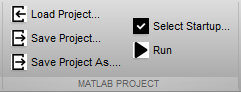
I like to logically separate my files into several folders (f.e. model, gui, etc.), so for each my project I have specific folder structure. Each time I am opening Matlab I have to add all of my folders to the paths. I don't want to make it permanently, because I have several projects with different project structure. So I have my main folder, and foldes under it. This toolbox can store my folder structure in a file, and automatically add my folders to the path using this project file.
To save current filder structure use: MpfCommands('save'); (or shortcut)
To load folder structure from file use: MpfCommands('load'); (or shortcut)
When I am clicking Run on editor tab, matlab tryes to run current editting file,
so when I am debugging my main file (f.e. gui) I shold after anu change of subfunctions switch to my main file. To make it easier for me I need to a way to select running file (like startup project in VS), and command to run it.
To select run file use: MpfCommands('selectstartup'); (or shortcut)
To run selected file use: MpfCommands('run'); (or shortcut)
Installation:
To install shortcuts and quick access buttons use: MpfCommands('install');
To uninstall shortcuts and quick access buttons use: MpfCommands('uninstall');
If it will no work, you can make shortcuts manually.
Cite As
Dmitry Ratner (2026). Matlab Project File (https://www.mathworks.com/matlabcentral/fileexchange/65974-matlab-project-file), MATLAB Central File Exchange. Retrieved .
MATLAB Release Compatibility
Platform Compatibility
Windows macOS LinuxCategories
Tags
Discover Live Editor
Create scripts with code, output, and formatted text in a single executable document.
doc/
| Version | Published | Release Notes | |
|---|---|---|---|
| 1.0 |
|
