alim
Set or query axes alpha limits
Syntax
alpha_limits = alim

alim([amin amax])

alim_mode = alim('mode')

alim('alim_mode')

alim(ax,...)
Description
alpha_limits = alim returns
the alpha limits (ALim property) of the current axes.
alim([amin amax]) sets the
alpha limits to the specified values. amin is the
value of the data mapped to the first alpha value in the alphamap,
and amax is the value of the data mapped to the
last alpha value in the alphamap. Data values in between are linearly
interpolated across the alphamap, while data values outside are clamped
to either the first or last alphamap value, whichever is closest.
alim_mode = alim('mode') returns the alpha limits mode
(ALimMode property) of the
current axes.
alim('alim_mode') sets the
alpha limits mode on the current axes. alim_mode can
be
auto— MATLAB® automatically sets the alpha limits based on the alpha data of the objects in the axes.manual— MATLAB does not change the alpha limits.
alim(ax,...) operates on the specified
Axes object or GeographicAxes object.
Examples
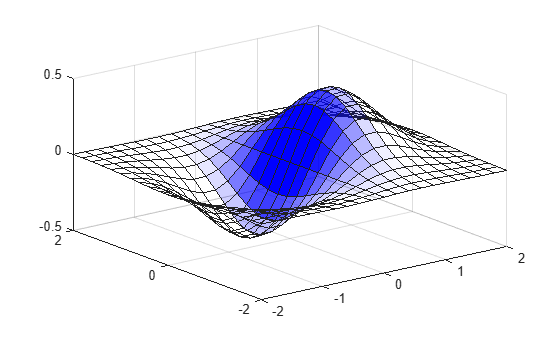
Plot a surface using the gradient of z as the alphamap. Adjust the alpha limits to see only where the gradient is between 0 and 0.15.
[x,y] = meshgrid(-2:.2:2);
z = x.*exp(-x.^2-y.^2);
surf(x,y,z+.001,'FaceAlpha','flat',...
    'AlphaDataMapping','scaled',...
    'AlphaData',gradient(z),...
    'FaceColor','blue');
alim([0 .15])
Version History
Introduced before R2006a

