alpha
Add transparency to objects in axes
Description
alpha sets the face transparency for objects
in the current axes that support transparency. Specify valuevalue
as 'clear' or 'opaque', or as a number in
the range [0, 1]. A value of 0 makes the objects transparent,
and value of 1 makes the objects fully opaque.
alpha controls the transparency of the
faces for patch, surface, and scatter objects in the axes. This option sets the
facealphaFaceAlpha on patch and surface objects. For scatter
objects, it sets the MarkerFaceAlpha and
MarkerEdgeAlpha properties.
alpha controls the interpretation
of the alpha data values for all image, patch, surface, and scatter objects in
the axes. This option sets the alphadatamappingAlphaDataMapping property on
the objects.
alpha( sets the transparency for
the objects specified by obj,___)obj. The option,
obj, can precede any of the input arguments in the
previous syntaxes. Use single quotes around input arguments that are character
arrays, for example, alpha(obj,'opaque').
alpha( sets the transparency for
the objects in the axes specified by ax,___)ax, instead of the
current axes. Specify ax as the first input argument. You
cannot specify both the ax and obj
inputs.
Examples
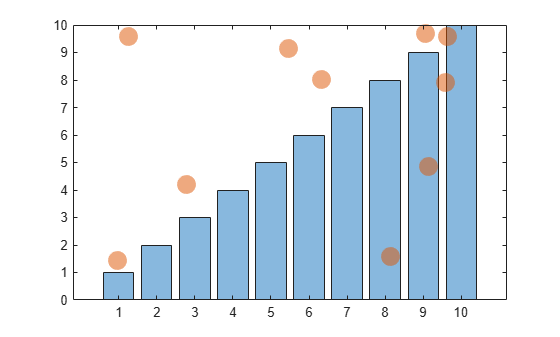
Create a bar chart and a scatter chart. Set the face transparency for both the bar series and scatter series object to 0.5.
bar(1:10)
hold on
scatter(10*rand(10,1),10*rand(10,1),'filled','SizeData',200)
hold off
alpha(.5)
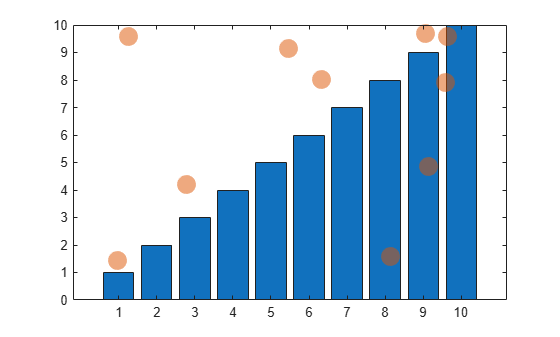
Create a bar chart and a scatter chart. Set the transparency for the scatter series object to 0.5 without affecting the bar series object.
b = bar(1:10);
hold on
s = scatter(10*rand(10,1),10*rand(10,1),'filled','SizeData',200);
hold off
alpha(s,.5)
Create a surface chart. Vary the transparency across the surface based on the z values.
s = surf(peaks);
alpha(s,'z')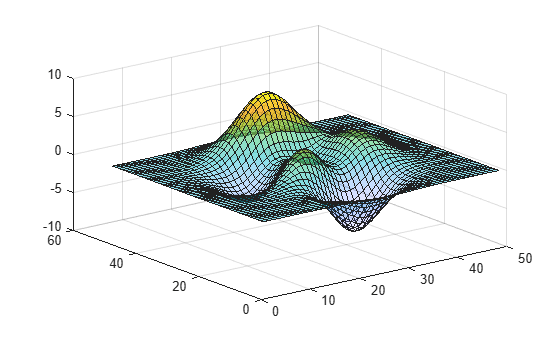
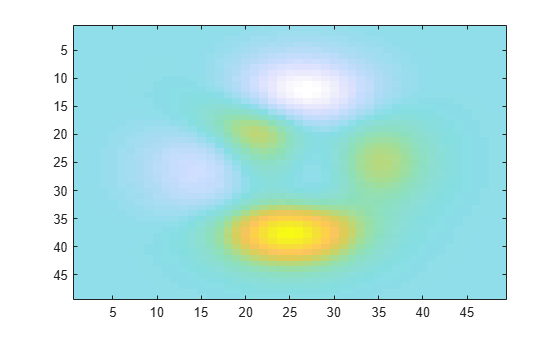
Create an image. Vary the transparency across the image based on the color values. By default, the image clamps the transparency values between 0 and 1. Values less than 0 are completely transparency and values greater than 1 are completely opaque. Instead, transform the transparency values to span the alphamap using the alpha scaled command.
imagesc(peaks)
alpha color
alpha scaled
Input Arguments
Version History
Introduced before R2006aStarting in R2020b, Scatter objects in the axes are affected
when you call the alpha function with the
alphadata, facealpha, or
alphadatamapping arguments without specifying a particular
object within the axes to modify.
In R2020a and earlier releases, the alphadata,
facealpha, and alphadatamapping arguments
have no effect on Scatter objects in the axes.
For example, this code creates a surface plot and a scatter plot, and then calls
the alpha function to vary the transparency along the
x-dimension. In R2020a, only the surface plot changes when
you call the alpha function. In R2020b, both plots are
affected.
[X,Y] = meshgrid(-10:10);
Z = ones(21,21) * -2;
surf(X,Y,Z)
hold on
scatter([-8 2 4 -5 5 3],[7 4 2 -1 -7 0],200,'filled')
alpha('x')

To prevent Scatter objects from changing, specify the object to
modify as the first argument to the alpha function. For
example, to update the preceding code, call the surf function
with an output argument s. Then pass s to the
alpha function to modify only the
Surface
object.
[X,Y] = meshgrid(-10:10);
Z = ones(21,21) * -2;
s = surf(X,Y,Z)
hold on
scatter([-8 2 4 -5 5 3],[7 4 2 -1 -7 0],200,'filled')
alpha(s,'x')

