| MATLAB Function Reference | ![]() |
![]()
ezmesh(fun)
ezmesh(fun,domain)
ezmesh(funx,funy,funz)
ezmesh(funx,funy,funz,[smin,smax,tmin,tmax])
ezmesh(funx,funy,funz,[min,max]
ezmesh(...,n)
ezmesh(...,'circ')
ezmesh(axes_handle,...)
h = ezmesh(...)
ezmesh(fun) creates a graph of fun(x,y) using the mesh function. fun is plotted over the default domain: -2π < x < 2π, -2π < y < 2π.
fun can be a function handle for an M-file function or an anonymous function (see Function Handles and Anonymous Functions) or a string (see the Remarks section).
ezmesh(fun,domain) plots fun over the specified domain. domain can be either a 4-by-1 vector [xmin, xmax, ymin, ymax] or a 2-by-1 vector [min, max] (where min < x < max, min < y < max).
ezmesh(funx,funy,funz) plots the parametric surface funx(s,t), funy(s,t), and funz(s,t) over the square: -2π < s < 2π, -2π < t < 2π.
ezmesh(funx,funy,funz,[smin,smax,tmin,tmax]) or ezmesh(funx,funy,funz,[min,max]) plots the parametric surface using the specified domain.
ezmesh(...,n) plots fun over the default domain using an n-by-n grid. The default value for n is 60.
ezmesh(...,'circ') plots fun over a disk centered on the domain.
ezmesh(axes_handle,...) plots into the axes with handle axes_handle instead of the current axes (gca).
h = ezmesh(...) returns the handle to a surface object in h.
Array multiplication, division, and exponentiation are always implied in the string expression you pass to ezmesh. For example, the MATLAB® syntax for a mesh plot of the expression
sqrt(x.^2 + y.^2);
is written as
ezmesh('sqrt(x^2 + y^2)')That is, x^2 is interpreted as x.^2 in the string you pass to ezmesh.
If the function to be plotted is a function of the variables u and v (rather than x and y), then the domain endpoints umin, umax, vmin, and vmax are sorted alphabetically. Thus, ezmesh('u^2 - v^3',[0,1],[3,6]) plots u2 - v3 over 0 < u < 1, 3 < v < 6.
Function handle arguments must point to functions that use MATLAB syntax. For example, the following statements define an anonymous function and pass the function handle fh to ezmesh.
fh = @(x,y) sqrt(x.^2 + y.^2); ezmesh(fh)
Note that when using function handles, you must use the array power, array multiplication, and array division operators (.^, .*, ./) since ezmesh does not alter the syntax, as in the case with string inputs.
If your function has additional parameters, for example k in myfun:
function z = myfun(x,y,k) z = x.^k - y.^k - 1;
then you can use an anonymous function to specify that parameter:
ezmesh(@(x,y)myfun(x,y,2))
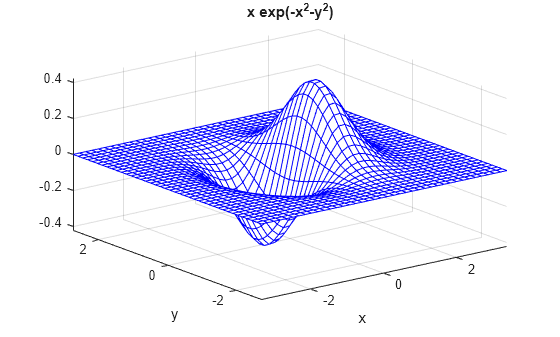
This example visualizes the function
![]()
with a mesh plot drawn on a 40-by-40 grid. The mesh lines are set to a uniform blue color by setting the colormap to a single color:
fh = @(x,y) x.*exp(-x.^2-y.^2); ezmesh(fh,40) colormap([0 0 1])
ezmeshc, function_handle, mesh
Function Plots for related functions
![]() | ezcontourf | ezmeshc | ![]() |
| © 1984-2008- The MathWorks, Inc. - Site Help - Patents - Trademarks - Privacy Policy - Preventing Piracy - RSS |