interp3
Interpolation for 3-D gridded data in meshgrid format
Syntax
Description
Vq = interp3(X,Y,Z,V,Xq,Yq,Zq)X, Y,
and Z contain the coordinates of the sample points. V contains
the corresponding function values at each sample point. Xq, Yq,
and Zq contain the coordinates of the query points.
Vq = interp3(___,method,extrapval)extrapval, a scalar value that is assigned
to all queries that lie outside the domain of the sample points.
If you omit the extrapval argument for queries
outside the domain of the sample points, then based on the method argument interp3 returns
one of the following:
The extrapolated values for the
'spline'and'makima'methodsNaNvalues for other interpolation methods
Examples
Load the points and values of the flow function, sampled at 10 points in each dimension.
[X,Y,Z,V] = flow(10);
The flow function returns the grid in the arrays, X, Y, Z. The grid covers the region, , , , and the spacing is , , and .
Now, plot slices through the volume of the sample at: X=6, X=9, Y=2, and Z=0.
figure
slice(X,Y,Z,V,[6 9],2,0);
shading flat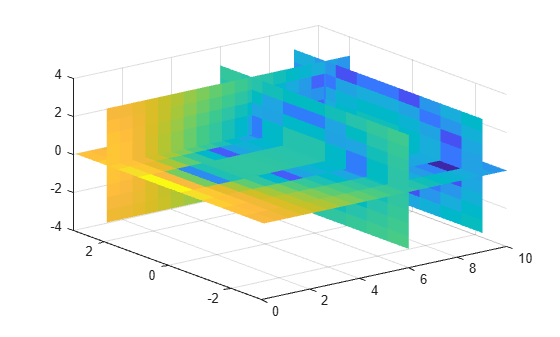
Create a query grid with spacing of 0.25.
[Xq,Yq,Zq] = meshgrid(.1:.25:10,-3:.25:3,-3:.25:3);
Interpolate at the points in the query grid and plot the results using the same slice planes.
Vq = interp3(X,Y,Z,V,Xq,Yq,Zq);
figure
slice(Xq,Yq,Zq,Vq,[6 9],2,0);
shading flat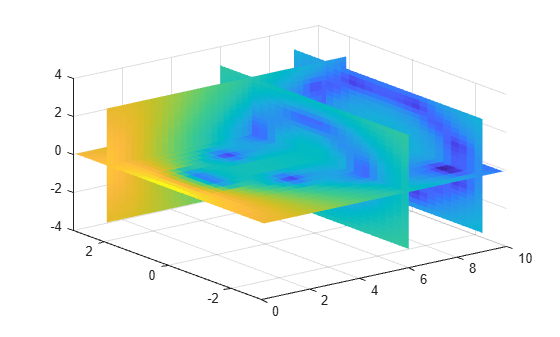
Load the points and values of the flow function, sampled at 10 points in each dimension.
[X,Y,Z,V] = flow(10);
The flow function returns the grid in the arrays, X, Y, Z. The grid covers the region, , , , and the spacing is , , and .
Plot slices through the volume of the sample at: X=6, X=9, Y=2, and Z =0.
figure
slice(X,Y,Z,V,[6 9],2,0);
shading flat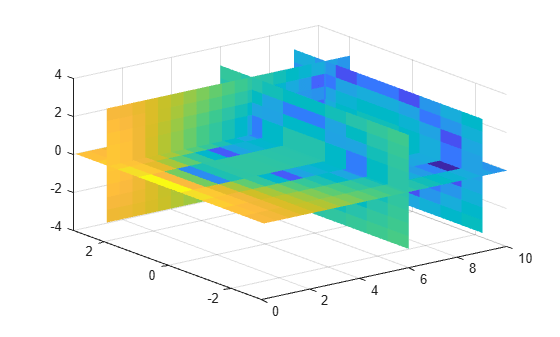
Create a query grid with spacing of 0.25.
[Xq,Yq,Zq] = meshgrid(.1:.25:10,-3:.25:3,-3:.25:3);
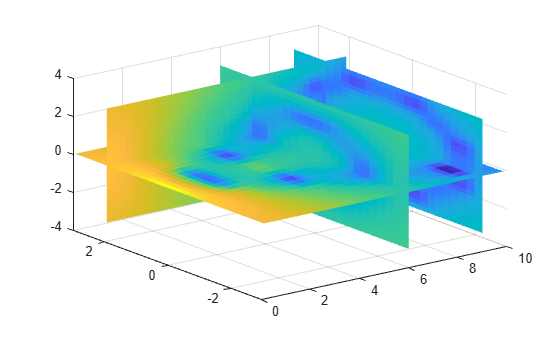
Interpolate at the points in the query grid using the 'cubic' interpolation method. Then plot the results.
Vq = interp3(X,Y,Z,V,Xq,Yq,Zq,'cubic');
figure
slice(Xq,Yq,Zq,Vq,[6 9],2,0);
shading flat
Create the grid vectors, x, y, and z. These vectors define the points associated with values in V.
x = 1:100;
y = (1:50)';
z = 1:30;
Define the sample values to be a 50-by-100-by-30 random number array, V. Use the rand function to create the array.
rng('default')
V = rand(50,100,30);
Evaluate V at three points outside the domain of x, y, and z. Specify extrapval = -1.
xq = [0 0 0];
yq = [0 0 51];
zq = [0 101 102];
vq = interp3(x,y,z,V,xq,yq,zq,'linear',-1)
vq = 1×3
-1 -1 -1
All three points evaluate to -1 because they are outside the domain of x, y, and z.
Input Arguments
Sample grid points, specified as real arrays or vectors. The sample grid points must be unique.
If
X,Y, andZare arrays, then they contain the coordinates of a full grid (in meshgrid format). Use themeshgridfunction to create theX,Y, andZarrays together. These arrays must be the same size.If
X,Y, andZare vectors, then they are treated as a grid vectors. The values in these vectors must be strictly monotonic, either increasing or decreasing.
Example: [X,Y,Z] = meshgrid(1:30,-10:10,1:5)
Data Types: single | double
Sample values, specified as a real or complex array. The size
requirements for V depend on the size of X, Y,
and Z:
If
X,Y, andZare arrays representing a full grid (inmeshgridformat), then the size ofVmatches the size ofX,Y, orZ.If
X,Y, andZare grid vectors, thensize(V) = [length(Y) length(X) length(Z)].
If V contains complex numbers, then interp3 interpolates
the real and imaginary parts separately.
Example: rand(10,10,10)
Data Types: single | double
Complex Number Support: Yes
Query points, specified as a real scalars, vectors, or arrays.
If
Xq,Yq, andZqare scalars, then they are the coordinates of a single query point in R3.If
Xq,Yq, andZqare vectors of different orientations, thenXq,Yq, andZqare treated as grid vectors in R3.If
Xq,Yq, andZqare vectors of the same size and orientation, thenXq,Yq, andZqare treated as scattered points in R3.If
Xq,Yq, andZqare arrays of the same size, then they represent either a full grid of query points (inmeshgridformat) or scattered points in R3.
Example: [Xq,Yq,Zq] = meshgrid((1:0.1:10),(-5:0.1:0),3:5)
Data Types: single | double
Refinement factor, specified as a real, nonnegative, integer
scalar. This value specifies the number of times to repeatedly divide
the intervals of the refined grid in each dimension. This results
in 2^k-1 interpolated points between sample values.
If k is 0, then Vq is
the same as V.
interp3(V,1) is the same as interp3(V).
The following illustration depicts k=2 in
one plane of R3.
There are 72 interpolated values in red and 9 sample values in black.

Example: interp3(V,2)
Data Types: single | double
Interpolation method, specified as one of the options in this table.
| Method | Description | Continuity | Comments |
|---|---|---|---|
'linear' | The interpolated value at a query point is based on linear interpolation of the values at neighboring grid points in each respective dimension. This is the default interpolation method. | C0 |
|
'nearest' | The interpolated value at a query point is the value at the nearest sample grid point. | Discontinuous |
|
'cubic' | The interpolated value at a query point is based on a cubic interpolation of the values at neighboring grid points in each respective dimension. The interpolation is based on a cubic convolution. | C1 |
|
'makima' | Modified Akima cubic Hermite interpolation. The interpolated value at a query point is based on a piecewise function of polynomials with degree at most three evaluated using the values of neighboring grid points in each respective dimension. The Akima formula is modified to avoid overshoots. | C1 |
|
'spline' | The interpolated value at a query point is based on a cubic interpolation of the values at neighboring grid points in each respective dimension. The interpolation is based on a cubic spline using not-a-knot end conditions. | C2 |
|
Function value outside domain of X, Y,
and Z, specified as a real or complex scalar. interp3 returns
this constant value for all points outside the domain of X, Y,
and Z.
Example: 5
Example: 5+1i
Data Types: single | double
Complex Number Support: Yes
Output Arguments
More About
Extended Capabilities
Version History
Introduced before R2006a

