pdeval
R2026bInterpolate numerical solution of PDE
Description
[
interpolates a numerical solution returned by u,dudx] = pdeval(m,xmesh,usol,xq)pdepe at new query points
xq, and returns the interpolated values of the solution
u and their partial derivative dudx. The
m, xmesh, and usol arguments are
reused from a previous call to pdepe:
The numerical solution produced by
sol =
                pdepe(m,@pdefun,@pdeic,@pdebc,xmesh,tspan)
uses the coordinate symmetrymand spatial meshxmeshto return a 3-D matrix of the solution valuessol. Reuse themandxmeshinputs used to calculate the solution when you callpdeval.The input vector
usol = sol(i,:,k)is the value of componentkof the solution at timetspan(i). When there is only one solution component,usolis a row extracted from the solution matrixusol = sol(i,:).
Examples
Use pdepe to solve a partial differential equation, and then use pdeval to evaluate the solution at additional points.
Solve PDE
Use pdepe to solve the pdex1 example problem. You can type edit pdex1 to see more details on the problem, or see pdepe for details on the PDE solution process. The required functions to solve the pdex1 problem are included at the end of this example as local functions.
m = 0;
x = linspace(0,1,20);
t = linspace(0,2,5);
sol = pdepe(m,@pdex1pde,@pdex1ic,@pdex1bc,x,t);
Interpolate Solution
The solution sol generated by pdepe uses 20 points for x, evenly spaced between 0 and 1. Create a vector of query points that are located midway between the points used by pdepe.
xq = x;
xq(1:end-1) = xq(1:end-1) + diff(xq)./2;
Use pdeval to interpolate the solution at the query points. Since there is only one solution component, you can extract a row from sol to operate on, such as sol(2,:).
[u,dudx] = pdeval(m,x,sol(2,:),xq);
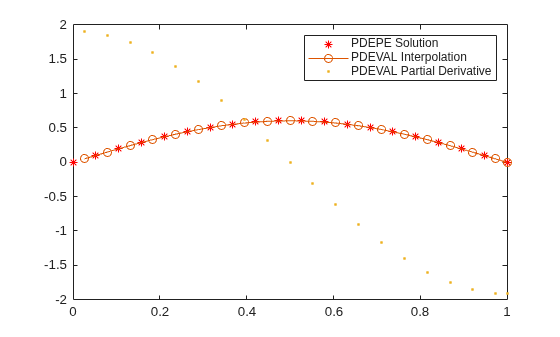
Plot the solution computed by pdepe, as well as the interpolated solution and its partial derivative computed by pdeval.
plot(x,sol(2,:),'r*')
hold on
plot(xq,u,'-o')
plot(xq,dudx,'.')
hold off
legend('PDEPE Solution', 'PDEVAL Interpolation', 'PDEVAL Partial Derivative')
Local Functions
Listed here are the local helper functions that the PDE solver pdepe calls to calculate the solution.
function [c,f,s] = pdex1pde(x,t,u,DuDx)
c = pi^2;
f = DuDx;
s = 0;
end
% ------------------------------------------------------
function u0 = pdex1ic(x)
u0 = sin(pi*x);
end
% ------------------------------------------------------
function [pl,ql,pr,qr] = pdex1bc(xl,ul,xr,ur,t)
pl = ul;
ql = 0;
pr = pi * exp(-t);
qr = 1;
end
Input Arguments
Output Arguments
Tips
pdevalevaluates the partial derivative rather than the flux . Although the flux is continuous, the partial derivative can have a jump at a material interface.
Extended Capabilities
Version History
Introduced before R2006a

