smooth3
R2026bSmooth 3-D data
Description
W = smooth3( smooths the volumetric data
V)V and returns the smoothed data in W.
W is a double array with the same dimensions as
V.
Examples
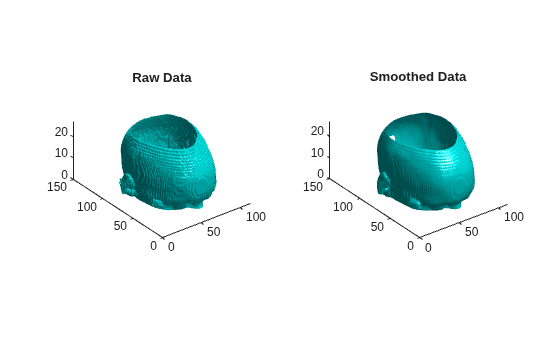
Load the mri data set and squeeze the 4-D array stored in the D variable into three dimensions. Then smooth the data.
load mri
D = squeeze(D);
W = smooth3(D);
Display the raw data and the smoothed data as an isosurface.
figure
tiledlayout(1,2)
nexttile
p1 = patch(isosurface(D,5),"FaceColor","cyan", ...
    "EdgeColor","none");
view(3)
daspect([1,1,0.4])
camlight
isonormals(D,p1)
title("Raw Data")

nexttile
p2 = patch(isosurface(W,5),"FaceColor","cyan", ...
    "EdgeColor","none");
view(3)
daspect([1,1,0.4])
camlight
isonormals(W,p2)
title("Smoothed Data")
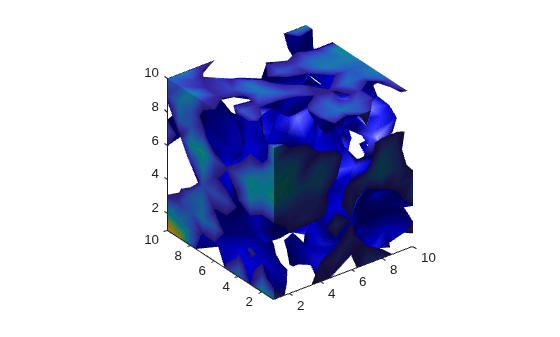
Create a 10-by-10-by-10 array of random data. Smooth the data using the "gaussian" method with a 3-D window size of 5.
data = rand(10,10,10);
data = smooth3(data,"gaussian",5);
Display the data as an isosurface with end caps.
patch(isocaps(data,0.5), ...
   "FaceColor","interp","EdgeColor","none")
p1 = patch(isosurface(data,0.5), ...
   "FaceColor","blue","EdgeColor","none");
isonormals(data,p1)
view(3)
axis vis3d tight
camlight left
lighting gouraud
Input Arguments
Extended Capabilities
Version History
Introduced before R2006a

