Import AUTOSAR Adaptive Software Descriptions
R2026bYou can import AUTOSAR XML (ARXML) descriptions of adaptive software components, service interfaces, and data types into Simulink®. Use the ARXML importer to:
Create an initial AUTOSAR adaptive software component Simulink model.
Update an AUTOSAR adaptive software component model with shared ARXML definitions of component communication and execution behavior and data types.
You can also round-trip AUTOSAR Adaptive component ARXML descriptions between Simulink and other development environments.
When you import AUTOSAR Adaptive ARXML descriptions, the importer creates Simulink modeling elements configured for the service-oriented workflow:
Events — Imported as bus element ports with In Bus Element and Out Bus Element blocks.
Methods — Imported as function ports and implemented with Function Caller for the client, and Simulink Function blocks for the server.
Persistency — Imported as ports and data elements in the AUTOSAR Dictionary, with corresponding measurement services in the Service Mappings Editor. Data Store Memory blocks are not created during import, you must manually add them and map them to the imported persistency configuration.
The software preserves the service communication and execution specifications of the created ports after import. You can view these service specifications as the service properties in the Property Inspector and service mappings in the Service Mappings Editor. If you specify a data dictionary during import, interface definitions in the imported ARXML files are used to create interfaces in the Architectural Data section of the specified data dictionary. The created port interfaces are automatically assigned to their respective software component ports.
To create an initial Simulink representation of an AUTOSAR Adaptive software component from an ARXML
component description, use the createComponentAsModel function.
openExample("autosarblockset/ImportAUTOSARAdaptiveARXML")
arImport = arxml.importer("autosar_LaneGuidance.arxml");
createComponentAsModel(arImport,"/CompanyName/Powertrain/LaneGuidance");
To update an existing software component model configured for the AUTOSAR Adaptive
Platform with shared ARXML definitions, use the updateAUTOSARProperties function.
Import AUTOSAR Package into Adaptive Component Model
This example shows how to import and reference shared ARXML element definitions to software component models configured for the AUTOSAR Adaptive Platform.
When developing an AUTOSAR Adaptive software component in Simulink®, you can import AUTOSAR element definitions that are common to many components. After you create an AUTOSAR Adaptive software component model, you import shared data definitions from AUTOSAR XML (ARXML) files that contain packages of AUTOSAR shared elements. To help implement component algorithmic behavior, reference predefined elements such as AUTOSAR Adaptive Service Interfaces, and their associated events, methods, namespaces, and data types.
In this example, you import an ARXML file containing descriptions of shared AUTOSAR Adaptive platform types to an existing AUTOSAR Adaptive software component model by using the updateAUTOSARProperties function.
Import ARXML descriptions from Adaptive_PlatformTypes.arxml to Simulink by using arxml.importer.
ar = arxml.importer("Adaptive_PlatformTypes.arxml");Update example model autosar_LaneGuidance with the imported data type descriptions.
load_system("autosar_LaneGuidance");
updateAUTOSARProperties(ar,"autosar_LaneGuidance")
### Updating model autosar_LaneGuidance
### Saving original model as autosar_LaneGuidance_backup.slx
### Creating HTML report autosar_LaneGuidance_update_report.html
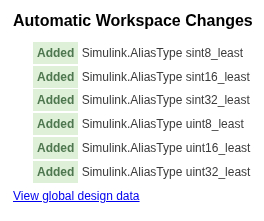
The updateAUTOSARProperties function copies the elements in the specified ARXML files to the AUTOSAR Dictionary of the specified model. If you import data types, the function also creates data objects for the imported types in a data dictionary (if available) or in the base workspace. The function generates an HTML report listing the workspace changes and the element additions. The AUTOSAR update report shows Simulink workspace changes, reflecting creation of data objects to represent previously undefined adaptive platform types.
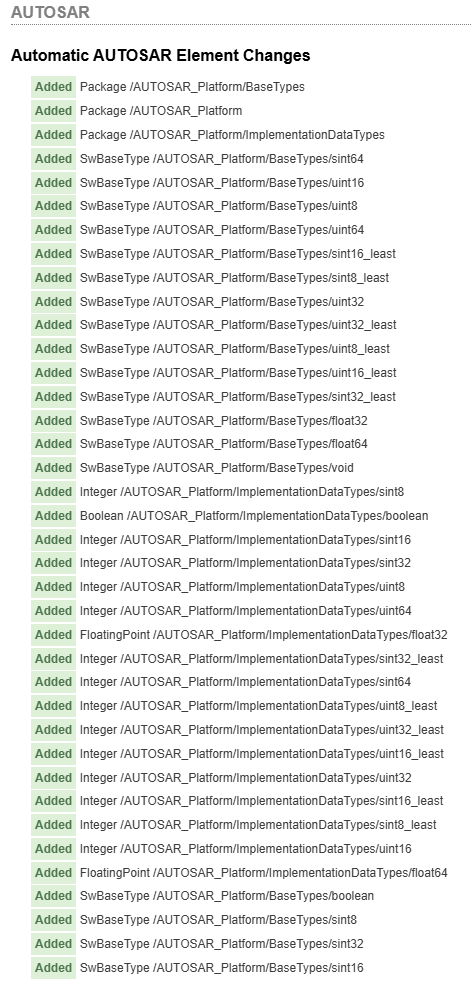
The AUTOSAR updated report also shows AUTOSAR element additions. Notice that the function created a new AUTOSAR package named AUTOSAR_Platform. Based on the imported adaptive platform types, the function populated the package with AUTOSAR software base types and AUTOSAR implementation data types.
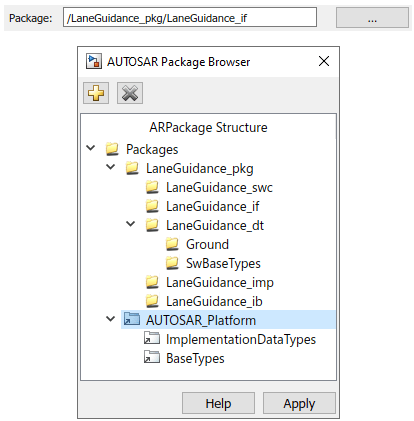
The package changes are reflected in the AUTOSAR Dictionary views of the package tree. Open the AUTOSAR Dictionary and navigate to an individual service interface. Click the three dots to the right of the Package field to view the current package tree.
After importing AUTOSAR elements into the AUTOSAR Adaptive software component model, reference and configure the elements in the same manner as any AUTOSAR Dictionary element.
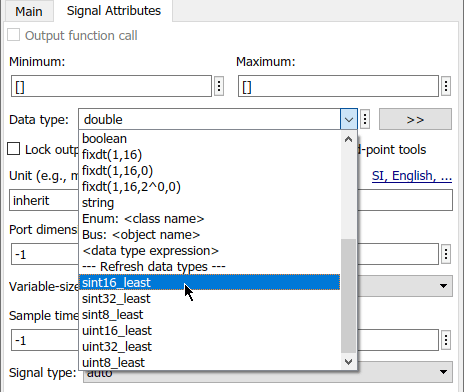
Reference the imported data types from your model blocks. Open a Simulink port block in the model and select the Signal Attributes tab. Expand the Data type list of values, and select imported data type sint16_least.
If you have Embedded Coder® software, you can generate C++ code compliant with the AUTOSAR Adaptive Platform and export ARXML descriptions from the AUTOSAR Adaptive software component model. The C++ code reflects references from model blocks to the imported AUTOSAR Adaptive elements. Export preserves the file structure and content of the shared descriptions files from which you imported definitions. In ARXML files other than the shared description files, ARXML descriptions reference the shared element definitions where required.
See Also
createComponentAsModel | updateAUTOSARProperties

